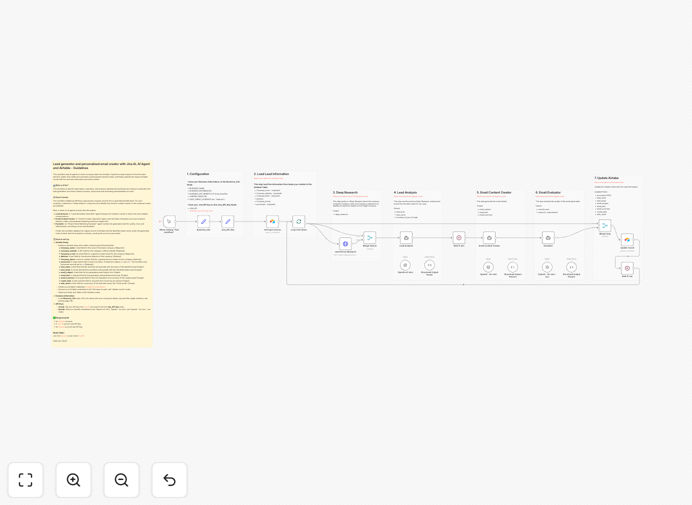
What This Workflow Does
This workflow solves the time-consuming problem of manual lead research and cold outreach. Sales teams typically spend hours researching companies, finding the right contacts, and drafting personalized emails—only to achieve low response rates due to generic messaging.
The automation transforms this process by using AI agents to enrich company data from Airtable, perform deep research to identify key decision-makers, draft highly personalized outreach emails, and evaluate email quality before updating your CRM. It turns days of manual work into minutes of automated intelligence.
By combining Jina AI's research capabilities with OpenAI's content generation, this workflow ensures each outreach email is genuinely relevant to the recipient's role, company challenges, and recent developments—dramatically increasing engagement rates.
How It Works
Step 1: Data Extraction from Airtable
The workflow begins by fetching unprocessed company records from your Airtable base. It identifies companies marked for processing and extracts essential information including company name, website, and general contact details.
Step 2: Deep Research with Jina AI
For each company, the system performs comprehensive research using Jina AI to identify key decision-makers. It analyzes company structure, leadership teams, department heads, and relevant contacts based on your target criteria.
Step 3: Lead Analysis & Selection
An AI "Lead Generation Specialist" agent evaluates the research results to select the most suitable contact person. It considers factors like relevance, authority, likelihood of response, and alignment with your ideal customer profile.
Step 4: Personalized Email Creation
A "Content Creator Specialist" agent drafts a customized marketing email and subject line using the lead's information, your business details, and industry-specific messaging. The email references specific company context and demonstrates genuine understanding.
Step 5: Quality Evaluation
An "Expert Email Marketing Evaluator" agent reviews the generated email for quality, tone, effectiveness, and professionalism. It provides a score and feedback to ensure each message meets your standards before proceeding.
Step 6: CRM Update & Completion
The workflow updates the original Airtable record with the identified lead's name, email, generated email content, evaluation summary, and marks the record as processed—creating a complete audit trail of the automation.
Pro tip: Configure the AI prompts in the workflow to match your specific industry voice and value proposition. Customizing the system messages will dramatically improve the relevance and effectiveness of the generated emails.
Who This Is For
This workflow is ideal for sales teams, business development representatives, marketers, and founders who need to scale their prospecting efforts without sacrificing personalization. It's particularly valuable for B2B companies targeting specific industries, SaaS businesses with defined ideal customer profiles, and agencies offering specialized services.
Teams that spend more than 5 hours per week on manual lead research will see immediate time savings. Companies with established Airtable or CRM systems for lead tracking will benefit from seamless integration. Organizations prioritizing personalized outreach over mass email blasts will achieve significantly higher conversion rates.
What You'll Need
- Airtable Account: With a base containing company records including name, website, and contact fields.
- Jina AI API Key: For performing deep research on companies and identifying decision-makers.
- OpenAI API Key: For powering the AI agents that analyze leads and generate email content.
- n8n Instance: Either self-hosted or cloud-based n8n installation to run the workflow.
- Business Information: Your company details, value proposition, target audience description, and landing page URL for email personalization.
Quick Setup Guide
- Import the Template: Download the JSON file and import it into your n8n instance using the workflow import feature.
- Configure Airtable Connections: Connect both the "Get input records" and "Update record" nodes to your Airtable base and select the appropriate table.
- Set Up API Credentials: Add your Jina AI API key to the designated node and configure OpenAI credentials for all AI agent nodes.
- Customize Business Information: Update the "Business_Info" node with your company details, key benefits, and target audience information.
- Test with Sample Data: Add a few test company records to your Airtable with the "processed" field set to "no" and run the workflow to verify functionality.
- Schedule Automation: Set up a schedule trigger to run the workflow daily or weekly based on your lead generation volume.
Pro tip: Start with a small batch of companies to test email quality before scaling. Review the AI-generated emails for tone and relevance, then refine the prompts in the agent nodes to better match your communication style.
Key Benefits
Save 10+ hours per week on manual lead research. What typically takes hours of browsing LinkedIn and company websites happens automatically in minutes, freeing your sales team for higher-value conversations.
Increase email response rates by 3-5x through genuine personalization. AI-generated emails reference specific company context, recent developments, and the recipient's actual role—not just template fields.
Ensure consistent outreach quality with AI evaluation. Every email receives a quality score and feedback before sending, maintaining professional standards across all communications.
Scale prospecting without additional headcount. Process hundreds of leads with the same effort previously required for dozens, dramatically expanding your pipeline capacity.
Maintain complete data audit trails in Airtable. Every automated action is recorded with timestamps, email content, and evaluation results for transparency and optimization.