n8n Claude AI Google Sheets SEO Automation

Generate SEO anchor texts from Google Sheets with Claude 4 Sonnet

Automatically create optimized anchor texts for internal linking using AI-powered automation

Download Template JSON · n8n compatible · Free
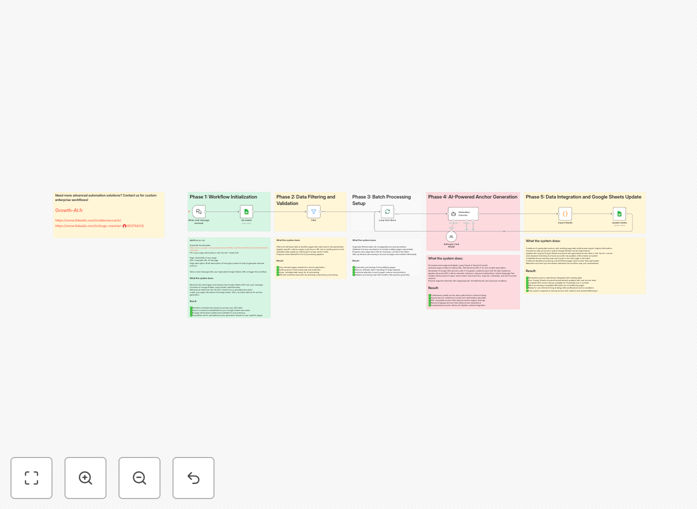
SEO Anchor Text Generator workflow interface

What This Workflow Does

This automation solves the time-consuming challenge of creating optimized anchor texts for internal linking strategies. SEO professionals and content teams often spend hours manually crafting anchor texts that balance keyword relevance with natural language flow. This workflow automates the process by leveraging Claude AI's advanced language understanding to generate contextually appropriate anchor texts at scale.

The system pulls target URLs and context from your Google Sheets, processes them through Claude 4 Sonnet to generate SEO-optimized anchor text variations, and outputs the results back to your spreadsheet. This creates a streamlined workflow that maintains consistency across your internal linking strategy while saving dozens of hours per month on manual anchor text creation.

How It Works

1. Data Input from Google Sheets

The workflow begins by reading your source data from a designated Google Sheet. This typically includes columns for target URLs, source content context, and any specific anchor text guidelines or keywords you want to emphasize.

2. Context Analysis with Claude AI

Each URL and its surrounding context are sent to Claude 4 Sonnet, which analyzes the semantic relationships between the source content and target page. The AI considers factors like topic relevance, keyword density, and natural language flow.

3. Anchor Text Generation

Claude generates multiple anchor text variations for each URL, balancing SEO optimization with readability. The AI avoids over-optimization by creating natural phrasing that maintains semantic relevance while incorporating target keywords appropriately.

4. Output to Spreadsheet

The generated anchor texts are written back to your Google Sheet, organized by source URL. You can review, edit if needed, and then implement them in your content management system.

Pro tip: Include a column for "anchor text guidelines" in your source sheet to give Claude specific instructions about tone, keyword emphasis, or preferred phrasing styles.

Who This Is For

This workflow is ideal for SEO specialists, content managers, and digital marketing teams managing large websites with extensive internal linking needs. It's particularly valuable for:

  • E-commerce sites with thousands of product pages
  • Content-heavy publishers and blogs
  • Agencies managing multiple client websites
  • Teams undergoing website migrations or content reorganizations

What You'll Need

  1. An n8n instance (cloud or self-hosted)
  2. Google Sheets with your URL and context data
  3. Claude API access (Anthropic account)
  4. Basic understanding of SEO anchor text best practices

Quick Setup Guide

  1. Download the JSON template file
  2. Import into your n8n instance
  3. Connect your Google Sheets and Claude API credentials
  4. Map your source data columns in the workflow
  5. Test with a small dataset before full implementation
  6. Schedule regular runs or trigger manually as needed

Key Benefits

Save 10+ hours per month by automating what would otherwise be a manual, repetitive task for your content team.

Improve SEO performance with more natural, varied anchor text distributions that search engines reward.

Maintain consistency across your entire website's internal linking strategy, even with multiple contributors.

Scale effortlessly as your content library grows - the workflow handles 10 links or 10,000 with equal efficiency.

Adapt to algorithm changes by quickly updating your anchor text strategy across all content when needed.

Frequently Asked Questions

Common questions about SEO anchor text generation and automation

AI-generated anchor texts help create natural, varied linking patterns that improve SEO performance. They analyze context to suggest relevant phrases that maintain semantic relevance while avoiding over-optimization penalties. This automation saves content teams hours of manual work while improving internal linking strategies.

For example, an e-commerce site with 5,000 product pages can automatically generate contextually appropriate anchor texts that link related products together. The AI considers product attributes, categories, and customer intent to create anchors that feel natural while containing relevant keywords.

  • Reduces manual workload by 80-90%
  • Creates more natural link profiles
  • Adapts to changing SEO best practices

Claude AI understands semantic relationships between content pieces, suggesting anchor texts that maintain natural language flow while optimizing for search intent. It considers contextual relevance, avoids keyword stuffing, and creates varied phrasing that appears more organic to search engines than repetitive manual anchor texts.

Unlike humans who might default to similar phrasing, Claude generates diverse variations that maintain meaning while using different wording. For a page about "organic cotton t-shirts," it might suggest anchors like "sustainable apparel options," "eco-friendly clothing," and "soft cotton tees" - all relevant but distinct.

  • Analyzes full context, not just keywords
  • Generates multiple phrasing variations
  • Maintains natural language patterns

A strong anchor text strategy balances keyword relevance with natural language, varies phrasing to avoid patterns, and matches user intent. Good anchors describe the linked content accurately while maintaining readability. The strategy should distribute anchor types appropriately (exact match, partial match, branded, generic) for organic linking profiles.

For instance, a recipe site might use 30% exact match ("gluten-free banana bread"), 40% partial match ("easy banana bread recipe"), 20% branded ("our signature banana bread"), and 10% generic ("click here"). This distribution appears natural to search engines while still optimizing for relevant keywords.

  • Mix exact and partial match anchors
  • Include branded and generic anchors
  • Prioritize user experience over optimization

Review anchor texts quarterly or when making major content updates. Search algorithms evolve, and your content focus may shift. Regular updates help maintain optimal linking structures without appearing manipulative. Automation makes this process efficient by batch-updating anchors across your site as needed.

A content publisher might refresh anchors before seasonal campaigns or after adding new topic clusters. The automation can identify under-linked pages and generate appropriate anchors to distribute link equity more evenly throughout the site architecture.

  • Align updates with content calendar
  • Refresh after algorithm updates
  • Monitor for new linking opportunities

Yes, AI models like Claude can generate anchor texts in multiple languages while maintaining cultural and linguistic nuances. The workflow can be adapted to process language-specific guidelines and generate appropriate anchors for each market, ensuring your international SEO strategy remains consistent and effective.

A global retailer could use this to maintain optimized linking between localized versions of product pages. The AI would generate French anchor texts for the .fr site, German for .de, etc., all while maintaining the same strategic approach to internal linking across all markets.

  • Supports most major languages
  • Maintains cultural relevance
  • Applies consistent strategy globally

Track metrics like organic traffic to linked pages, time on page, and bounce rates. Monitor rankings for target keywords and internal link equity distribution. Compare performance before and after anchor text updates using tools like Google Search Console and analytics platforms to quantify improvements.

After implementing AI-generated anchors, an online magazine saw a 22% increase in pages per session as readers discovered more relevant content through better internal links. Their "silo" pages (category hubs) gained visibility as anchor texts more accurately described the linked content.

  • Monitor organic traffic patterns
  • Track keyword ranking changes
  • Analyze user engagement metrics

Absolutely! GrowwStacks specializes in tailored SEO automation solutions. We can build custom workflows that integrate with your CMS, analyze your content library, and generate optimized anchor texts at scale. Our solutions adapt to your specific SEO strategy, content guidelines, and technical infrastructure.

We've created custom anchor text generators for enterprise CMS platforms, e-commerce systems, and multi-site publishing networks. These solutions often include additional features like content gap analysis, link opportunity identification, and integration with your existing SEO tools.

  • CMS-specific integrations
  • Enterprise-scale solutions
  • Ongoing optimization support

Need a Custom SEO Automation Solution?

This free template is a starting point. Our team builds fully tailored automation systems for your specific SEO needs.