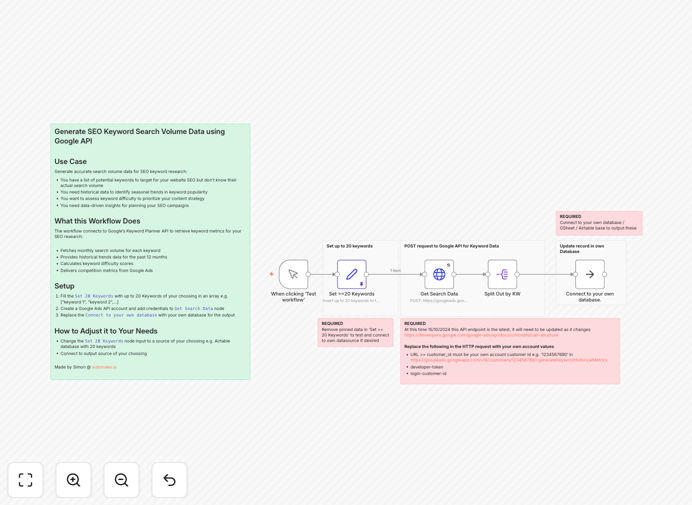
What This Workflow Does
SEO keyword research is foundational to digital marketing success, but manually checking search volume for dozens of keywords is tedious and often inaccurate. This automation solves that by connecting directly to Google's Keyword Planner API—the most authoritative source for search data.
The workflow fetches monthly search volume, provides 12-month historical trends, calculates keyword difficulty scores, and delivers competition metrics from Google Ads. It transforms a list of potential keywords into a structured dataset ready for analysis, prioritization, and content planning. Instead of guessing which keywords matter, you get data-driven insights that inform your entire SEO strategy.
How It Works
Step 1: Input Your Keyword List
The workflow begins with your keyword array—up to 20 terms you want to research. You can manually enter them or connect to an external source like Airtable, Google Sheets, or a CRM where your team maintains keyword ideas.
Step 2: Connect to Google Keyword Planner API
Using a Google Ads API account, the workflow authenticates and requests keyword metrics for each term. It pulls the official search volume numbers Google uses internally, along with competition levels and suggested bid ranges for advertisers.
Step 3: Process and Structure the Data
The raw API response is parsed, cleaned, and structured into a consistent format. Monthly volume, historical trends, difficulty scores, and competition metrics are extracted and organized into fields ready for analysis.
Step 4: Output to Your Preferred Destination
The enriched keyword data is sent to your database, spreadsheet, or content planning tool. You can connect it to Google Sheets for team collaboration, Airtable for workflow management, or directly to your CMS to trigger content creation.
Who This Is For
This automation is ideal for SEO specialists, content marketers, digital agencies, and businesses investing in organic search growth. If you create content regularly, manage website SEO, or run paid search campaigns, accurate keyword data is essential. Marketing teams that need to prioritize topics, allocate resources, and measure ROI will find this workflow transforms their research process from manual guesswork to automated intelligence.
What You'll Need
- A Google Ads account with API access enabled.
- Your list of keywords to research (up to 20 initially, scalable with modifications).
- A destination for the output data—database, spreadsheet, or content management system.
- Basic familiarity with n8n to import and configure the workflow.
Quick Setup Guide
- Download the template and import it into your n8n instance.
- Replace the sample keyword array with your actual keyword list.
- Configure the Google Ads API node with your credentials (developer token, client ID, etc.).
- Connect the output node to your database or spreadsheet.
- Test with a few keywords to verify data retrieval, then run the full list.
Pro tip: Schedule this workflow to run monthly. Regular updates catch emerging trends and seasonal shifts, keeping your keyword database always current.
Key Benefits
Accuracy over estimates: Get real search volume from Google's official API instead of third‑party approximations. Data quality directly impacts decision quality.
Speed multiplies capacity: Research 20 keywords in minutes instead of hours. Scale to hundreds without increasing manual effort.
Historical trends inform timing: See seasonal patterns and year‑over‑year changes. Plan content publication around actual search behavior peaks.
Competition metrics prioritize effort: Identify high‑volume, low‑competition keywords—the sweet spot for quick wins and sustainable growth.
Integration enables action: Connect keyword data directly to your content calendar, CMS, or analytics platform. Turn research into execution seamlessly.