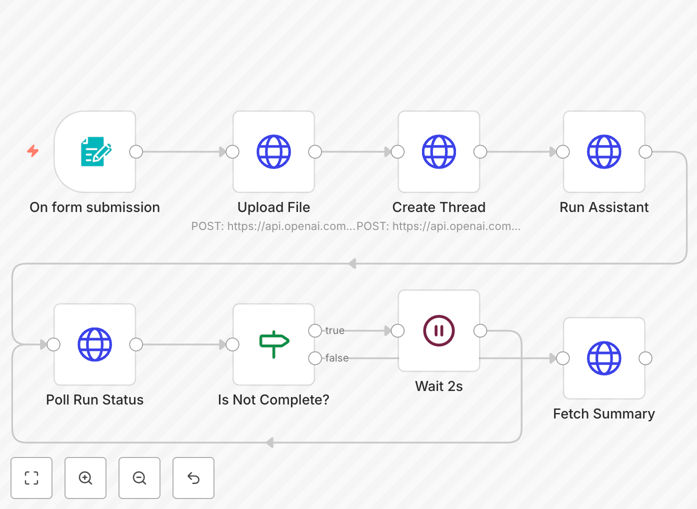
What This Workflow Does
This automation solves the time-consuming problem of manually reading and summarizing lengthy documents. Businesses and professionals regularly receive research papers, contracts, reports, and other documents that require quick comprehension but take hours to read thoroughly.
The workflow automatically processes uploaded documents in multiple formats (PDF, DOCX, PPTX, TXT, CSV, JSON, Markdown) and uses OpenAI's Assistants API to generate structured summaries containing a title, concise summary, key bullet points, and relevant tags. This transforms hours of manual work into seconds of automated processing.
How It Works
Step 1: Document Upload
Users upload documents through a simple form interface. The system accepts multiple file formats commonly used in business and research environments.
Step 2: File Processing & Storage
The workflow securely uploads the document to OpenAI's servers, where it becomes accessible to the AI assistant for analysis while maintaining proper data handling protocols.
Step 3: AI Analysis with Assistants API
OpenAI's Assistants API, equipped with File Search and Code Interpreter capabilities, analyzes the document content. This specialized configuration allows for more sophisticated document understanding than standard AI models.
Step 4: Structured Summary Generation
The AI generates a structured output including a 5-10 word title, 1-2 sentence summary, 3-5 key bullet points, and 3-6 relevant tags that capture the document's essence and main topics.
Step 5: Result Delivery
The formatted summary is returned in JSON format, ready for integration with other systems, storage in databases, or direct presentation to users.
Who This Is For
This automation is ideal for legal professionals processing contracts and case files, researchers analyzing academic papers, consultants reviewing client documents, content teams managing large volumes of information, and any business that needs to quickly extract value from lengthy documents without manual reading.
Educational institutions can use it to help students process reading materials, while financial services firms can analyze reports and regulatory documents more efficiently. The workflow scales from individual professionals to entire departments processing hundreds of documents daily.
What You'll Need
- OpenAI API Access: An active OpenAI account with API credentials (starts with "sk-")
- OpenAI Assistant: A configured Assistant in the OpenAI platform with File Search and Code Interpreter enabled
- n8n Instance: Either n8n Cloud (any plan) or self-hosted n8n Community Edition
- HTTP Header Auth Credential: Configured in n8n with your OpenAI API key for secure API communication
- Basic Technical Understanding: Ability to import JSON workflows and configure simple API credentials
Pro tip: Create separate OpenAI Assistants for different document types (legal, technical, business) with customized instructions for more accurate, domain-specific summaries.
Quick Setup Guide
- Download and import the JSON workflow template into your n8n instance
- Configure the HTTP Header Auth credential with your OpenAI API key when prompted
- Replace the placeholder Assistant ID in the "Run Assistant" node with your actual OpenAI Assistant ID (starts with "asst_")
- Test the workflow with a sample document to verify the summarization output
- Customize the user prompt in the "Create Thread" node if you need different summary formats or focus areas
- Add an HTTP Response node if you want to return the summary directly to users via a web interface
Key Benefits
Save 2-5 hours per lengthy document by automating the reading and summarization process. What previously required concentrated human attention now happens automatically in the background.
Improve decision-making speed by providing executives and team members with concise summaries instead of overwhelming them with full documents. Key information reaches decision-makers faster.
Enhance knowledge management by creating searchable, structured summaries that can be indexed, categorized, and retrieved much more efficiently than full documents.
Scale document processing capacity without adding staff. The same system that handles 10 documents daily can process 100 or 1000 with minimal additional cost.
Ensure consistency in analysis by applying the same criteria to every document, eliminating human variability in what different readers might consider important.