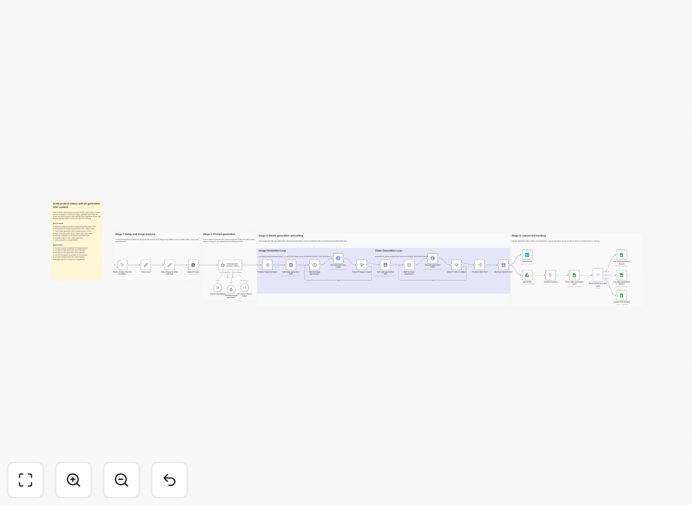
What This Workflow Does
This automation workflow solves a major bottleneck for e-commerce and marketing teams: producing authentic, user-generated content (UGC) style video ads at scale. Instead of manually scripting and filming each video, this system uses AI to analyze your product images, extract brand elements, and generate compelling video prompts automatically.
The workflow connects OpenAI's vision capabilities with Kie.ai's video generation API to create multiple video variants from a single reference image. It then organizes the output by uploading finished videos to cloud storage (Google Drive and Box) and logging results in Google Sheets for tracking and analysis. This eliminates hours of creative work per product and enables rapid testing of different video styles.
For businesses selling physical products, digital goods, or services, this automation dramatically increases video content output while maintaining brand consistency. You can generate dozens of video ads overnight, ready for social media campaigns, landing pages, or email marketing.
How It Works
Step 1: Image Analysis with AI Vision
The workflow starts by analyzing your reference product image using OpenAI's vision capabilities. It extracts colors, design elements, key features, and brand aesthetics. This analysis forms the foundation for all subsequent creative prompts, ensuring generated videos accurately represent your product.
Step 2: UGC Prompt Generation
Based on the visual analysis, the system generates multiple UGC-style prompts for video creation. These prompts mimic authentic user experiences—showing the product in real-life scenarios, highlighting specific features, or demonstrating use cases. You can customize prompt styles through workflow notes.
Step 3: Video Creation via API
The workflow sends these prompts to Kie.ai's video generation API (or similar services) to produce actual video files. It handles API calls, parameter configuration, and batch processing to create multiple video variants from the same prompts.
Step 4: Polling & Asset Retrieval
Since video generation takes time, the workflow includes polling mechanisms to check completion status and retrieve finished video files. It manages download URLs, file formats, and error handling for reliable output.
Step 5: Cloud Storage & Logging
Finally, videos are uploaded to both Google Drive and Box for redundancy and accessibility. All generation details—prompts used, video URLs, creation times—are logged in Google Sheets for performance tracking and future optimization.
Pro tip: Store your brand style guidelines and UGC preferences in the workflow's sticky notes. This ensures consistent output across different product lines and marketing campaigns.
Who This Is For
This automation is ideal for e-commerce brands, digital product creators, marketing agencies, and social media teams that need scalable video content. Specifically:
- E-commerce stores selling physical products who want authentic video ads for Facebook, Instagram, or TikTok
- Digital product creators (apps, software, courses) needing demonstration videos
- Marketing agencies managing multiple client campaigns with limited creative resources
- Social media managers who need fresh video content daily without increasing production costs
- Brands testing multiple ad angles across different audience segments
If you're spending hours scripting and filming product videos, or outsourcing video production at high costs, this workflow provides an automated alternative.
What You'll Need
- OpenAI API credentials for image analysis (vision capabilities)
- Kie.ai API access or similar video generation service credentials
- Google Drive account with API permissions for file uploads
- Box account with API access for secondary storage
- Google Sheets setup for logging and tracking results
- Reference product images (high-quality photos showing key features)
- n8n instance (cloud or self-hosted) to run the workflow
Quick Setup Guide
Follow these steps to implement this automation in your business:
- Import the template into your n8n instance using the downloaded JSON file.
- Configure credentials for OpenAI, Kie.ai, Google Drive, Box, and Google Sheets in the respective nodes.
- Add your reference images to the workflow trigger (manual or scheduled).
- Customize UGC style notes in the sticky note sections to match your brand voice.
- Test with one product to verify video quality and storage locations.
- Schedule automation to run daily or weekly for continuous content generation.
- Monitor Google Sheets logs to track performance and optimize prompts.
Pro tip: Start with a small batch of 3-5 products to validate video quality before scaling to dozens of items. Adjust prompts based on initial results.
Key Benefits
Scale video production without scaling costs. Generate dozens of video ads overnight instead of paying for studio production or freelance creators.
Maintain brand consistency across all content. AI vision analysis ensures colors, features, and design elements are accurately represented in every video.
Test multiple marketing angles rapidly. Create different UGC styles (enthusiastic user, practical demo, problem-solution) to see which performs best.
Reduce creative team workload. Automate the repetitive parts of video scripting and production, freeing your team for strategic work.
Organize assets automatically. Videos are stored in structured cloud folders with detailed logs for easy retrieval and analysis.