AI Video Content Creation Multimodal AI KIE.AI n8n

Generate AI Videos from Images with ByteDance Seedance 1.5 Pro

Transform static product photos and graphics into engaging animated videos automatically. This free n8n template uses the powerful ByteDance Seedance 1.5 Pro model via KIE.AI API to create social media content, ads, and marketing videos in minutes.

Download Template JSON · n8n compatible · Free
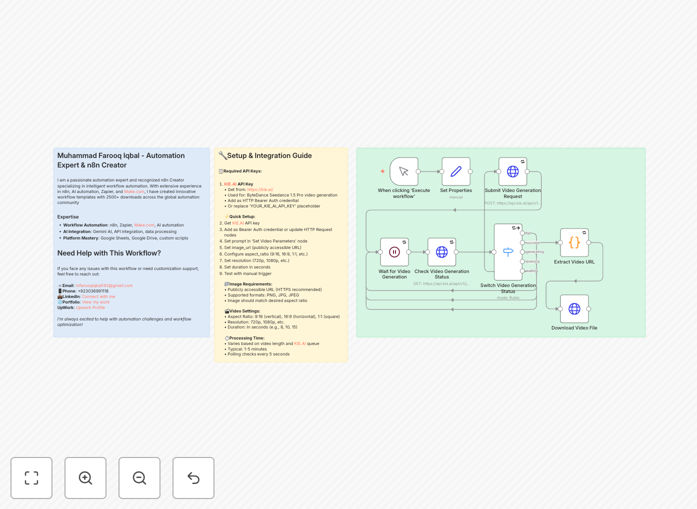
AI video generation workflow diagram showing image input transforming into animated video output

What This Workflow Does

This automation template solves a common challenge for businesses: creating engaging video content at scale without expensive production resources. Instead of hiring animators or learning complex video editing software, you can automatically transform any static image into a professional-looking animated video using cutting-edge AI technology.

The workflow connects to the KIE.AI API, which provides access to ByteDance's advanced Seedance 1.5 Pro model. You provide an image URL and a text prompt describing the desired animation, and the system generates a complete video file ready for download or distribution. This enables businesses to produce social media content, product demonstrations, animated advertisements, and educational materials in minutes rather than days.

Beyond simple conversion, the template includes intelligent polling to monitor generation status, error handling for failed requests, and flexible output configuration. You can specify aspect ratios for different platforms (9:16 for TikTok/Reels, 16:9 for YouTube, 1:1 for Instagram), control video duration, and set resolution preferences—all through a simple n8n interface.

How It Works

The automation follows a systematic process to ensure reliable video generation with minimal manual intervention.

1. Input Configuration

The workflow begins by accepting your image URL and text prompt. The image must be publicly accessible via HTTPS, and the prompt should describe the desired animation style and motion. You can hardcode these values for batch processing or connect to triggers like form submissions, database updates, or scheduled runs.

2. API Request Submission

Your parameters are formatted into a proper API request to KIE.AI's video generation endpoint. The template includes your KIE.AI API key (configured as HTTP Bearer authentication) and sends the image URL, prompt, and video specifications to the Seedance 1.5 Pro model.

3. Processing & Status Monitoring

After submission, the workflow waits briefly then begins polling the API for generation status. Video creation typically takes 1-5 minutes depending on queue length and complexity. The template handles different status responses: "queuing," "generating," "success," or "fail," with appropriate waiting intervals between checks.

4. Result Extraction & Delivery

Once generation completes successfully, the workflow extracts the video file URL from the API response. It then downloads the MP4 file to your n8n instance or forwards it to your preferred storage destination (Google Drive, Dropbox, S3, etc.). Failed generations trigger notification alerts for manual review.

Who This Is For

This template is ideal for marketing teams, e-commerce businesses, content creators, social media managers, and digital agencies. If you regularly need to create video content from product photos, blog images, or marketing graphics, this automation can save dozens of hours per month.

E-commerce stores can automatically generate product demonstration videos for new listings. Marketing agencies can produce client content at scale. Social media managers can maintain consistent posting schedules with fresh animated content. Educational content creators can bring static diagrams to life. The workflow is particularly valuable for businesses with large image catalogs that would be prohibitively expensive to animate manually.

What You'll Need

  1. KIE.AI API Account: Sign up at KIE.AI to get your API key for accessing the Seedance 1.5 Pro model.
  2. Public Image URLs: Images must be accessible via HTTPS links (hosted on your server, cloud storage, or CDN).
  3. n8n Instance: Either n8n Cloud (recommended for beginners) or a self-hosted n8n installation.
  4. Basic Understanding of Prompts: Knowing how to write effective animation descriptions improves video quality.
  5. Storage Destination: Where to save generated videos (local storage, cloud services, or content management systems).

Quick Setup Guide

Follow these steps to implement this AI video generation workflow in your business:

  1. Import the Template: Download the JSON file and import it into your n8n instance via the "Import from File" option.
  2. Configure KIE.AI Credentials: Create HTTP Request credentials with your KIE.AI API key as Bearer Token authentication.
  3. Set Your Parameters: Update the "Set Video Parameters" node with your default image URL and prompt, or connect it to dynamic data sources.
  4. Adjust Video Settings: Modify aspect ratio, resolution, and duration in the "Submit Video Generation Request" node to match your platform requirements.
  5. Test with Sample Image: Run the workflow manually with a test image to verify everything works correctly.
  6. Connect Triggers: Replace the manual trigger with webhooks, schedules, or other triggers based on your use case.
  7. Add Output Destinations: Extend the workflow to save videos to your preferred storage and notify your team upon completion.

Pro tip: For consistent branding, create prompt templates with your brand voice and style preferences. Save these as variables in n8n to apply across all generated videos automatically.

Key Benefits

Scale Video Production 10x: Generate dozens of videos daily that would require hours of manual animation work. What used to take a week can now be done in an afternoon.

Reduce Content Creation Costs: Eliminate expensive animation software licenses and freelance animator fees. The AI handles the technical work while you focus on strategy and quality control.

Maintain Consistent Posting Schedule: Automatically create enough video content to post daily on all social platforms without creative burnout or resource constraints.

Test Multiple Variations Quickly: Generate different versions of the same video with varied prompts, aspect ratios, or durations for A/B testing to optimize engagement.

Future-Proof Your Content Strategy: Video continues to dominate social algorithms and user attention. This automation ensures you can meet growing video demand without proportional increases in budget or staff.

Frequently Asked Questions

Common questions about AI video generation and automation

AI video generation uses machine learning models to create animated videos from static images and text prompts. The AI analyzes the image content and your description, then generates a short video with motion effects that bring the scene to life. This n8n template specifically uses ByteDance's Seedance 1.5 Pro model through the KIE.AI API to transform product photos, graphics, or any image into engaging video content automatically.

The technology works by understanding spatial relationships in the image and applying realistic motion patterns based on your prompt. For example, describing "gentle swaying leaves" on a tree photo will generate subtle movement that looks natural rather than artificial.

Businesses use AI video generation for social media content creation, product marketing videos, animated advertisements, educational content, and brand storytelling. E-commerce companies can animate product photos for better engagement. Marketing teams can create video ads from graphics without hiring animators. Content creators can produce more video content faster.

The automation saves significant time and resources compared to manual video production. Specific applications include turning blog post featured images into social media previews, creating animated product demonstrations for online stores, generating educational explainer videos from diagrams, and producing regular content for TikTok, Instagram Reels, and YouTube Shorts.

AI video generation is dramatically faster and more cost-effective than traditional methods. While traditional production might take days or weeks with specialized software and skills, AI can generate videos in minutes. The quality is suitable for social media, ads, and presentations, though complex cinematic projects still benefit from human creativity.

The key advantage is scalability—you can generate hundreds of variations for A/B testing or personalize videos for different audiences automatically. However, AI currently works best for shorter clips (5-15 seconds) and may not match the precision of hand-crafted animation for specific brand requirements.

ByteDance Seedance 1.5 Pro specializes in realistic motion generation from static images with excellent temporal consistency. It produces smoother animations with fewer artifacts than many open-source alternatives. The model understands scene context better, resulting in more natural movements that maintain object relationships throughout the video.

Through KIE.AI's API, you get enterprise-grade reliability and support compared to consumer-facing tools, making it suitable for business automation workflows. The model handles various aspect ratios and durations natively, and the API provides predictable pricing and service level agreements for business use.

High-quality, well-lit images with clear subjects work best. Product photos on clean backgrounds, landscape images with distinct elements, and graphics with good contrast yield excellent results. Avoid blurry, low-resolution, or overly complex images with many overlapping elements.

The AI responds well to specific prompts—describe the type of motion you want (gentle sway, zoom in, pan left) and the mood (energetic, calm, professional). For products, include details like "slow rotation showing all angles" or "subtgle glow highlighting features." Test different prompts with the same image to see what generates the best results for your use case.

Businesses can integrate AI video generation into content calendars, e-commerce product updates, social media scheduling, and marketing automation. Connect it to your CMS to automatically create videos for new blog images. Link it to e-commerce platforms to generate product videos for new listings.

Connect to social media schedulers to post videos automatically. The n8n template provides the foundation to build these automated pipelines. You can also integrate with approval workflows, quality control checks, and analytics to track performance of different video styles and prompts.

  • Batch process entire product catalogs overnight
  • Generate multiple aspect ratios for different platforms simultaneously
  • Add watermarks or branding elements automatically
  • Distribute to multiple channels with customized formatting

Current AI video generation works best with short clips (typically 5-15 seconds) and may struggle with complex human movements or specific brand requirements. The technology is rapidly improving but still has limitations in consistency for longer videos and precise control over specific motions.

However, for social media content, product showcases, and marketing materials, it provides tremendous value at a fraction of traditional production costs. The key is understanding these limitations and designing your use cases accordingly—focus on supplementing human creativity rather than replacing it entirely for mission-critical brand videos.

Yes, GrowwStacks specializes in building custom AI video automation systems tailored to specific business needs. We can create workflows that integrate with your existing tools, handle batch processing of product catalogs, implement quality control checks, and connect to your distribution channels.

Our team will assess your requirements and build a solution that fits your workflow, whether you need daily social media content, e-commerce video generation, or marketing asset automation. We handle the technical implementation so you can focus on creating great content and growing your business.

  • Custom integrations with your CMS, e-commerce platform, or DAM
  • Automated quality assurance and human review workflows
  • Performance tracking and optimization based on engagement data
  • Scalable architecture for processing thousands of images monthly

Need a Custom AI Video Generation Automation?

This free template is a starting point. Our team builds fully tailored automation systems for your specific business needs.