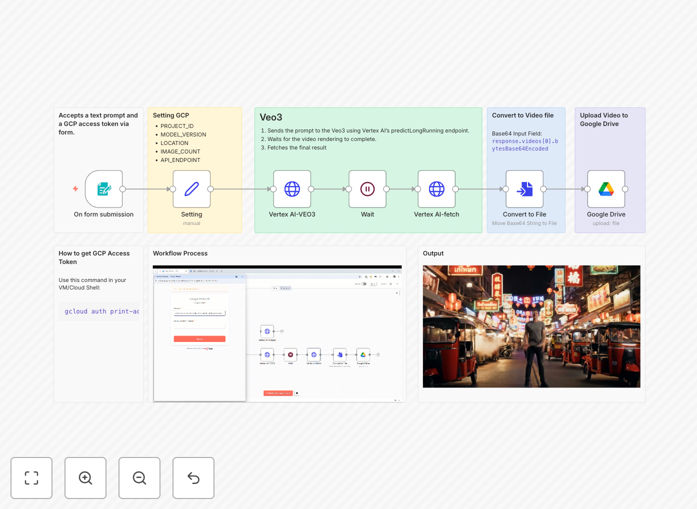
What This Workflow Does
This automation template solves a critical bottleneck for modern content teams: the time and resource intensity of video production. Instead of spending hours filming, editing, and rendering, you describe what you want in plain text, and this workflow generates professional-quality video content using Google's cutting-edge Vertex AI Veo 3 model.
The workflow accepts a text prompt (like "a serene mountain landscape at sunrise with mist rolling through pine trees") along with your Google Cloud access token. It sends this to Vertex AI's video generation API, waits for the rendering to complete, converts the base64-encoded video file, and automatically uploads the finished .mp4 to your designated Google Drive folder. What traditionally takes a production team days now happens automatically in minutes.
Beyond simple generation, this automation creates a systematic pipeline for scalable video content. Marketing teams can produce social media clips, product demos, or explainer videos on demand. Educational platforms can generate visual learning materials. E-commerce brands can create product showcases without expensive studio shoots.
How It Works
Step 1: Prompt Submission & Authentication
The workflow begins with a form trigger where you input your descriptive text prompt and Google Cloud access token. The token authenticates your GCP project with Vertex AI services, ensuring secure API access without storing credentials in the workflow itself.
Step 2: Vertex AI Video Generation
Your prompt is sent to Vertex AI Veo 3's predictLongRunning endpoint. This advanced model interprets the text description and begins generating corresponding video frames with cinematic quality, handling complex scene composition, lighting, and motion.
Step 3: Processing Wait & Status Monitoring
The workflow includes intelligent waiting logic that periodically checks the generation status. Video rendering can take several minutes depending on complexity, so this step ensures the process completes successfully before proceeding.
Step 4: File Conversion & Storage
Once generation completes, the base64-encoded video data is converted into a proper .mp4 file format. The workflow then connects to your Google Drive via OAuth2 credentials and uploads the finished video to your specified folder with appropriate naming and metadata.
Who This Is For
This template is ideal for content creators, marketing teams, educators, and businesses that need scalable video production. Digital marketing agencies can prototype client concepts rapidly. E-commerce brands can generate product videos for thousands of SKUs. Educational platforms can create visual learning content. Social media managers can maintain consistent posting schedules with fresh video content.
Developers and AI enthusiasts will appreciate the technical implementation showing how to integrate Vertex AI's latest video generation capabilities into automated workflows. Teams already using Google Workspace will benefit from the seamless Google Drive integration for immediate asset organization and sharing.
What You'll Need
- n8n instance (v1.94.1 or higher) either self-hosted or cloud
- Google Cloud Platform project with Vertex AI API enabled and billing activated
- Google Cloud access token generated via
gcloud auth print-access-token - Google Drive OAuth2 credentials connected to your n8n instance
- Basic understanding of Google Cloud services and n8n workflow concepts
Pro tip: Generate your access token with gcloud auth application-default set-quota-project [YOUR_PROJECT_ID] to avoid quota issues. Tokens expire after approximately one hour, so consider automating token refresh for production workflows.
Quick Setup Guide
- Enable Vertex AI API: Visit the Google Cloud Console, navigate to APIs & Services, and enable the Vertex AI API for your project.
- Configure Authentication: Run
gcloud auth loginandgcloud auth print-access-tokento generate your temporary access token. - Connect Google Drive: In n8n, create OAuth2 credentials for Google Drive with appropriate file upload permissions.
- Import the Template: Download and import the JSON workflow file into your n8n instance.
- Configure Nodes: Update the HTTP Request node with your GCP project details and set your Google Drive upload destination folder.
- Test & Deploy: Run the workflow with a test prompt, verify the video generation and upload process, then activate for production use.
Key Benefits
Reduce video production time from days to minutes. What traditionally requires filming crews, editing suites, and post-production can now be accomplished with a text description and automated processing.
Scale content creation without scaling costs. Generate hundreds of variations for A/B testing or produce localized versions for different markets without proportional increases in production expenses.
Maintain brand consistency across all video assets. AI-generated videos follow consistent visual styles, ensuring cohesive branding across marketing channels and campaigns.
Eliminate manual file management. Automated uploads to Google Drive with proper naming conventions create an organized media library accessible to your entire team instantly.
Future-proof your content strategy. As AI video generation technology advances, your automated workflow can be easily updated to leverage newer models and capabilities.