What This Workflow Does
This automation solves the problem of manual workflow monitoring by automatically generating comprehensive analytics reports from your n8n instance. Instead of checking individual executions or building custom dashboards, you'll receive a weekly email summary with all key metrics, error analysis, and performance trends.
The report helps technical teams identify problematic workflows before they cause major issues, while giving managers visibility into automation ROI. By centralizing this data in an easy-to-digest format, teams can make data-driven decisions about workflow optimization and resource allocation.
How It Works
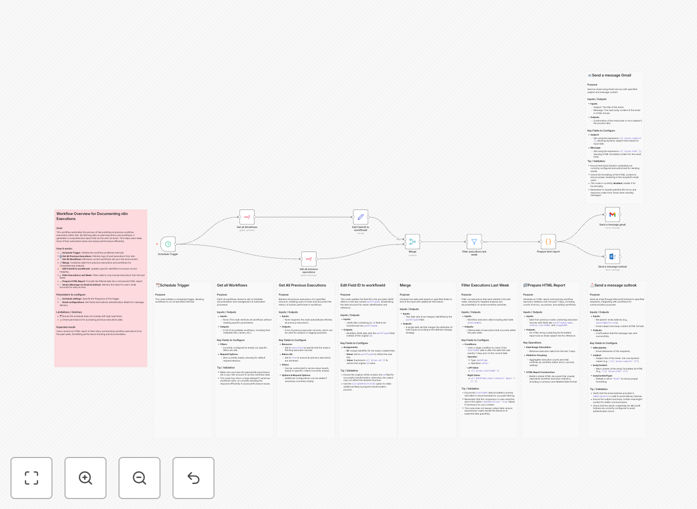
1. Scheduled Data Collection
Every week, the workflow queries n8n's API to gather execution data for all your workflows. It pulls metrics like success rates, execution times, and error messages from the specified date range.
2. Data Processing
The raw data is transformed into meaningful metrics and visualizations. The system calculates trends, compares week-over-week performance, and flags any anomalies or degradation in workflow reliability.
3. Report Generation
A formatted HTML email is created with tables and charts showing the most important metrics. The report highlights top-performing workflows, frequent errors, and recommendations for optimization.
Who This Is For
This automation is ideal for:
- n8n administrators who need to monitor workflow health
- Operations teams tracking automation performance
- Technical leaders who want visibility into workflow ROI
- Developers troubleshooting problematic workflows
Pro tip: Use the report's error analysis section to prioritize debugging efforts. The most frequent errors often represent the biggest opportunities for workflow improvement.
What You'll Need
- An n8n instance with workflows already running
- API access to your n8n server
- An email service configured in your automation platform
- Basic understanding of n8n's execution data structure
Quick Setup Guide
- Download the template JSON file
- Import it into your n8n or Zapier instance
- Configure the n8n API connection with your credentials
- Set the recipient email address(es) for reports
- Adjust the schedule to match your preferred reporting cadence
- Test with a manual trigger to verify the output
Key Benefits
Proactive issue detection: Catch workflow problems before they impact business operations by monitoring error rates and performance trends.
Time savings: Eliminate manual data gathering and report generation that typically takes hours each week.
Performance optimization: Identify workflows that consume disproportionate resources or have declining success rates.
Stakeholder visibility: Share automated reports with non-technical team members to demonstrate automation value.