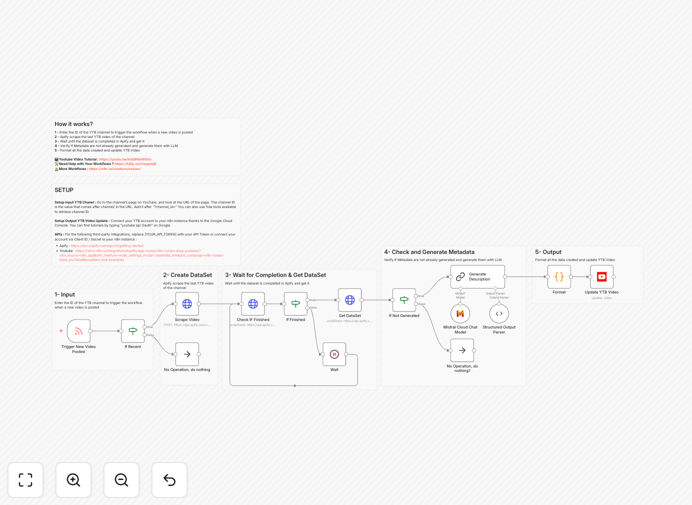
What This Workflow Does
Creating compelling YouTube metadata—timestamps (chapters), relevant tags, and optimized descriptions—is time-consuming but critical for SEO and viewer engagement. This automation solves that by automatically generating all necessary metadata whenever you publish a new video.
The workflow monitors your YouTube channel for new uploads, extracts the video content, uses AI to analyze it, and generates structured timestamps, keyword-optimized tags, and a complete description. It then updates the video with this metadata, ensuring every upload is fully optimized without manual effort.
For content creators, marketing teams, and agencies managing multiple channels, this represents a significant efficiency gain. Instead of spending 30–60 minutes per video on metadata, the process happens automatically in the background, freeing you to focus on content creation and strategy.
How It Works
1. Channel Monitoring & Trigger
The workflow starts by monitoring your specified YouTube channel ID. When a new video is uploaded (or reaches a certain status), it triggers the automation sequence. This ensures the process begins immediately after content is ready for optimization.
2. Video Content Extraction
Using the YouTube API and web scraping tools like Apify, the workflow extracts the video's transcript, title, and existing metadata. This raw content serves as the foundation for AI analysis and metadata generation.
3. AI-Powered Analysis
An AI model (like GPT-4 or Claude) analyzes the video content to identify key topics, natural breakpoints for chapters, relevant keywords, and optimal description structure. The AI considers your channel's niche and previous successful videos.
4. Metadata Generation
Based on the analysis, the system generates: clickable timestamps at logical content transitions, 10–15 relevant tags including primary and secondary keywords, and a complete description with hooks, summaries, and call-to-actions.
5. Quality Check & Update
Before applying changes, the workflow verifies the generated metadata meets quality standards and doesn't duplicate existing content. It then uses the YouTube API to update the video with the new timestamps, tags, and description.
Who This Is For
This automation is ideal for YouTube content creators who publish regularly and want to maintain high SEO standards without the time drain. Marketing teams managing corporate YouTube channels will appreciate the consistency and time savings. Agencies handling multiple client channels can scale their services without proportional increases in manual work.
Educational creators, podcasters with video versions, and businesses using YouTube for tutorials or demonstrations will find particular value. The workflow is especially beneficial for channels publishing long-form content (10+ minutes) where timestamps significantly improve viewer experience.
What You'll Need
- YouTube Channel ID: The unique identifier for your YouTube channel (found in your channel URL).
- YouTube API Access: OAuth credentials from Google Cloud Console to read and update your videos.
- AI API Key: Access to an AI service like OpenAI, Anthropic, or Google AI for content analysis.
- Web Scraping Service: Optional service like Apify for enhanced content extraction (free tier available).
- n8n Instance: Self-hosted n8n or n8n.cloud account to run the workflow.
Pro tip: Start with your 3–5 most recent videos to test the automation before applying it to your entire catalog. This lets you refine the AI prompts and ensure the generated metadata matches your brand voice.
Quick Setup Guide
- Download the template using the button above and import it into your n8n instance.
- Configure the YouTube trigger by adding your channel ID in the first node.
- Connect your YouTube account via OAuth in the YouTube update node (follow n8n's credential setup guide).
- Add your AI API key in the LLM node, adjusting the prompt if needed for your content style.
- Test with a recent video by manually triggering the workflow and reviewing the generated metadata.
- Activate the workflow and set it to run automatically when new videos are published.
Key Benefits
Save 10–20 hours monthly on manual metadata creation. What previously took 30–60 minutes per video now happens automatically, freeing significant creative time.
Improve SEO consistency across all uploads. Automated metadata ensures every video follows your keyword strategy and formatting standards, building channel authority.
Enhance viewer experience with professional timestamps. Chapters keep viewers engaged longer, increasing watch time and algorithmic favor.
Scale content production without proportional administrative overhead. Publish more frequently while maintaining (or improving) metadata quality.
Reduce human error in tagging and descriptions. The AI consistently applies best practices you might occasionally overlook when working manually.