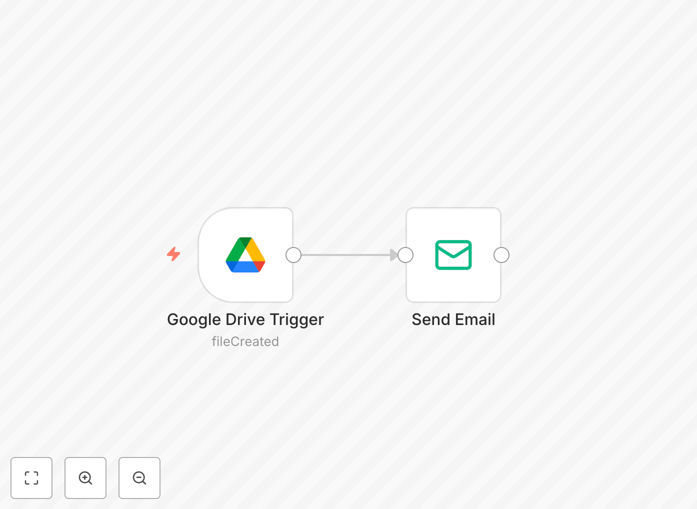
What This Workflow Does
This automation solves a common business problem: teams wasting time constantly checking shared Google Drive folders for new files. Without automation, important documents can sit unnoticed for hours or days, delaying projects and causing communication gaps.
The workflow automatically monitors specified Google Drive folders and sends instant email notifications whenever new files are uploaded. It captures essential details like file name, uploader, timestamp, and provides direct links, ensuring your team stays immediately informed without manual intervention.
How It Works
Step 1: Google Drive Trigger Detection
The workflow begins with a Google Drive Trigger node that continuously monitors your selected folder. When any new file is added—whether it's a document, spreadsheet, presentation, or image—the trigger immediately activates the workflow.
Step 2: Data Extraction and Formatting
The system extracts all relevant file metadata including the file name, size, type, upload timestamp, and owner information. This data is structured into a clean, readable format suitable for email notifications.
Step 3: Automated Email Dispatch
Using the Send Email node, the workflow generates and sends a professional notification email to your designated recipients. The email includes actionable information and direct links to the new file, enabling immediate access and review.
Who This Is For
This automation is ideal for project teams, client service departments, remote workforces, and any business relying on Google Drive for collaboration. Marketing agencies can track client asset deliveries, legal teams can monitor document submissions, accounting departments can receive immediate notification of new financial records, and educational institutions can alert instructors to student submissions.
What You'll Need
- A Google Workspace account with Drive access
- An email service (Gmail, SMTP, or email service provider)
- n8n instance (cloud or self-hosted)
- Google Drive API credentials configured in n8n
- Email service credentials configured in n8n
Quick Setup Guide
- Download the template file using the button above
- Import the JSON file into your n8n instance
- Connect your Google Drive account in the trigger node
- Specify which folder to monitor for new files
- Configure your email service in the Send Email node
- Set recipient email addresses and customize the message
- Activate the workflow and test with a sample file upload
Pro tip: Create separate workflows for different departments or project folders. This allows customized notification messages and recipient lists tailored to each team's specific needs and terminology.
Key Benefits
Eliminate manual folder monitoring that can consume 30-60 minutes daily per team member. This automation runs 24/7 without breaks, ensuring no file goes unnoticed even outside business hours.
Accelerate project timelines by reducing document review cycles by 50-70%. Immediate notifications mean work can begin on new files within minutes rather than hours or days.
Improve accountability and audit trails with automated timestamp records of when files were received and who was notified. This creates a reliable documentation chain for compliance and project management.
Reduce communication overhead by automating what would otherwise require manual messages, Slack pings, or meeting announcements about new file availability.
Scale effortlessly across multiple teams and projects without additional administrative burden. One workflow can serve an entire organization with proper configuration.