n8n Facebook API Automation Token Management

Get Long-Lived Facebook Access Token

Automatically convert short-lived Facebook tokens to 60-day long-lived versions for uninterrupted API access

Download Template JSON · n8n compatible · Free
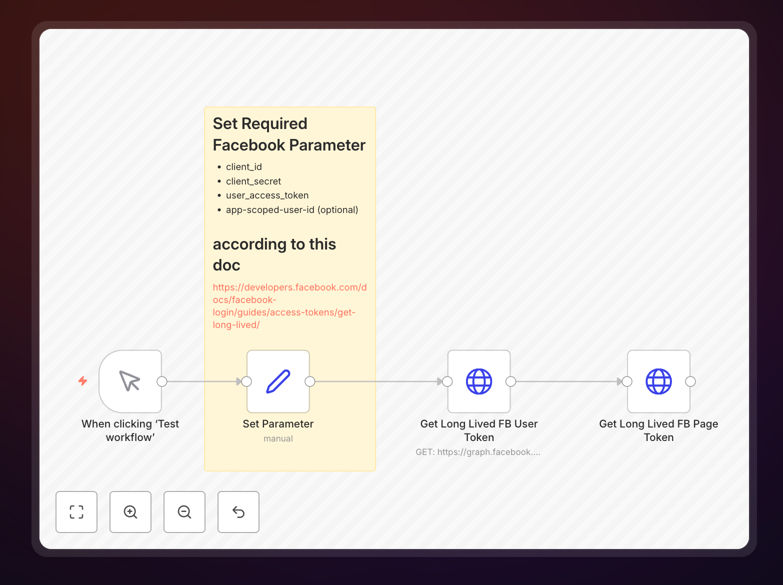
n8n workflow for Facebook token conversion

What This Workflow Does

Facebook access tokens are essential for businesses using Facebook's API to manage pages, run ads, or sync data. However, these tokens expire frequently - short-lived tokens last just 1-2 hours while long-lived versions still expire after 60 days. This creates operational headaches as integrations break when tokens expire.

This n8n workflow automates the conversion of short-lived Facebook tokens to their long-lived versions. It handles the entire token exchange process through Facebook's official OAuth endpoints, saving developers and marketers hours of manual work while ensuring continuous API access for your business applications.

How It Works

1. Input Short-Lived Token

The workflow begins by accepting your existing short-lived Facebook user or page access token. This can be provided manually or pulled from your existing systems where the token is stored.

2. Exchange Token via Facebook API

The workflow makes an authenticated request to Facebook's token exchange endpoint (/oauth/access_token) with your app credentials and short-lived token. Facebook verifies the credentials and returns a long-lived token valid for 60 days.

3. Store the New Token Securely

The generated long-lived token is then stored in your preferred secure storage system - whether that's a database, environment variables, or a secrets management tool. The workflow can be configured to update all systems using this token.

4. Optional Notification

You can configure the workflow to send email or Slack notifications confirming the successful token exchange, including the new expiration date for tracking purposes.

Who This Is For

This workflow benefits any business relying on Facebook API access, including:

  • Marketing teams managing Facebook Pages and ads
  • Ecommerce stores syncing products with Facebook Shops
  • Customer service teams using Messenger integrations
  • Developers building Facebook-connected applications
  • Agencies managing multiple client Facebook assets

What You'll Need

  1. A Facebook Developer account and registered app
  2. Valid short-lived user or page access token
  3. Facebook app ID and secret
  4. n8n instance (self-hosted or cloud)
  5. Secure storage solution for the new token

Quick Setup Guide

  1. Download the JSON workflow file
  2. Import into your n8n instance
  3. Configure Facebook app credentials in the HTTP Request node
  4. Set up your token storage method (database, variables, etc.)
  5. Test with a short-lived token to verify functionality
  6. Schedule the workflow to run before token expiration

Key Benefits

Eliminates manual token renewal: Save 2-3 hours per month that would otherwise be spent manually exchanging tokens through Facebook's developer tools.

Prevents integration downtime: Automated renewal ensures your Facebook-connected systems never lose access due to expired tokens.

Centralized token management: Maintain all tokens in one secure location rather than scattered across different systems.

Scalable solution: Easily manage tokens for multiple pages, users, or clients from a single workflow.

Audit trail: The workflow creates a record of each token exchange for compliance and troubleshooting.

Frequently Asked Questions

Common questions about Facebook token management and automation

Facebook tokens expire for security reasons to prevent unauthorized access if credentials are compromised. Short-lived tokens (1-2 hours) provide temporary access while long-lived tokens (60 days) offer extended access for applications needing continuous API connectivity. This expiration policy helps protect user data while allowing legitimate integrations to function.

The expiration system creates a balance between security and usability. Businesses need tokens that last long enough for practical use but not so long that stolen credentials provide indefinite access. Facebook's approach forces regular credential rotation while providing mechanisms for automated renewal.

User tokens grant access to personal Facebook data while page tokens manage Facebook Pages. User tokens authenticate individual users while page tokens allow managing business pages, ads, and content. Both can be converted to long-lived versions, but page tokens require additional permissions and steps in the Facebook API.

For businesses, page tokens are typically more important as they control access to company assets. However, user tokens may be needed first to generate page tokens. The conversion process differs slightly - page tokens require the user token that has admin rights on the page.

Long-lived tokens last 60 days but should be refreshed before expiration. Best practice is to automate renewal at 50-55 days to prevent service interruptions. Some businesses implement token rotation systems that generate new tokens automatically before old ones expire.

The exact timing depends on your risk tolerance. Earlier renewal provides more buffer but increases API calls. Consider monitoring token age and setting alerts at 45+ days to ensure you never reach the 60-day limit. Critical systems may warrant even more conservative renewal schedules.

Facebook's policy limits tokens to 60 days maximum. There's no official way to extend beyond this period. However, you can implement automated workflows that generate new tokens before expiration. Some businesses use serverless functions or scheduled jobs to maintain continuous access without manual intervention.

While you can't stop tokens from expiring, you can make the renewal process invisible to your systems. The key is automating the entire lifecycle - detecting expiring tokens, generating replacements, and updating all connected systems before any disruption occurs.

Expired tokens immediately lose API access, breaking any integrations. Automated posts stop, ads pause, and data syncs fail. The impact depends on your use case - marketing teams lose ad management, ecommerce stores may stop syncing products, and customer service bots become unresponsive until tokens are renewed.

The business consequences can be significant. An ecommerce site might stop updating Facebook Shop listings. A marketing team could lose access to ad performance data. Customer messages might go unanswered. That's why proactive token management is critical for any Facebook-reliant business.

Yes, with proper security measures. Store tokens encrypted, limit access permissions, and implement monitoring. Automated token workflows should use Facebook's official API endpoints and follow OAuth best practices. The security risk comes from mishandling tokens, not automation itself.

Proper implementation actually improves security by ensuring tokens are regularly rotated. Automation prevents human errors like forgetting to renew tokens. Just be sure to:

  • Store app secrets securely
  • Limit token permissions to only what's needed
  • Monitor for unusual access patterns

Absolutely. GrowwStacks specializes in custom Facebook API integrations tailored to your specific needs. We can build automated token management systems integrated with your CRM, marketing tools, or internal systems. Our solutions include monitoring, alerts, and fail-safes to ensure uninterrupted Facebook API access.

For businesses managing multiple pages or complex integrations, we develop bespoke solutions that:

  • Handle token rotation for entire teams
  • Integrate with your existing tech stack
  • Provide centralized visibility and control

Need a Custom Facebook Token Automation?

This free template is a starting point. Our team builds fully tailored automation systems for your specific needs.