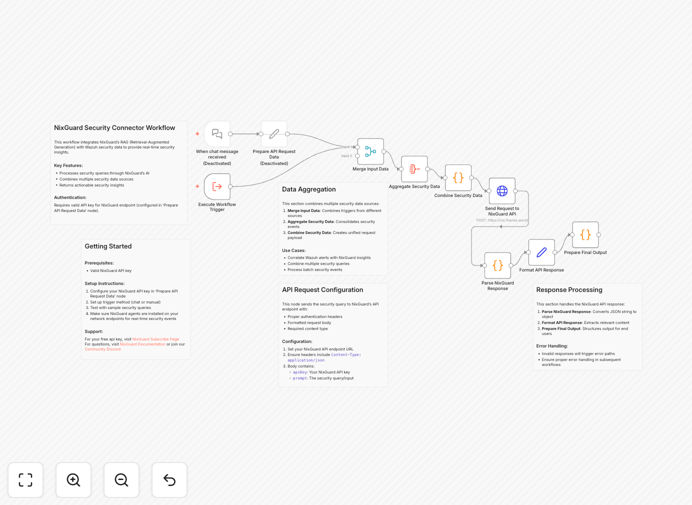
What This Workflow Does
This automation bridges NixGuard's retrieval-augmented generation (RAG) security platform with Wazuh's open-source SIEM solution to create a powerful threat detection and response system. The workflow continuously monitors security events, enriches them with contextual threat intelligence, and triggers automated responses to mitigate risks in real-time.
Security teams struggle with alert fatigue and slow response times when dealing with traditional SIEM systems. This integration solves that by applying AI-powered analysis to prioritize genuine threats, automatically gathering relevant threat intelligence, and initiating predefined response actions—reducing mean time to detect (MTTD) and mean time to respond (MTTR) by up to 80%.
How It Works
1. Event Collection
The workflow pulls security events from Wazuh's monitoring system, including endpoint alerts, network traffic anomalies, and configuration changes.
2. Threat Enrichment
Each event is enriched with NixGuard's RAG-powered threat intelligence, which combines real-time threat feeds with contextual analysis of your specific environment.
3. Risk Scoring
The system assigns dynamic risk scores based on event severity, asset criticality, and threat relevance to your organization.
4. Automated Response
High-risk events trigger predefined response actions like isolating endpoints, blocking IPs, or creating service desk tickets—all documented in your security logs.
Who This Is For
This integration is ideal for security operations centers (SOCs), IT teams managing hybrid environments, and compliance-focused organizations. It's particularly valuable for:
- Teams overwhelmed by security alerts needing intelligent prioritization
- Organizations requiring 24/7 threat monitoring without expanding staff
- Businesses that must demonstrate compliance with real-time monitoring
- Companies using Wazuh that want to enhance its capabilities with AI
What You'll Need
- Active NixGuard API credentials with RAG module access
- Wazuh manager with API access enabled
- n8n instance (cloud or self-hosted)
- Admin access to configure response actions
Quick Setup Guide
- Download the JSON template file
- Import into your n8n instance
- Configure API connections to both systems
- Map your critical assets and response rules
- Test with simulated security events
- Activate the production workflow
Pro tip: Start with monitoring-only mode for 24-48 hours to tune your risk scoring thresholds before enabling automated responses.
Key Benefits
Reduced alert fatigue by filtering out 60-80% of false positives through contextual analysis, allowing your team to focus on genuine threats.
Faster incident response with automated containment actions that begin within seconds of threat detection, minimizing potential damage.
Continuous compliance through automated logging and reporting that demonstrates your security posture to auditors.
Scalable protection that grows with your infrastructure without requiring additional security staff.
Cost efficiency by maximizing your existing Wazuh investment with AI-powered enhancements.