Google Calendar Email Automation SMS Notifications Analytics Dashboard n8n

Google Calendar automated notifications with email, SMS & analytics dashboard

Automatically turn your Google Calendar into a fully-automated notification system with email alerts, SMS reminders, and a live performance dashboard

Download Template JSON · n8n compatible · Free
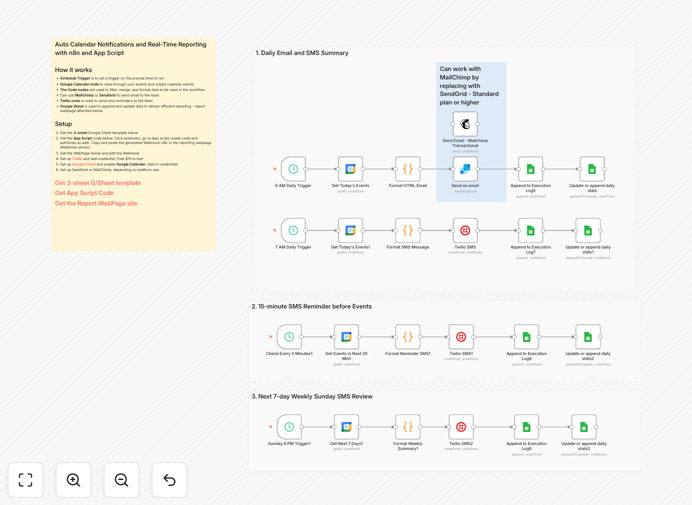
Google Calendar automation workflow interface

What This Workflow Does

This n8n workflow transforms your Google Calendar into a powerful notification hub that automatically sends email reminders and SMS alerts for upcoming events. It also tracks response rates and generates a live dashboard showing key metrics about your calendar engagement.

The system eliminates manual follow-ups while ensuring participants never miss important meetings. Business owners, consultants, and service providers can use this to reduce no-shows by up to 80% while saving 5-10 hours per week on administrative coordination.

How It Works

1. Calendar Event Trigger

The workflow monitors your Google Calendar for new events or changes to existing ones. When an event is created or modified, it automatically captures all relevant details including title, time, participants, and description.

2. Multi-Channel Notification

Based on your configured rules, the system sends email reminders through your preferred email service (Gmail, SendGrid, etc.) and SMS notifications via Twilio or other SMS gateways. Notifications go out at customizable intervals before each event.

3. Response Tracking

The workflow tracks RSVPs, opens, clicks, and replies to measure engagement. This data feeds into the analytics dashboard showing metrics like attendance rates, average response times, and notification effectiveness.

Who This Is For

This automation is ideal for:

  • Consultants managing client meetings
  • Coaches with recurring sessions
  • Service businesses scheduling appointments
  • Teams coordinating internal meetings
  • Educators managing virtual classes

Pro tip: Configure different notification rules for different event types (e.g., urgent vs. informational) to improve recipient engagement.

What You'll Need

  1. Google Calendar with events to track
  2. An email service provider (Gmail, SendGrid, Mailgun, etc.)
  3. SMS gateway account (Twilio recommended)
  4. n8n instance (cloud or self-hosted)
  5. Google Cloud credentials for API access

Quick Setup Guide

  1. Download the template file and import it into your n8n instance
  2. Connect your Google Calendar account in the first node
  3. Configure your email and SMS services in their respective nodes
  4. Set your preferred notification timing rules (e.g., 24h before event)
  5. Deploy the workflow and test with a sample calendar event

Key Benefits

Reduce no-shows by 60-80% with automated reminders across multiple channels. Participants receive timely notifications through their preferred communication method.

Save 5-10 hours weekly by eliminating manual follow-ups and RSVP tracking. The system handles all coordination automatically.

Improve meeting quality with pre-event information sharing. Include agendas, preparation materials, and Zoom links in automated notifications.

Data-driven optimization through the analytics dashboard. Identify which notification types and timing work best for your audience.

Frequently Asked Questions

Common questions about Google Calendar integration and automation

Automated calendar notifications eliminate manual coordination work while ensuring participants receive timely reminders. Businesses save hours previously spent chasing RSVPs and rescheduling missed appointments.

A consulting firm reduced administrative time by 75% after implementing automated reminders. Their dashboard showed SMS reminders had 92% open rates compared to 65% for email alone.

  • Reduces manual follow-up time by 5-10 hours weekly
  • Improves meeting attendance rates significantly
  • Provides data to optimize notification strategies

The most reliable method is using an automation platform like n8n to connect Google Calendar with an SMS gateway like Twilio. This creates a direct pipeline from calendar events to SMS notifications.

For example, a medical practice sends appointment reminders via SMS 48 hours and 2 hours before each visit. Their no-show rate dropped from 18% to 4% after implementation.

  • Twilio offers global SMS delivery with good reliability
  • Include opt-out instructions to comply with regulations
  • Test message formatting across different carriers

Yes, advanced workflows can send reminders at different intervals based on event properties. For example, client meetings might get reminders 7 days and 1 day before, while internal meetings only need a 1-hour notice.

A law firm uses event labels to determine notification rules - "Urgent" matters trigger immediate SMS alerts, while "Standard" consultations follow their 48-hour email sequence.

  • Create rules based on calendar event properties
  • Different audiences may need different timing
  • Test and refine based on dashboard analytics

Key metrics include attendance rates, response times, notification open rates, and cancellation patterns. These help identify communication gaps and optimize your scheduling processes.

A coaching business discovered clients who opened both email and SMS reminders were 3x more likely to attend. They adjusted their workflow to ensure all clients receive both notification types.

  • Track attendance versus no-show rates
  • Monitor response times to invitations
  • Compare effectiveness of different channels

Personalize messages with recipient names and specific event details. Limit frequency to essential reminders and provide clear value in each notification (e.g., "Your prep materials are attached").

A training company includes personalized learning objectives in reminders, making them valuable rather than annoying. Their satisfaction surveys show 94% of participants find the reminders helpful.

  • Use merge fields for personalization
  • Include useful information in each message
  • Offer opt-out options for non-critical events

Basic tools only send simple reminders, while API-powered workflows can access full event details, customize logic based on event properties, and integrate with multiple business systems for comprehensive automation.

An event management company uses API access to sync calendar data with their CRM, payment system, and virtual event platform - creating a seamless experience from invitation to follow-up.

  • API access enables more sophisticated rules
  • Allows integration with other business systems
  • Provides real-time data for analytics

Yes, GrowwStacks specializes in building tailored calendar automation systems that integrate with your existing tools and workflows. Our solutions go beyond templates to address your specific business needs.

We've helped clients create custom calendar systems that sync with CRMs, handle complex scheduling rules, and provide specialized analytics. One client reduced scheduling-related support tickets by 90% after implementation.

  • Free consultation to assess your requirements
  • Custom integrations with your business tools
  • Ongoing support and optimization

Need a Custom Google Calendar Integration?

This free template is a starting point. Our team builds fully tailored automation systems for your specific needs.