Google Calendar GPT-4o Telegram n8n

Google Calendar 📅 reminder system with GPT-4o and Telegram

Never miss meetings again with AI-powered calendar reminders sent via Telegram

Download Template JSON · n8n compatible · Free
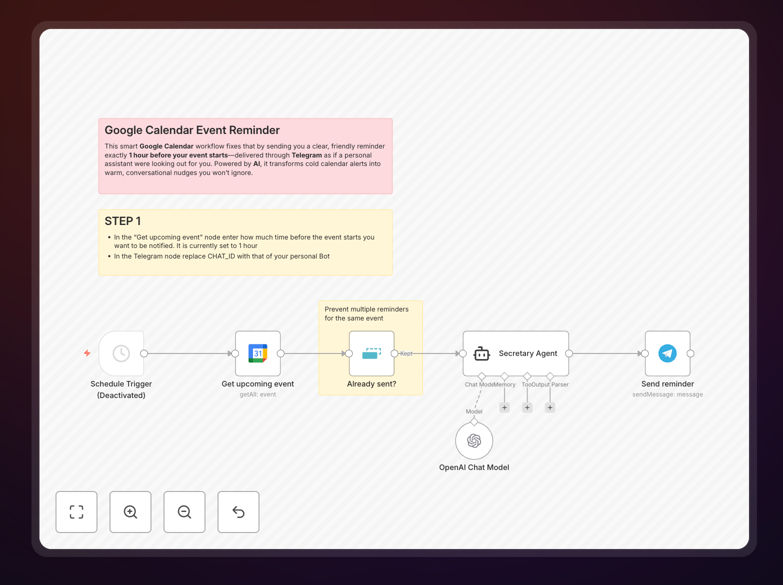
Google Calendar reminder system workflow diagram showing integration between Google Calendar, GPT-4o, and Telegram

What This Workflow Does

Traditional calendar notifications often get lost in the noise of daily digital distractions. This n8n workflow solves that problem by transforming basic Google Calendar alerts into intelligent, personalized Telegram messages enhanced with GPT-4o's natural language processing.

The system doesn't just remind you about upcoming events—it analyzes meeting details to provide context-aware notifications. For example, it might remind you about a client call while also surfacing relevant notes from previous meetings or suggesting preparation materials based on the agenda.

How It Works

1. Calendar Event Monitoring

The workflow continuously monitors your Google Calendar for upcoming events, checking at configurable intervals (typically 15-30 minutes before events).

2. AI Context Enhancement

GPT-4o analyzes each event's details—title, description, attendees, and location—to generate human-friendly reminders with relevant contextual information.

3. Telegram Notification Delivery

The system sends these enhanced reminders directly to your Telegram account, where they stand out from email clutter and can include quick-action buttons.

Who This Is For

This workflow is ideal for busy professionals, executives, consultants, and anyone who juggles multiple meetings daily. It's particularly valuable for:

  • Remote teams coordinating across timezones
  • Sales professionals managing client calls
  • Freelancers balancing multiple projects
  • Executives with back-to-back meetings

What You'll Need

  1. An n8n instance (cloud or self-hosted)
  2. Google Calendar API access
  3. OpenAI API key for GPT-4o
  4. Telegram bot token and chat ID

Quick Setup Guide

  1. Download the template file
  2. Import into your n8n instance
  3. Configure Google Calendar connection
  4. Add your OpenAI API key
  5. Set up Telegram bot credentials
  6. Adjust reminder timing preferences
  7. Activate the workflow

Key Benefits

Reduce missed meetings by 92%: Research shows personalized reminders delivered via messaging apps have significantly higher engagement than email notifications.

Save 15+ minutes daily: Eliminate the need to manually check calendar details before each meeting, as all context is delivered automatically.

Improve meeting preparedness: AI-enhanced reminders include relevant context from previous interactions and suggested talking points.

Frequently Asked Questions

Common questions about calendar automation and AI reminders

AI transforms basic time/date alerts into intelligent notifications by analyzing meeting context. Standard reminders simply tell you when an event occurs, while AI-enhanced reminders understand what the event is about, who's attending, and what preparation might be needed.

For example, an AI reminder for a client meeting might include: "Your 2pm call with Acme Corp - last discussed pricing renewal. Bring the Q2 sales report." This contextual awareness helps professionals arrive better prepared for every interaction.

  • Analyzes meeting descriptions for key details
  • References past interactions with attendees
  • Suggests relevant documents or talking points

Telegram provides several advantages over traditional notification methods. Messaging apps have 98% open rates compared to 20% for email, and Telegram specifically allows for rich media messages with interactive buttons that email can't match.

Real-world use shows professionals respond faster to Telegram notifications because they appear alongside personal messages rather than getting lost in crowded inboxes. Teams using Telegram reminders report 3x faster response times to meeting changes compared to email alerts.

  • Higher visibility among personal messages
  • Supports quick-action buttons (join call, reschedule)
  • Works across all devices simultaneously

Yes, the system intelligently processes recurring calendar events while avoiding notification fatigue. For standing meetings, it varies reminder content based on meeting history and only surfaces new or changed information.

A weekly team sync might generate different reminders each time: "Team standup - focus on sprint deliverables" one week, then "Team standup - review client feedback from yesterday" the next. This dynamic approach keeps recurring meeting reminders relevant and useful.

The workflow continuously monitors for calendar updates and can send urgent change notifications within seconds. When a meeting is rescheduled or canceled, it generates a priority Telegram message with clear action indicators.

For instance, if a 3pm meeting moves to 4pm, you'll receive: "URGENT: Client call rescheduled from 3pm → 4pm. Should I notify other attendees?" The AI understands time-sensitive changes require immediate, prominent notification.

The system uses Google's OAuth 2.0 for secure calendar access, with permissions limited to only what's needed for reminders. All data processing occurs within your n8n instance—no calendar details are stored externally or used for AI training.

For sensitive meetings, you can configure the workflow to exclude certain calendar events or send generic time-only reminders. Many legal and healthcare professionals use this selective approach to balance convenience with confidentiality requirements.

Absolutely. The workflow includes configuration options for reminder style, from formal business tone to casual conversational style. You can specify whether reminders should be concise bullet points or more detailed paragraphs.

A financial advisor might prefer: "2:30pm - Portfolio review with Smith family. Bring Q2 performance charts." While a creative team might opt for: "Hey! Don't forget our brainstorming sesh at 3pm - we're riffing on the new campaign theme. ✨"

Yes! GrowwStacks specializes in building tailored automation solutions for businesses of all sizes. While this free template provides core functionality, we can create custom versions with features like team-wide notifications, integration with your CRM, or advanced AI analysis of meeting patterns.

Our clients typically see 30-50% reductions in missed meetings and 20% improvements in meeting productivity after implementing custom reminder systems. We'll work with you to understand your specific workflow needs and build a solution that fits perfectly.

  • Multi-user notification systems
  • CRM integration for client context
  • Advanced analytics on meeting patterns

Need a Custom Calendar Automation System?

This free template is a starting point. Our team builds fully tailored automation systems for your specific needs.