Google Sheets Twilio SMS Automation Bulk Messaging n8n

Automate Bulk SMS from Google Sheets with Twilio

Send personalized text messages to hundreds of contacts automatically. Update a spreadsheet, and let the workflow handle delivery, tracking, and status updates.

Download Template JSON · n8n compatible · Free
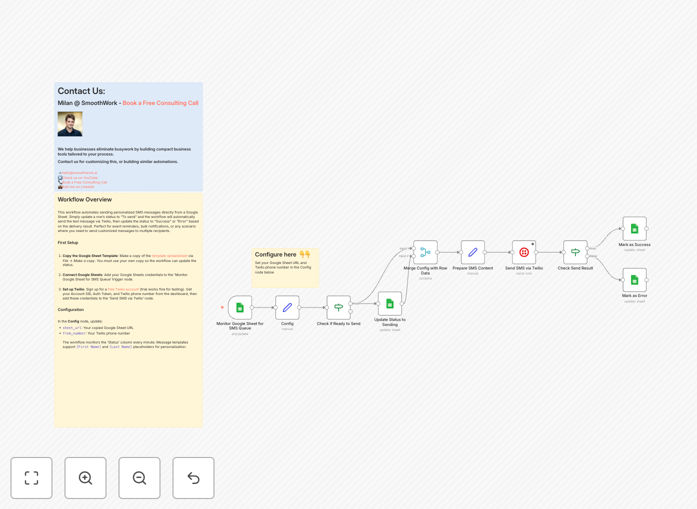
Google Sheets to Twilio SMS automation workflow interface showing connected nodes

What This Workflow Does

Manual SMS sending is tedious, error-prone, and doesn't scale. This automation solves that by connecting your Google Sheets contact list directly to Twilio's SMS platform. When you mark a row as "To send," the workflow instantly delivers a personalized text message, then updates the status to "Success" or "Error" based on delivery confirmation.

Perfect for appointment reminders, event notifications, marketing campaigns, or any scenario where you need to communicate with multiple people quickly and reliably. The system handles personalization, tracks delivery, and logs results—all without manual intervention.

How It Works

Step 1: Monitor Your Spreadsheet

The workflow polls your Google Sheet every minute, looking for rows where the Status column is set to "To send." It reads the contact details, phone number, and message template for each queued recipient.

Step 2: Personalize and Send

Using placeholders like [First Name] and [Last Name], the system creates a unique message for each contact. It then sends the SMS via Twilio using your configured phone number and credentials.

Step 3: Track and Update

Twilio returns a delivery status for each message. The workflow updates your Google Sheet accordingly—changing the status to "Success" for delivered messages or "Error" for failures (like invalid numbers).

Who This Is For

This automation is ideal for small businesses, service providers, marketers, educators, healthcare practices, nonprofits, and any organization that regularly communicates with customers, clients, or members via text message. If you're currently copying and pasting messages or using manual SMS tools, this workflow will save you hours each week.

What You'll Need

  1. A Google account with access to Google Sheets
  2. A Twilio account (free trial works for testing)
  3. Your Twilio Account SID, Auth Token, and a phone number
  4. A Google Sheet with columns for: ID, First Name, Phone Number, Message Template, and Status
  5. An n8n instance (cloud or self-hosted) to run the workflow

Quick Setup Guide

  1. Copy the template sheet: Make a copy of the provided Google Sheets template to your own Drive.
  2. Connect accounts: Add your Google and Twilio credentials to the corresponding nodes in the workflow.
  3. Configure settings: Update the Config node with your sheet URL and Twilio phone number.
  4. Activate and test: Turn on the workflow, add a test row to your sheet, and set status to "To send."
  5. Scale up: Once testing succeeds, add your full contact list and let the automation run continuously.

Pro tip: Use separate sheets for different campaigns (e.g., "Event Reminders," "Weekly Promos"). Duplicate the workflow for each sheet to keep campaigns organized and independently manageable.

Key Benefits

Save 10+ hours monthly by eliminating manual copy-paste and sending. What used to take an hour for 100 messages now happens automatically in minutes.

Reduce errors by 90% with automated validation and status tracking. No more missed messages, wrong numbers, or forgotten follow-ups.

Improve response rates through personalized messaging. Using [First Name] and other placeholders makes messages feel one-to-one, increasing engagement.

Gain real-time visibility with automatic status updates in your sheet. Instantly see which messages were delivered, which failed, and why.

Scale effortlessly from 10 to 10,000 recipients without additional work. The system handles the volume while you focus on strategy.

Frequently Asked Questions

Common questions about SMS automation and integration

Manual SMS sending is time-consuming, error-prone, and doesn't scale. Automation ensures every message is sent on time, personalizes content for each recipient, tracks delivery status automatically, and frees your team for higher-value work.

For bulk communications, automation reduces human error by 90% and cuts sending time from hours to minutes. You also gain consistent delivery regardless of staff availability or time zones.

  • Eliminates copy-paste mistakes
  • Ensures 24/7 operation
  • Provides delivery confirmation

Connecting Google Sheets with Twilio creates a powerful, flexible SMS system. You can manage your contact list and message templates in a familiar spreadsheet, use placeholders for personalization, trigger sends based on status changes, and automatically log results back to your sheet.

This integration is perfect for event reminders, appointment confirmations, marketing blasts, and customer notifications. The spreadsheet becomes your control center—easy to update, sort, filter, and share with team members.

SMS automation ensures timely, consistent, and personalized communication at scale. Customers receive important information immediately, with their name and relevant details included. Automated tracking means you know which messages were delivered, and failed deliveries are flagged for follow-up.

This reliability builds trust and improves response rates compared to manual methods. For example, appointment reminder no-shows typically drop by 20-30% with automated SMS confirmations.

Service businesses (appointment reminders), e-commerce (order updates, promotions), healthcare (medication reminders), education (class notifications), nonprofits (donation appeals), and any organization needing to communicate regularly with customers or members.

Any business sending 50+ similar messages monthly can save significant time and reduce errors with automation. The ROI becomes clear quickly as staff time is redirected to revenue-generating activities.

  • Service providers: Reduce no-shows
  • Retail: Drive flash sales
  • Healthcare: Improve patient adherence

Yes, you can personalize messages using placeholders like [First Name], [Last Name], [Appointment Time], or any column data from your sheet. The automation replaces these placeholders with actual values for each recipient, making messages feel one-to-one even when sent in bulk.

This personalization increases open rates and engagement significantly. You can create dynamic messages that reference specific order details, appointment times, account balances, or any data stored in your spreadsheet.

Automated delivery through Twilio is more reliable than manual sending. The system handles retries for failed attempts, provides delivery confirmations, and avoids human errors like wrong numbers or missed messages.

Twilio's infrastructure ensures 99.9%+ uptime, and automation runs consistently regardless of time of day or staff availability. You also get detailed logs and analytics that manual sending can't provide.

Common mistakes include not formatting phone numbers correctly (include country code), forgetting to set up proper error handling, not testing with a small batch first, using overly long messages (SMS has character limits), and not obtaining proper consent for marketing messages.

Always test thoroughly and ensure compliance with local telecommunications regulations. Start with a small group, verify delivery, check formatting, then scale up gradually.

  • Test with 5-10 numbers first
  • Include country codes (+1 for US)
  • Keep messages under 160 characters

Yes, GrowwStacks specializes in building custom SMS automation systems tailored to your specific business needs. We can integrate multiple data sources, create complex personalization logic, set up advanced scheduling, build dashboards for monitoring, and ensure compliance with regulations.

Our team handles everything from design to deployment and training. Whether you need to connect your CRM, add two-way messaging, create approval workflows, or build comprehensive reporting, we can develop a solution that fits your exact requirements.

  • Multi-channel communication systems
  • CRM integration and data sync
  • Advanced analytics and reporting

Need a Custom SMS Automation?

This free template is a starting point. Our team builds fully tailored automation systems for your specific business needs.