AI Automation Learning Management Corporate Training n8n OpenAI

AI-Powered Learning Management Automation

Automate learner progress tracking, engagement analysis & personalized feedback delivery. Reduce instructor workload by 70% and identify at-risk learners weeks earlier.

Download Template JSON · n8n compatible · Free
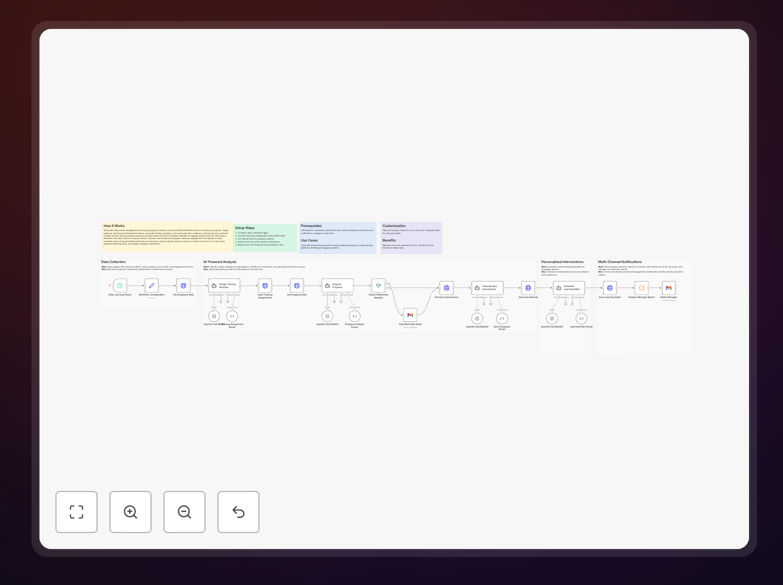
AI-powered learning management automation workflow diagram showing learner tracking, AI analysis, and notification system

What This Workflow Does

Manual progress tracking in corporate training and online education consumes valuable instructor time and often misses early warning signs of struggling learners. This AI-powered automation solves both problems by continuously monitoring learner engagement, analyzing performance data, and delivering personalized interventions at scale.

The workflow connects to your learning management system (LMS), retrieves daily activity data, uses AI models to assess engagement patterns and quiz performance, generates individualized progress summaries, and triggers targeted notifications. It identifies at-risk learners up to two weeks earlier than manual methods, allowing for timely support that improves completion rates and learning outcomes.

How It Works

The automation runs on a daily schedule, systematically processing each learner's data through a intelligent analysis pipeline.

1. Data Collection & Monitoring

The workflow connects to your LMS API to retrieve current course enrollment, learner activity logs, assessment scores, and completion metrics. It monitors login frequency, time spent on materials, forum participation, and assignment submission patterns.

2. AI-Powered Analysis

Using OpenAI models, the system analyzes engagement trends, identifies performance deviations, and assesses comprehension through quiz score patterns. The AI evaluates both quantitative metrics and qualitative indicators to create a holistic view of each learner's progress.

3. Risk Assessment & Segmentation

Learners are automatically categorized based on risk levels: thriving, progressing, at-risk, or critical. The system applies customizable thresholds to flag those needing intervention, considering both absolute performance and trajectory changes.

4. Personalized Communication

Automated progress reports are generated and sent to learners with personalized feedback and encouragement. Simultaneously, instructors receive notifications about at-risk cases with specific intervention recommendations and context.

5. Manager Escalation & Reporting

For critical cases or program-wide trends, the workflow escalates to training managers with summarized insights and recommended actions. It also generates aggregate reports for leadership on program effectiveness and ROI.

Who This Is For

This automation is ideal for corporate learning and development teams managing employee onboarding, compliance training, or skill development programs. It's equally valuable for online education platforms, university extension programs, and professional certification providers scaling their operations.

Training managers drowning in manual progress tracking, instructors needing to provide more personalized attention at scale, and organizations seeking data-driven insights into their training investments will find immediate value. The solution works with any LMS that provides API access, including Moodle, Canvas, Blackboard, Cornerstone, and custom learning platforms.

What You'll Need

  1. LMS API Access: Credentials and API keys for your learning management system with permissions to read learner data and course progress.
  2. OpenAI API Key: For AI-powered analysis of engagement patterns and performance trends.
  3. Email Service: Configured email account (Gmail, SMTP, etc.) for sending notifications to learners, instructors, and managers.
  4. Contact Lists: Instructor and manager email addresses for escalation workflows.
  5. n8n Instance: Self-hosted n8n or n8n.cloud account to run the automation.

Pro tip: Start with a pilot group of 20-50 learners to fine-tune your risk thresholds and notification templates before scaling to your entire organization.

Quick Setup Guide

  1. Import the Template: Download the JSON file and import it into your n8n instance using the "Import from File" option.
  2. Configure Schedule Trigger: Set the Schedule Trigger node to run daily at a time when LMS data is typically updated (e.g., 2 AM).
  3. Connect Your LMS: Add your LMS API credentials to the HTTP Request nodes, adjusting endpoints to match your specific platform.
  4. Set Up AI Analysis: Add your OpenAI API key to the AI Model nodes and adjust the prompt templates to match your course objectives.
  5. Configure Notifications: Set up your email service in the Gmail/SMTP nodes and customize message templates for learners, instructors, and managers.
  6. Test & Activate: Run the workflow manually with a test learner to verify all connections, then activate the schedule trigger.

Key Benefits

Reduce instructor administrative workload by 70% by automating progress tracking, report generation, and initial intervention communications. Instructors can focus on high-value teaching activities rather than data monitoring.

Identify at-risk learners 2-3 weeks earlier through continuous AI analysis of engagement patterns and performance trends, enabling timely support that improves completion rates by 25-40%.

Personalize learning at scale with automated feedback tailored to individual performance patterns, creating a more engaging learning experience without increasing instructor workload.

Improve training ROI visibility with automated reporting on program effectiveness, learner progress, and skill development outcomes for leadership decision-making.

Ensure consistent follow-up across all learners regardless of class size or instructor availability, maintaining engagement and support throughout the learning journey.

Frequently Asked Questions

Common questions about AI learning management automation and integration

AI-powered learning management automation uses artificial intelligence to monitor learner engagement, analyze progress, and deliver personalized feedback automatically. It connects to your LMS, analyzes data with AI models, identifies at-risk learners, and sends targeted notifications to instructors and managers.

This approach transforms passive data into actionable insights, enabling proactive intervention and personalized learning experiences at scale. Instead of manual tracking, the system continuously evaluates multiple data points to provide a comprehensive view of learner progress and program effectiveness.

Automation improves corporate training by providing real-time visibility into employee progress, identifying skill gaps early, and delivering personalized learning paths. It ensures consistent follow-up, reduces administrative overhead for trainers, and helps measure ROI on training investments.

For example, automated systems can detect when employees struggle with specific compliance modules and trigger additional resources or manager notifications. This proactive approach increases completion rates, improves knowledge retention, and provides data-driven insights for optimizing future training content and delivery methods.

Integrating AI with LMS platforms enables predictive analytics to forecast learner success, automated content recommendations based on individual performance, and natural language processing for feedback analysis. It transforms passive data into actionable insights that personalize learning at scale.

The combination creates adaptive learning experiences that respond to individual needs while providing administrators with comprehensive analytics. AI can identify patterns invisible to human reviewers, such as subtle engagement declines that predict future dropout, enabling interventions weeks before traditional methods would detect issues.

Automated progress tracking eliminates manual gradebook updates, attendance monitoring, and individual progress reviews. The system continuously monitors all learners, flags those needing attention, generates performance reports, and sends automated notifications—reducing instructor administrative work significantly.

Instructors transition from data collectors to learning facilitators, focusing on high-value interactions like personalized coaching, content refinement, and complex problem-solving. The automation handles routine monitoring and initial interventions, freeing 10-15 hours weekly for a typical instructor managing 50+ learners.

Key indicators for at-risk learners include declining engagement metrics (login frequency, time spent), assessment score trends, assignment submission delays, forum participation drops, and course material access patterns. AI models can correlate these factors to predict dropout risk weeks before traditional methods.

The most effective analysis combines quantitative metrics with qualitative signals. For instance, a learner submitting assignments on time but spending minimal time on reading materials may be struggling with comprehension. Similarly, declining forum participation coupled with lower quiz scores often indicates disengagement before formal assessments reveal problems.

Personalization at scale uses learner data to create customized content recommendations, adaptive difficulty levels, targeted feedback messages, and individualized learning paths. Automation segments learners by performance, learning style, and goals, then delivers appropriate resources without manual effort.

Effective personalization combines rule-based automation with AI-driven insights. For example, learners struggling with conceptual topics might receive additional explanatory videos, while those excelling could be offered advanced materials or peer mentoring opportunities. The system adjusts recommendations based on continuous performance data, creating a truly adaptive learning experience.

Common challenges include data integration from multiple systems, ensuring AI model accuracy and fairness, maintaining learner privacy, getting stakeholder buy-in, and managing change for instructors. Successful implementation requires clear objectives, phased rollout, and continuous monitoring.

Start with a pilot program focusing on high-impact, low-complexity use cases. Ensure proper data governance, provide comprehensive training for instructors, and establish feedback loops to refine the system. Address privacy concerns transparently and demonstrate early wins to build organizational support for broader implementation.

Yes, GrowwStacks specializes in building custom learning management automation solutions tailored to your specific LMS, corporate training needs, and organizational workflows. We can integrate with your existing systems, design AI models for your content, and create automated reporting dashboards.

Our team works with you to understand your unique training objectives, learner demographics, and success metrics. We then design and implement a solution that addresses your specific pain points—whether that's reducing administrative overhead, improving completion rates, personalizing learning paths, or providing better ROI visibility for training investments.

  • Integration with your specific LMS and HR systems
  • Custom AI models trained on your content and learner data
  • Tailored reporting dashboards for different stakeholders
  • Ongoing optimization and support as your needs evolve

Need a Custom Learning Management Automation?

This free template is a starting point. Our team builds fully tailored automation systems for your specific business needs.