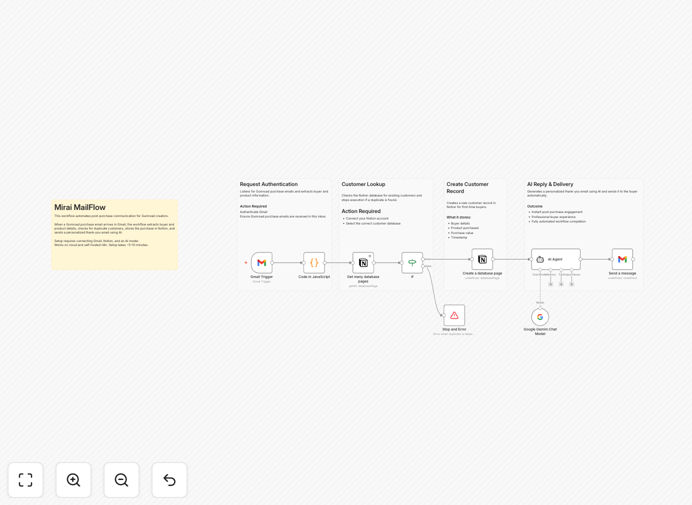
What This Workflow Does
Digital creators on Gumroad face a common challenge: after someone buys their product, they need to send thank-you emails, provide download links, and keep track of customers—all manually. This takes valuable time away from creating.
The GummyMail workflow solves this by automating the entire post-purchase process. When a customer buys your digital product on Gumroad, this system instantly sends them a personalized thank-you email (powered by AI for unique content) and automatically logs their details into a Notion database. It's like having a full-time customer service assistant that works 24/7.
Beyond basic automation, this template creates a foundation for building stronger customer relationships. By immediately acknowledging purchases with personalized messages, you increase customer satisfaction and reduce support requests. The Notion database becomes your lightweight CRM, giving you insights into who's buying what and when.
How It Works
Step 1: Trigger on New Gumroad Sale
The workflow monitors your Gumroad account for new purchases. When someone buys your digital product, it captures all relevant details: customer name, email, product purchased, price, and purchase timestamp.
Step 2: Generate AI-Powered Email Content
Using Google Gemini (or your preferred AI model), the system creates a personalized thank-you email. The AI considers the specific product bought and can incorporate your brand voice to make each message feel genuinely personal, not templated.
Step 3: Send Email via Gmail
The personalized email is automatically sent through your Gmail account. This maintains deliverability and keeps all communication under your brand. You can customize the email template to include download links, additional resources, or special offers.
Step 4: Log Customer to Notion CRM
Simultaneously, the customer's information is added to a Notion database. This creates a searchable record of all purchases, which you can use for future marketing, customer support, or product development insights.
Step 5: Error Handling & Logging
The workflow includes built-in error handling. If any step fails (like email sending or Notion update), the system logs the issue and can notify you, ensuring no customer falls through the cracks.
Who This Is For
This template is ideal for digital creators, course creators, ebook authors, software developers, and anyone selling digital products on Gumroad. If you're spending more than an hour per week manually emailing customers or updating spreadsheets, this automation will save you significant time.
It's particularly valuable for solo creators and small teams who want to provide professional post-purchase experiences without hiring additional staff. The system scales with your business—whether you have 10 sales per month or 1,000, it handles the communication consistently.
What You'll Need
- n8n instance (Cloud or self-hosted)
- Gumroad account with products for sale
- Gmail account with OAuth access configured
- Notion account with a database created for customer records
- Google Gemini API key (or alternative AI service key)
- Basic understanding of connecting APIs (we provide setup guidance)
Pro tip: Start with a test product on Gumroad priced at $0 to verify the entire workflow works before applying it to your main products. This prevents any automation errors affecting paying customers.
Quick Setup Guide
Follow these steps to implement this automation in your business:
- Download the template using the button above and import it into your n8n instance.
- Configure credentials for Gumroad, Gmail, Notion, and Google Gemini in n8n's credentials management.
- Update field mappings to match your Notion database structure and Gmail template preferences.
- Test with a manual trigger using sample data to ensure emails send and Notion updates correctly.
- Activate the workflow and make a test purchase on Gumroad to verify end-to-end functionality.
- Monitor for 24 hours to ensure reliability, then scale to all your products.
Key Benefits
Save 5-10 hours weekly on manual customer communication. Instead of individually emailing each buyer, the system handles everything instantly, freeing you to focus on product creation and marketing.
Improve customer experience with immediate, personalized responses. Buyers receive acknowledgment within minutes of purchase, increasing satisfaction and reducing "where's my product?" support requests.
Build a searchable customer database automatically. Every sale is logged in Notion with details you can filter, sort, and analyze for business insights and targeted follow-ups.
Scale your business without proportional time increase. Whether you have 10 or 1,000 sales monthly, the system handles the communication workload consistently.
Create foundation for advanced automation. Once this basic system runs, you can easily add upsell sequences, feedback requests, or content delivery automation.