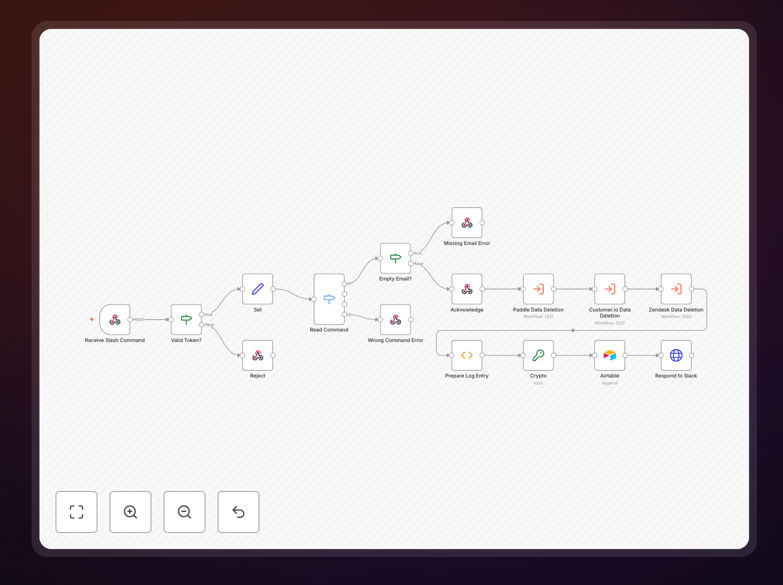
What This Workflow Does
GDPR and other privacy regulations give users the right to request deletion of their personal data. Manually finding and removing this data across multiple apps—CRM, email marketing, support tickets, billing systems—is time-consuming, error-prone, and risks missing the 30-day deadline.
This automation solves that. It turns a complex compliance task into a simple Slack command. When an authorized team member issues a slash command (like /delete-user-data [email protected]), the workflow instantly triggers a secure, documented deletion process across all your connected services.
You get a consistent, auditable process that ensures compliance, reduces legal risk, and frees your team from hours of manual administrative work each month.
How It Works
1. Slack Command Trigger
A team member uses a pre-configured Slack slash command. The workflow's webhook node receives this command instantly.
2. Request Validation & Routing
The workflow first verifies the Slack verification token and checks the command format. It then simplifies the payload and uses a Switch node to determine the correct action path.
3. Multi-Service Data Deletion
Execute Workflow nodes call dedicated sub-workflows tailored to delete data from each service (e.g., Airtable, a CRM, a mailing list). This modular design lets you easily add or remove services.
4. Audit Logging & Confirmation
A Function node generates a unique hash for the request. A Crypto node secures it, and an Airtable node stores a permanent log entry with timestamp, user email, and action results. Finally, an HTTP Request node sends a confirmation back to the Slack channel.
Who This Is For
This template is ideal for any business that handles user data and must comply with GDPR, CCPA, or similar privacy laws.
Startups & SaaS Companies: Manage user data deletion requests efficiently without dedicating developer time to build a custom system.
Marketing & Operations Teams: Quickly remove user data from CRMs and email lists upon request, maintaining list hygiene and compliance.
Legal & Compliance Officers: Implement a standardized, provable process for handling data subject requests, creating a clear audit trail for regulators.
IT & Support Teams: Provide a simple, secure tool for colleagues to process deletion requests without granting direct database access.
What You'll Need
- A running n8n instance (cloud or self-hosted).
- A Slack workspace with permissions to create slash commands.
- Accounts and API credentials for the apps/services from which you need to delete data (e.g., Airtable, HubSpot, Mailchimp).
- Basic familiarity with setting up n8n credentials and webhooks.
- (Optional) An Airtable base or similar tool to store the audit log.
Pro tip: Start by connecting just one or two critical services (like your CRM). Once the core workflow is tested, you can easily extend it to more apps by duplicating and modifying the Execute Workflow nodes.
Quick Setup Guide
- Download & Import: Click the "Download Template" button and import the JSON file into your n8n instance.
- Configure Slack: In your Slack workspace, create a new slash command and point its URL to your n8n webhook URL.
- Set Credentials: In n8n, add credentials for each service you want the workflow to interact with (Airtable, etc.).
- Customize Sub-Workflows: Adapt the "Execute Workflow" nodes or their corresponding sub-workflows to match the specific delete API calls for your apps.
- Test Thoroughly: Activate the workflow and test the Slack command with a safe test email. Verify the deletion and the audit log entry.
- Deploy & Train: Share the Slack command with authorized team members and provide brief instructions on its use.
Key Benefits
Eliminate Compliance Risk: Process every deletion request within the mandated timeframe, with a full log to prove it. Avoid costly regulatory fines and reputational damage.
Save Dozens of Hours Monthly: Transform a 30-minute manual task per request into a 10-second Slack command. Reclaim valuable team time for strategic work.
Ensure Consistency & Accuracy: The automated workflow performs the exact same steps every time, removing the risk of human error or missed services.
Build Customer Trust: Respond to privacy requests promptly and professionally. Demonstrating robust data handling practices strengthens customer relationships.
Future-Proof Your Process: The modular design makes it easy to add new data sources as your tech stack evolves, keeping your compliance process scalable.