n8n Website Monitoring Automation

Host your own uptime monitoring with scheduled triggers

Build a simple uptime monitoring service using n8n scheduled triggers

Download Template JSON · n8n compatible · Free
n8n workflow for uptime monitoring

What This Workflow Does

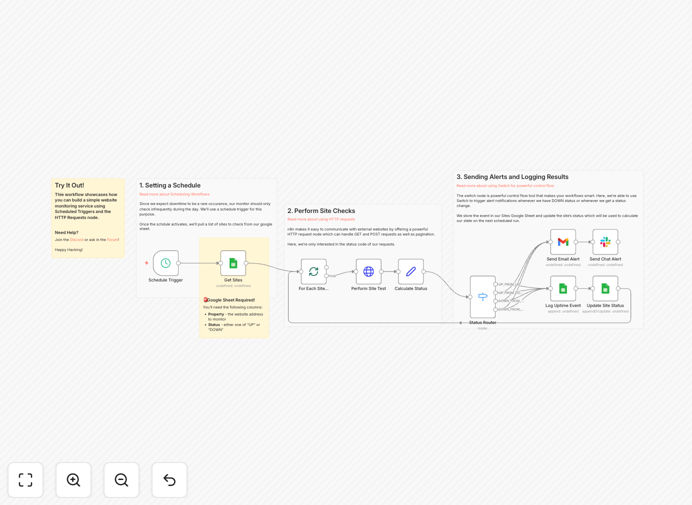
This n8n workflow creates a simple yet effective uptime monitoring system for your websites. Instead of paying for expensive third-party monitoring services, you can host your own solution that checks your sites at regular intervals and alerts you if they go down.

The workflow uses scheduled triggers to ping your websites periodically, checks their response status, and can notify you via email, Slack, or other channels if any site fails to respond. It's perfect for webmasters managing a handful of sites who want basic monitoring without the complexity of enterprise solutions.

How It Works

Scheduled Trigger

The workflow starts with a scheduled trigger that runs at your specified intervals (e.g., every 5 minutes). This acts as the heartbeat of your monitoring system.

Website Status Check

For each website in your list, the workflow makes an HTTP request and checks the response status code. It records whether the site is responding properly (HTTP 200) or experiencing issues.

Alert Logic

If a website fails to respond or returns an error status, the workflow triggers your chosen notification method. You can configure it to send alerts immediately or only after multiple failures to avoid false positives.

Response Tracking

The workflow can optionally log response times and statuses to a database or spreadsheet, giving you historical data about your websites' performance.

Who This Is For

This solution is ideal for:

  • Small business owners managing their own websites
  • Freelance developers maintaining client sites
  • Marketing agencies monitoring client portfolios
  • Anyone who wants basic uptime monitoring without monthly fees

What You'll Need

  1. An n8n instance (self-hosted or cloud)
  2. A list of websites you want to monitor
  3. Notification channel setup (email, Slack, etc.)
  4. Basic understanding of HTTP status codes

Quick Setup Guide

  1. Download and import the JSON template into your n8n instance
  2. Add your website URLs to the list in the workflow
  3. Configure your preferred notification method
  4. Set your desired monitoring frequency
  5. Activate the workflow

Pro tip: Start with longer intervals (e.g., 15 minutes) when testing to avoid hitting rate limits on your sites.

Key Benefits

Cost savings: Eliminate monthly fees for commercial uptime monitoring services that often charge per site.

Customization: Tailor the monitoring frequency, alert thresholds, and notification methods to your exact needs.

Privacy: Keep your monitoring data in-house rather than sharing it with third-party services.

Integration: Easily connect your monitoring with other business systems through n8n's extensive app integrations.

Frequently Asked Questions

Common questions about website uptime monitoring and automation

Self-hosted monitoring gives you complete control over your checking frequency, alert thresholds, and data storage. Unlike commercial services that charge per site, you can monitor unlimited websites without increasing costs.

For example, a marketing agency managing 50 client sites could save hundreds per year by switching from a commercial service to this self-hosted solution. You also avoid vendor lock-in and can customize exactly how alerts are delivered.

The ideal frequency depends on your website's importance and traffic. Critical e-commerce sites might need 1-minute checks, while informational blogs could be checked every 15-30 minutes.

A good practice is to start with 5-minute intervals and adjust based on your needs. Remember that more frequent checks increase server load and may trigger rate limiting on some hosting providers.

  • Critical sites: 1-5 minute intervals
  • Business sites: 5-15 minute intervals
  • Portfolio sites: 15-60 minute intervals

The most effective notification methods depend on your team's workflow. Email alerts are universal but may be missed. Slack/Teams integrations work well for teams, while SMS alerts ensure immediate visibility.

A digital agency might configure Slack alerts for their team during business hours and SMS alerts for after-hours emergencies. The key is choosing channels your team checks regularly and configuring escalation rules for critical outages.

False positives waste time and lead to alert fatigue. Configure your monitoring to only alert after multiple consecutive failures (e.g., 2-3 failed checks). This filters out temporary network blips.

A retail site owner might set alerts to trigger only after 3 failed checks spaced 1 minute apart. This prevents alarms during brief hosting provider maintenance or CDN caching issues while still catching real outages.

  • Require multiple consecutive failures
  • Set longer intervals between checks
  • Whitelist expected maintenance windows

Absolutely. While basic monitoring checks HTTP status, you can extend this to verify page content, response times, SSL certificates, API endpoints, and more. Advanced checks help catch subtle issues before they impact users.

An e-commerce business might monitor for specific text like "Add to Cart" to ensure functionality beyond basic uptime. You can also track gradual performance degradation by logging response times over time.

Commercial services offer global monitoring points and sophisticated features, but at a cost. Self-hosted solutions provide basic monitoring with more control and no per-site fees. The right choice depends on your needs and technical comfort.

A small business with 5 websites might find commercial services overkill, while an enterprise may need their global monitoring network. Self-hosted shines for custom integrations and avoiding vendor lock-in.

Yes! GrowwStacks specializes in custom automation solutions tailored to your specific monitoring needs. While this free template provides basic functionality, we can build enterprise-grade monitoring with advanced features.

Our team can create custom dashboards, multi-region checks, SLA reporting, and integration with your existing systems. Whether you need simple monitoring or a comprehensive solution, we'll design it to your exact requirements.

  • Custom alert thresholds and escalation paths
  • Integration with your existing tools
  • Historical reporting and analytics

Need a Custom Uptime Monitoring Solution?

This free template is a starting point. Our team builds fully tailored monitoring systems for your specific needs.