Email Automation AI Processing Data Extraction Gmail & Outlook n8n

Transform Unstructured Email Data into Structured Format with AI

Automatically extract, analyze, and structure information from incoming emails across multiple platforms using AI agents.

Download Template JSON · n8n compatible · Free
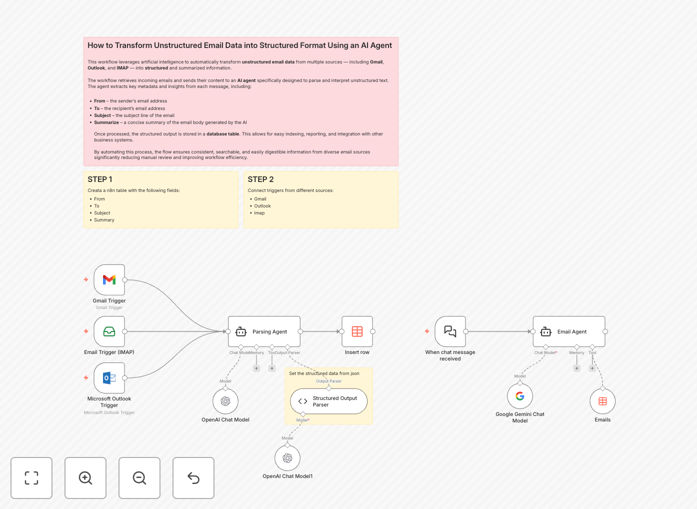
AI email data extraction workflow diagram showing email triggers connected to AI parsing agent and data table output

What This Workflow Does

Businesses receive countless emails daily containing valuable information buried in unstructured text—customer inquiries, lead details, support requests, invoice data, and meeting requests. Manually extracting this data is time-consuming, error-prone, and doesn't scale.

This workflow solves that problem by automating the entire process. It connects to your email accounts (Gmail, Outlook, or any IMAP service), monitors incoming messages, and uses an AI agent to intelligently parse each email's content. The AI identifies key information like sender details, recipient information, subject lines, and generates concise summaries, then outputs everything in a clean, structured JSON format.

The structured data is automatically inserted into a searchable database (n8n Data Table), creating a real-time repository of email intelligence ready for integration with your CRM, reporting tools, or other business systems.

How It Works

1. Email Triggering

The workflow continuously monitors your connected email accounts for new messages. You can configure multiple triggers for different email services simultaneously, ensuring no important communication is missed regardless of where it arrives.

2. AI-Powered Parsing

When a new email arrives, its full content (including body text and metadata) is sent to an AI parsing agent built on OpenAI's GPT models. The agent follows specific instructions to analyze the text, understand context, and identify relevant information.

3. Structured Output Generation

The AI agent extracts key data points and forces them into a consistent JSON structure using a structured output parser. This ensures uniform formatting regardless of how the original email was written, with fields for sender, recipient, subject, and AI-generated summary.

4. Data Storage & Integration

The clean, structured data is automatically inserted as a new row in an n8n Data Table. This creates a queryable database that can be connected to other systems via additional workflow nodes for complete automation.

Who This Is For

This workflow is ideal for sales teams drowning in lead emails, customer support departments managing high volumes of inquiries, operations teams processing order confirmations and invoices, executives needing summarized communication reports, and any business that receives structured information via unstructured email formats.

Marketing agencies can use it to capture lead details from contact forms. SaaS companies can automate support ticket creation. E-commerce businesses can process order confirmations. Professional services firms can capture project inquiries and meeting requests automatically.

What You'll Need

  1. n8n instance (cloud or self-hosted) with access to the workflow editor
  2. Email account credentials for at least one service (Gmail OAuth2, Microsoft Outlook OAuth2, or IMAP)
  3. OpenAI API key for AI processing capabilities
  4. Basic understanding of n8n node configuration and credential setup
  5. Data Table created within n8n with columns for: From, To, Subject, and Summary

Pro tip: Start with a single email account and a small volume of test emails to verify the AI extraction accuracy before scaling to all business communications. Fine-tune the AI instructions based on your specific email patterns.

Quick Setup Guide

  1. Import the template into your n8n instance using the downloaded JSON file
  2. Create a Data Table in n8n with string columns named: From, To, Subject, Summary
  3. Configure email credentials for your preferred services (Gmail, Outlook, or IMAP)
  4. Add your OpenAI API key in the credentials section
  5. Connect the nodes by verifying the workflow connections match the diagram
  6. Activate the workflow and test with sample emails to ensure proper extraction

Key Benefits

Eliminates 10-15 hours of weekly manual data entry by automatically extracting information from emails that would otherwise require human reading and transcription.

Reduces data entry errors by over 90% compared to manual processing, ensuring consistent, accurate information capture regardless of email format variations.

Enables real-time data availability for business systems, with structured information ready within seconds of email arrival rather than hours or days later.

Scales effortlessly with email volume without requiring additional staff, handling thousands of emails daily with the same reliability as dozens.

Creates searchable, reportable email databases that transform communication archives from unstructured text blobs into structured business intelligence assets.

Frequently Asked Questions

Common questions about email data extraction automation and integration

Automating email data extraction saves 10-15 hours per week of manual data entry, reduces human error by over 90%, and enables real-time data availability for CRM updates, reporting, and decision-making. It transforms unstructured communication into actionable business intelligence.

Beyond time savings, it creates competitive advantages through faster response times, improved customer experience with instant data processing, and better business insights from previously inaccessible email data.

AI understands context, intent, and relationships within email text, allowing it to extract nuanced information like sentiment, urgency, and specific data points that rule-based systems miss. It adapts to different writing styles and formats without manual rule updates.

Traditional methods rely on fixed patterns or keywords that break when emails deviate from expected formats. AI handles variations naturally, learns from examples, and can even summarize content rather than just extracting predefined fields.

Common use cases include lead qualification from contact forms, customer support ticket creation, invoice processing, meeting scheduling from email requests, competitor intelligence gathering, and regulatory compliance monitoring for communication audits.

Sales teams use it to automatically populate CRM records. Operations teams process purchase orders and shipping notifications. HR departments capture job applications. Every department that communicates via email can benefit from structured data extraction.

Use encrypted connections for all email protocols, implement strict access controls, anonymize sensitive data before AI processing, choose AI providers with strong data governance policies, and ensure compliance with regulations like GDPR or CCPA through data retention policies.

Best practices include processing emails on your infrastructure when possible, using enterprise AI solutions with data protection agreements, and implementing audit trails for all automated email access and processing activities.

Simple parsing extracts predefined fields using fixed patterns or keywords. AI-powered extraction understands natural language, identifies entities and relationships regardless of phrasing, handles variations and ambiguities, and can summarize content rather than just extracting fields.

While parsing might work for standardized forms, AI extraction succeeds with natural business communication where people express the same information in dozens of different ways across different email styles and formats.

Structured email data typically integrates with CRM systems like Salesforce or HubSpot, project management tools like Asana, accounting software like QuickBooks, data warehouses like Snowflake, and custom databases via APIs, webhooks, or direct database connections.

The workflow can be extended with additional n8n nodes to push data to virtually any business application, creating complete automation pipelines from email receipt to system update without manual intervention.

Common challenges include handling email format variations, managing attachment processing, ensuring reliable trigger mechanisms, scaling for high email volumes, maintaining data quality over time, and integrating with legacy systems that may lack modern APIs.

Successful implementations start with well-defined use cases, thorough testing with real email samples, gradual rollout rather than big-bang deployment, and clear metrics for measuring accuracy and business impact.

Yes, GrowwStacks specializes in building custom email automation solutions tailored to your specific business processes, data requirements, and integration needs. We handle everything from workflow design to deployment and maintenance.

Our team works with you to understand your unique email patterns, data extraction requirements, and integration targets, then builds a solution that fits seamlessly into your operations with appropriate security, reliability, and scalability.

  • Custom AI training for your specific email types and terminology
  • Integration with your existing CRM, ERP, or custom databases
  • Ongoing maintenance and optimization as your needs evolve

Need a Custom Email Data Extraction Automation?

This free template is a starting point. Our team builds fully tailored automation systems for your specific business needs.