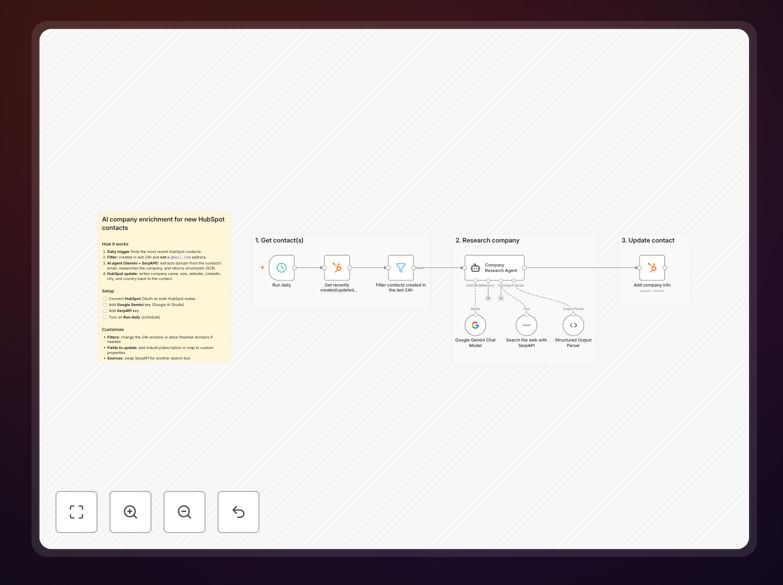
What This Workflow Does
Sales and marketing teams waste hours manually researching new leads. When a contact fills out your HubSpot form, you get an email address—but you don't know their company size, industry, location, or whether they're a good fit. This creates delayed responses, poor segmentation, and missed opportunities.
This n8n workflow solves that by automatically enriching every new HubSpot contact with detailed company information. It runs daily, finds contacts created in the last 24 hours, extracts the company domain from their email, researches the company using AI and web search, and writes clean, structured data back to HubSpot—all without human intervention.
The result: your sales team sees enriched company profiles within hours of lead capture, enabling faster prioritization, personalized outreach, and better conversion rates. Marketing gets accurate segmentation data for targeted campaigns. The entire process runs in the background, saving 80-90% of manual research time.
How It Works
Step 1: Daily Schedule Trigger
The workflow activates automatically each day at a set time. This ensures new leads are enriched within 24 hours while avoiding API rate limits and system overload.
Step 2: Fetch New HubSpot Contacts
It connects to your HubSpot account via OAuth2 and retrieves all contacts created or updated in the last 24 hours. This includes form submissions, imported lists, and manually added leads.
Step 3: Filter Out Free Email Domains
A filter node excludes contacts with free email domains (like Gmail, Yahoo, Outlook). These typically represent personal emails rather than business contacts, saving API calls and improving accuracy.
Step 4: AI Research Agent
The core enrichment happens here. An AI agent (Google Gemini) combined with SerpAPI web search extracts the company domain from the email address, researches the company online, and returns structured JSON with company name, industry, headquarters location, employee count, website, LinkedIn, and description.
Step 5: Update HubSpot Contact
The enriched data is mapped to corresponding HubSpot contact properties and written back to the contact record. The workflow handles field mapping, data validation, and error recovery.
Who This Is For
This workflow is ideal for B2B companies using HubSpot for CRM, particularly those with inbound lead generation through forms, content downloads, or event registrations. It benefits sales teams who need faster lead qualification, marketing teams requiring accurate segmentation, and operations teams looking to automate manual data entry.
Specific use cases include SaaS companies with free trial sign-ups, agencies receiving consultation requests, manufacturers with distributor inquiries, and professional services firms with client intake forms. Any business that captures email addresses and wants to understand the company behind the contact will benefit.
What You'll Need
- HubSpot account with API access (OAuth2 credentials)
- SerpAPI account for web search results (API key)
- Google Gemini API access through Google AI Studio
- n8n instance (cloud or self-hosted) to run the workflow
- Custom contact properties in HubSpot to store enriched fields (optional but recommended)
Quick Setup Guide
- Download the template using the button above and import it into your n8n instance.
- Connect HubSpot nodes by authenticating with your HubSpot OAuth2 credentials.
- Configure SerpAPI by adding your API key to the SerpAPI node settings.
- Set up Google Gemini by connecting your Google AI Studio API key.
- Test with a small batch by temporarily adjusting the schedule trigger to run immediately on a few test contacts.
- Verify data mapping by checking that enriched fields appear correctly in HubSpot contact records.
- Activate the workflow to run daily and monitor initial runs for any errors or adjustments needed.
Pro tip: Start by excluding additional free email domains (Outlook, iCloud, etc.) in the filter node to improve accuracy and reduce API costs. Create a separate workflow path for low-confidence enrichments that routes to manual review instead of automatically updating HubSpot.
Key Benefits
Save 10+ hours weekly on manual research: What previously required sales reps to Google each new lead now happens automatically in the background, freeing your team for higher-value activities.
Improve lead response time from days to hours: Enriched data enables immediate segmentation and prioritization, allowing sales to contact hot leads while they're still engaged.
Increase conversion rates with better segmentation: Accurate company data (industry, size, location) enables targeted messaging and appropriate resource allocation for each lead tier.
Maintain cleaner CRM data automatically: The workflow continuously updates contact records with fresh company information, preventing data decay and ensuring segmentation remains accurate over time.
Scale lead processing without adding staff: As lead volume grows, the automation handles the increased load without requiring additional manual researchers, maintaining consistent enrichment quality.