HubSpot Hunter.io CRM Automation Data Hygiene n8n

HubSpot Contact Email Validation with Hunter.io

Automatically verify email addresses in your HubSpot CRM, update contact records, and maintain a clean, actionable contact list.

Download Template JSON · n8n compatible · Free
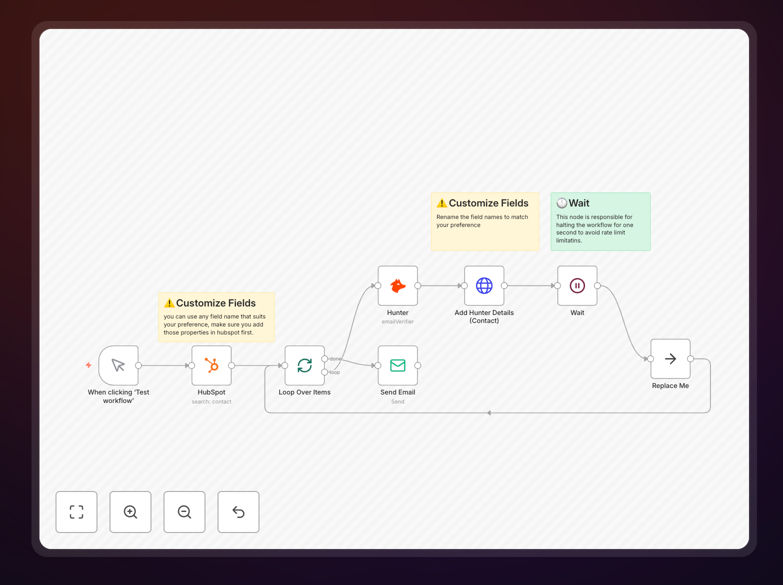
HubSpot and Hunter.io email validation automation workflow diagram

What This Workflow Does

Maintaining a clean contact list in HubSpot is crucial for effective marketing and sales outreach, yet manually verifying email addresses is time-consuming and error-prone. This automation solves that problem by connecting your HubSpot CRM directly to Hunter.io's email verification service.

The workflow automatically identifies contacts in HubSpot that haven't been validated, sends each email to Hunter.io for verification, updates the contact record with validation status and date, and sends you a completion notification. It transforms what was a manual, hours-long process into a fully automated background task that runs on schedule.

By ensuring every email in your CRM is valid before you send campaigns, you reduce bounce rates, protect your sender reputation, and increase the effectiveness of your marketing automation. This isn't just about cleaning data—it's about maximizing the ROI of every email you send.

How It Works

1. Identify Unvalidated Contacts

The workflow queries your HubSpot CRM for contacts that have an email address but lack a Hunter.io validation status property. It uses smart filtering to only process contacts that need verification, avoiding unnecessary API calls and processing time.

2. Verify Each Email with Hunter.io

Each contact's email address is sent to Hunter.io's verification API, which checks deliverability, domain validity, mailbox existence, and quality indicators. The service returns a detailed status (valid, invalid, risky, unknown) along with confidence scores.

3. Update HubSpot Contact Records

The workflow updates each contact in HubSpot with two custom properties: validation status (from Hunter.io) and verification date. This creates an audit trail and enables segmentation—you can now filter contacts by email quality or create lists of only validated addresses.

4. Send Completion Notification

Once all contacts have been processed, the workflow sends a summary email with counts of valid, invalid, and risky emails found. This keeps you informed without requiring manual checking of the process.

Who This Is For

This automation is ideal for marketing teams running email campaigns from HubSpot, sales teams managing prospect lists, and operations teams responsible for data quality. Specifically, it benefits businesses experiencing high bounce rates, companies with large contact databases that have never been cleaned, and organizations that acquire leads from multiple sources (forms, events, partnerships) where email quality varies.

Startups scaling their outreach, agencies managing client CRMs, and e-commerce businesses with customer lists will find immediate value. The workflow pays for itself in saved manual cleaning time and improved campaign performance within the first few runs.

What You'll Need

  1. HubSpot Account with API access (Private App token with contacts read/write permissions)
  2. Hunter.io API Key from your Hunter.io account (email verification credits required)
  3. n8n Instance (self-hosted or cloud) with HTTP Request and HubSpot nodes available
  4. Custom Properties in HubSpot created for "hunter_email_validation_status" and "hunter_verification_date"
  5. SMTP Credentials for sending completion notifications (optional but recommended)

Pro tip: Create a HubSpot workflow that automatically tags or segments contacts based on their validation status. For example, move invalid emails to a "Needs Review" list or add a "Verified Email" tag to valid contacts for use in targeted campaigns.

Quick Setup Guide

1. Download the template using the button above and import it into your n8n instance.

2. Configure credentials for HubSpot (Private App token) and Hunter.io in n8n's credential management.

3. Create custom properties in your HubSpot account with the exact names used in the workflow.

4. Test with a small batch by modifying the HubSpot node to limit results to 5-10 contacts first.

5. Schedule the workflow to run weekly or monthly based on your contact acquisition rate.

6. Monitor results in your HubSpot contact views and adjust segmentation rules as needed.

Key Benefits

Reduce email bounce rates by 60-80% by ensuring only valid, deliverable addresses receive your campaigns. This directly improves sender reputation and inbox placement rates for all your communications.

Save 5-10 hours monthly on manual list cleaning and verification tasks. The automation handles what would otherwise require spreadsheet exports, third-party tools, and manual data entry.

Improve campaign ROI by eliminating wasted sends to invalid addresses. For every 1,000 contacts cleaned, you save approximately $50-200 in email service costs while reaching more actual people.

Maintain real-time data hygiene with scheduled automation that keeps your CRM clean as new contacts are added. This proactive approach prevents data decay from accumulating.

Enable better segmentation using email quality as a filter criterion. Send high-priority offers to validated contacts while investigating risky or invalid addresses separately.

Frequently Asked Questions

Common questions about CRM email validation and automation

Email validation is critical for CRM hygiene because invalid emails waste marketing spend, damage sender reputation, and skew analytics. Bounce rates from bad emails can hurt your domain's deliverability, making even your legitimate emails land in spam.

Automated validation ensures your outreach reaches real people, improves campaign ROI, and keeps your contact data actionable. Without it, you're essentially paying to send messages to addresses that don't exist.

  • Protects your sender reputation and domain score
  • Reduces wasted spend on email marketing platforms
  • Provides accurate analytics for campaign performance

Integrating HubSpot with Hunter.io automates contact data enrichment and verification. It ensures every email in your CRM is valid before campaigns, reduces bounce rates, and automatically updates contact properties with verification status.

This saves hours of manual list cleaning, improves email deliverability scores, and increases the effectiveness of your marketing automation sequences. The integration creates a closed-loop system where data quality maintains itself.

  • Automated updates to contact records in real-time
  • Pre-campaign validation prevents reputation damage
  • Enables segmentation based on email quality scores

Businesses should validate email lists quarterly at minimum, or before every major campaign. High-growth companies with frequent new leads benefit from weekly or real-time validation.

The frequency depends on your lead acquisition rate—more incoming contacts mean more frequent validation needed to maintain list quality and protect your sender reputation. Consider setting up automated validation triggers for new contact creation.

  • Quarterly for stable lists with minimal new additions
  • Monthly for moderate growth (50-200 new contacts/month)
  • Weekly or real-time for high-volume lead generation

Email verification checks if an email address exists and can receive mail (syntax, domain, mailbox). Email validation goes further by assessing quality—checking for role-based addresses (info@, support@), disposable emails, and spam traps.

Hunter.io provides both verification and quality scoring, giving you deeper insights beyond simple deliverability checks. This distinction matters because role-based emails might be deliverable but have low engagement potential.

  • Verification: "Can this email receive messages?"
  • Validation: "Should we send marketing to this email?"
  • Quality scoring helps prioritize outreach efforts

Yes, automated email validation directly improves marketing ROI by reducing wasted spend on invalid addresses, increasing open rates, and protecting domain reputation. Clean lists mean higher deliverability, which translates to more emails reaching inboxes.

For every 1,000 contacts cleaned, businesses typically save $50-200 in email service costs and gain 50-100 more engaged recipients. The improved sender reputation also boosts deliverability for future campaigns, creating a compounding positive effect.

  • Lower cost per acquisition through better targeting
  • Higher conversion rates from engaged audiences
  • Reduced spam complaints and unsubscribes

Beyond email validation, you can automate lead scoring based on verification results, segment contacts by email quality, trigger follow-up actions for invalid emails, and sync validation data with other systems like your email marketing platform or customer support software.

This creates a complete data hygiene workflow that maintains itself. For example, automatically moving invalid emails to a re-engagement campaign or notifying sales reps when a prospect's email fails verification.

  • Automated lead scoring and prioritization
  • Dynamic list segmentation based on data quality
  • Cross-system synchronization for unified customer views

Yes, GrowwStacks specializes in custom CRM automation and data hygiene solutions. We can build tailored workflows that integrate your specific CRM, email verification services, and business rules.

Our team handles everything from initial consultation to deployment and maintenance, ensuring your contact data remains clean and actionable automatically. We work with businesses of all sizes to implement automation that scales with their growth.

  • Custom integration with your existing tech stack
  • Business rule implementation for your specific needs
  • Ongoing support and optimization as requirements change

Need a Custom CRM Data Hygiene Automation?

This free template is a starting point. Our team builds fully tailored automation systems for your specific business needs.