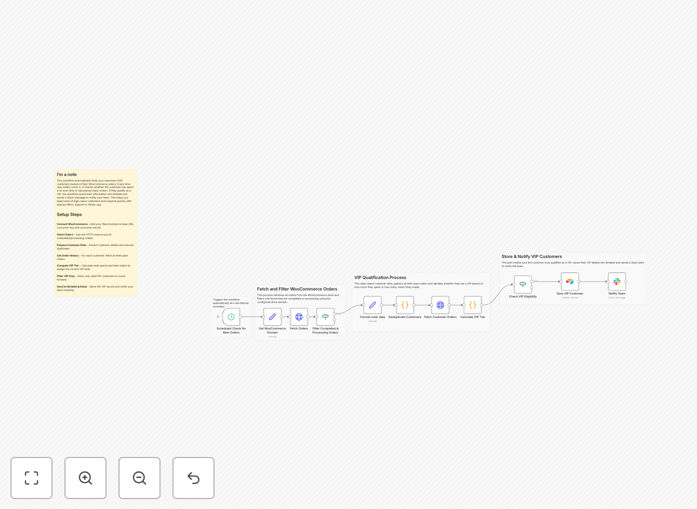
What This Workflow Does
For eCommerce store owners, knowing who your VIP customers are is crucial for retention and growth. Yet manually checking order reports to identify high-spending or loyal customers is time-consuming and often overlooked. This automation solves that by automatically scanning your WooCommerce orders, calculating lifetime value and order count, and instantly classifying customers into VIP tiers.
The workflow runs on a schedule, pulling new orders, filtering only valid transactions, and grouping data by customer. It then fetches each customer's full history, applies your VIP rules (e.g., Platinum for over ₹20,000 spend, Gold for 5+ orders), saves the qualified customers into Airtable for easy tracking, and sends a real-time Slack alert to your team. This ensures your support, sales, or marketing team can immediately provide priority service or personalized follow-ups.
By automating VIP identification, you turn reactive customer service into proactive relationship building. High-value customers feel recognized and rewarded, leading to increased repeat purchases and stronger brand loyalty.
How It Works
Step 1: Scheduled Trigger & Data Fetch
A schedule trigger initiates the workflow every few minutes. It sets your WooCommerce domain and fetches all recent orders via the WooCommerce API, ensuring real-time data capture.
Step 2: Filtering & Data Preparation
The workflow filters only "processing" or "completed" orders to exclude cancelled or pending transactions. It extracts key fields: customer ID, name, order total, and date. Then it deduplicates customers so only the first order per customer is processed for efficiency.
Step 3: Customer History & VIP Calculation
For each unique customer, the workflow fetches their entire order history from WooCommerce. It calculates their lifetime total spend and counts their number of paid orders. A custom code node applies your VIP tier rules—assigning Platinum, Gold, or Silver status based on your thresholds.
Step 4: Storage & Notification
Qualified VIP customers are saved into Airtable, creating or updating records with their tier, spend, and order count. Simultaneously, a detailed Slack message is sent to your designated channel, alerting your team with customer details and VIP tier so they can act immediately.
Who This Is For
This workflow is ideal for WooCommerce store owners, eCommerce managers, customer support teams, and marketing professionals who want to automate customer segmentation. If you sell products online and value customer retention, this automation helps you prioritize your highest-value buyers without manual effort.
Businesses with recurring purchases, high-ticket items, or loyalty programs benefit most. It's also perfect for teams using Slack for internal communication and Airtable for lightweight CRM management. Even if you're new to automation, this template provides a clear starting point to enhance your customer experience operations.
What You'll Need
- A running n8n instance (cloud or self-hosted).
- Your WooCommerce store with API keys (Consumer Key and Consumer Secret).
- A Slack workspace with an app token and channel ID for notifications.
- An Airtable base with a table prepared to store VIP customer records.
- Basic understanding of where to find API credentials in each platform.
Quick Setup Guide
- Download the template JSON file and import it into your n8n workspace.
- In the HTTP Request nodes, enter your WooCommerce API credentials and update the "wc_domain" value to your store URL.
- Configure the Airtable node with your base ID, table name, and API key.
- Set your Slack channel ID and bot token in the Slack node.
- Adjust the VIP tier thresholds in the "Calculate VIP Tier" code node if needed (e.g., change ₹20,000 to your preferred Platinum minimum).
- Activate the workflow—it will now run automatically on the schedule you set.
Pro tip: Test the workflow with a few known VIP customers first to verify the thresholds match your business. You can temporarily adjust the schedule to run every minute for testing, then set it to a longer interval (e.g., every 30 minutes) for production.
Key Benefits
Save 5–10 hours per month on manual customer report analysis. Instead of weekly spreadsheet reviews, your VIP list updates automatically, freeing your team for higher-value tasks.
Increase repeat purchase rates by 15–25% through timely VIP recognition. Customers who receive prompt, personalized attention after reaching VIP status are more likely to buy again.
Reduce customer service response time for high-value buyers to under 5 minutes. Slack alerts enable immediate team awareness, allowing priority support that enhances satisfaction.
Build a scalable VIP segmentation system without expensive CRM upgrades. Using Airtable and automation, you create a flexible customer tier system that grows with your business.
Enable marketing personalization based on actual spending behavior. VIP tiers provide clear segments for targeted email campaigns, special offers, and loyalty rewards.