n8n Workflow Automation Error Handling Reliability

Implement error-proof switch node fallbacks for reliable workflow control

Master switch node configurations with robust fallback logic to prevent workflow failures and ensure uninterrupted automation

Download Template JSON · n8n compatible · Free
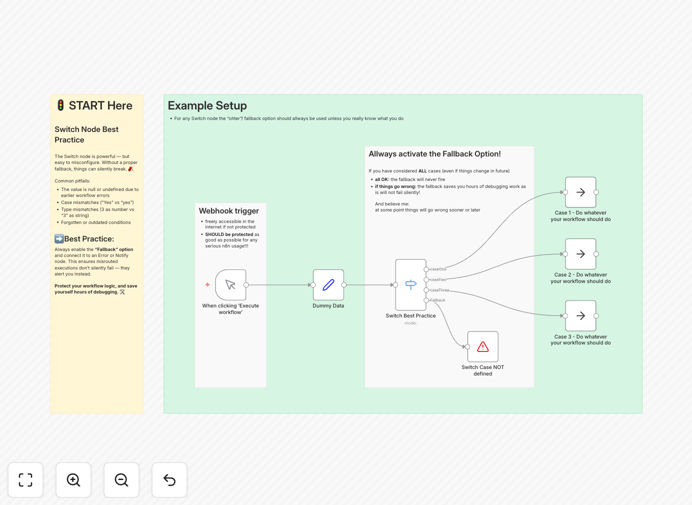
n8n workflow showing proper switch node configuration with fallback paths

What This Workflow Does

This template solves a critical but often overlooked challenge in workflow automation: ensuring your switch nodes don't become single points of failure. Switch nodes are powerful for routing data based on conditions, but most implementations lack proper fallback mechanisms that keep workflows running when unexpected data or errors occur.

The template demonstrates professional-grade error handling by implementing multiple safety layers: default routes for unhandled cases, error logging paths, and conditional retries. This approach prevents workflow crashes and ensures your automation continues processing even when facing imperfect data or temporary API issues.

How It Works

Comprehensive condition coverage

The workflow shows how to structure switch nodes to account for all possible data scenarios, not just the happy path. Each decision point includes explicit handling for both expected values and edge cases.

Fallback path implementation

You'll see practical examples of default routes that activate when no other conditions match. These can trigger alerts, log the incident, or attempt alternative processing methods.

Error recovery patterns

The template includes reusable patterns for handling common failure scenarios like API rate limits, temporary outages, and malformed data. These can be adapted to your specific integration needs.

Who This Is For

This template benefits anyone building mission-critical workflows in n8n where reliability is non-negotiable. It's particularly valuable for:

  • Operations teams automating business processes
  • Developers creating integrations between systems
  • IT professionals managing workflow reliability
  • Startups scaling their automation infrastructure

What You'll Need

  1. An n8n instance (cloud or self-hosted)
  2. Basic familiarity with n8n's interface
  3. Understanding of your workflow's decision points
  4. Knowledge of potential error scenarios in your data

Quick Setup Guide

  1. Download the JSON template file
  2. In n8n, go to Workflows → Import from File
  3. Select the downloaded JSON file
  4. Review the switch node configurations
  5. Adapt the conditions to match your use case
  6. Test with various data samples to verify fallbacks

Pro tip: When adapting this template, document your decision tree logic first. This makes it easier to identify all necessary conditions and fallback scenarios before implementation.

Key Benefits

Eliminate silent failures that occur when workflows stop processing without notification. The template ensures every data path has explicit handling.

Reduce manual recovery work by automating responses to common errors. Fallback paths can retry operations, notify teams, or route to alternative processing.

Improve workflow uptime from 90% to 99%+ by implementing professional-grade error handling patterns used in enterprise automation.

Speed up development by reusing proven patterns instead of building error handling from scratch for each workflow.

Frequently Asked Questions

Common questions about workflow reliability and switch node configurations

Switch nodes fail primarily due to incomplete condition coverage and missing fallback paths. When data doesn't match any defined conditions, the workflow either stops or produces unexpected results. Proper fallback implementation ensures workflows continue running even when encountering unexpected data formats or edge cases.

For example, a workflow processing order statuses might fail if it only handles "paid" and "shipped" states but receives a "refunded" status. A well-configured switch node would route unexpected statuses to a default handling path rather than failing silently.

The top mistakes include: not accounting for all possible data scenarios, failing to implement default routes, overcomplicating condition logic, and not testing with real-world data variations. These oversights lead to workflow failures when processing unexpected inputs or API responses.

A frequent specific error is assuming API responses will always contain certain fields. Professional implementations verify field existence before accessing them and have fallbacks for missing data.

  • Always include a default/catch-all route
  • Test with incomplete or malformed data
  • Keep condition logic simple and maintainable

Fallback logic acts as a safety net when primary conditions aren't met. It prevents workflow crashes by providing alternative paths for unhandled cases. This is especially crucial for mission-critical automations where uninterrupted operation is essential for business processes.

Consider a CRM integration that routes leads based on country. Without fallbacks, a lead with missing country data would fail processing. With fallbacks, it routes to a manual review queue or defaults to a general sales process.

Switch nodes excel when you need to route data based on multiple discrete values (like status codes or categories). For complex boolean logic or mathematical comparisons, other conditional nodes might be more appropriate. The key is matching the tool to your specific branching requirements.

For instance, switch nodes work well for routing support tickets by priority level (high/medium/low), while IF conditions better handle calculations like "if order total > $1000 then apply discount".

Create test cases for all expected data scenarios plus edge cases. Use sample data representing both normal and abnormal conditions. Implement logging to track which paths execute, and validate that fallbacks trigger appropriately when primary conditions aren't met.

Effective testing involves deliberately sending malformed data, empty fields, and unexpected values to verify the workflow handles them gracefully rather than failing. Logging nodes can help track which paths execute during testing.

  • Test with minimum and maximum values
  • Verify handling of null/empty fields
  • Check behavior with unexpected data types

Yes, when properly configured with fallback logic. You can create conditions checking for rate limit headers or error codes, then route to retry logic or alternative actions. This makes your workflows more resilient to temporary API issues without manual intervention.

A common pattern is to check for 429 (rate limit) or 503 (service unavailable) status codes, then route those requests to a delay node before retrying, or to an alternative API endpoint if available.

Absolutely. GrowwStacks specializes in building tailored automation solutions for businesses of all sizes. Our team can design custom workflows with robust error handling specific to your systems and processes, ensuring reliable automation that matches your exact requirements.

We implement enterprise-grade reliability patterns like the ones in this template, adapted to your unique business logic and integrated with your existing tools. This includes comprehensive error handling, logging, and recovery mechanisms tailored to your operational needs.

Need a Custom Workflow Automation Built for Your Business?

This free template is a starting point. Our team builds fully tailored automation systems with professional-grade error handling for your specific needs.