n8n IT Operations PagerDuty Jira Mattermost

Incident Response Workflow - Part 3

Automatically resolve IT incidents across PagerDuty, Jira, and team communication channels with this complete automation workflow.

Download Template JSON · n8n compatible · Free
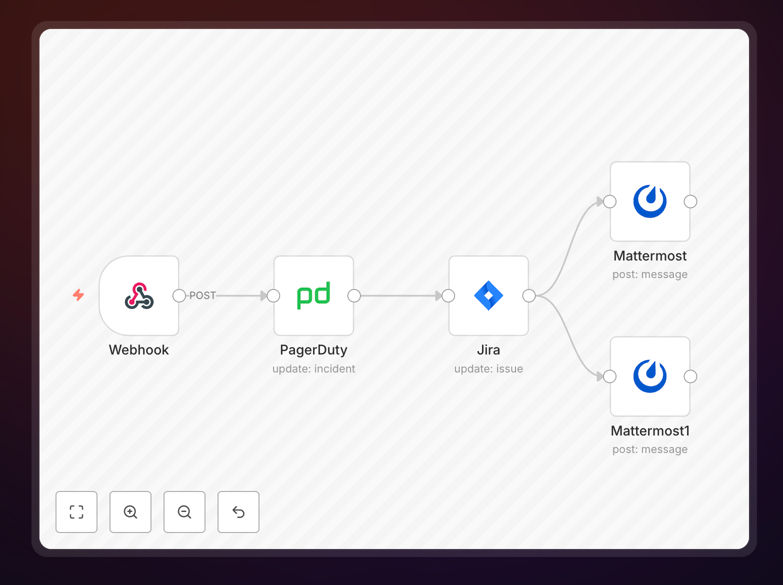
Incident response workflow diagram showing automation between PagerDuty, Jira, and Mattermost

What This Workflow Does

When IT incidents occur, the manual process of updating multiple systems and notifying various teams creates delays and inconsistencies. This workflow automates the resolution phase of incident management, ensuring that when an incident is marked as resolved, all connected systems are updated simultaneously and stakeholders are notified immediately.

The automation listens for a "resolve" trigger, then performs three critical actions in parallel: changes the incident status to "Resolved" in PagerDuty, moves the corresponding issue to "Done" in Jira Software, and posts resolution notifications in both auxiliary and main incident channels in Mattermost. This eliminates the 15-30 minutes typically spent manually updating these systems after each incident resolution.

How It Works

1. Webhook Trigger

The workflow starts when a webhook receives the signal that the "Resolve" button has been clicked in your incident management interface. This could come from a dashboard, chatbot command, or automated monitoring system that has determined the issue is fixed.

2. PagerDuty Status Update

The workflow immediately updates the incident status in PagerDuty from "Acknowledged" to "Resolved." This ensures your on-call rotation is properly released and incident metrics are accurately recorded for SLA reporting and post-incident analysis.

3. Jira Ticket Transition

Simultaneously, the corresponding Jira issue is moved to "Done" status. All relevant incident details—timestamps, resolution notes, and assignee information—are preserved in Jira for future reference and compliance requirements.

4. Team Notifications

Two Mattermost notifications are sent: one to an auxiliary channel documenting that the incident has been marked as resolved in both PagerDuty and Jira, and another to the main incidents channel announcing that the on-call team has successfully resolved the issue.

Who This Is For

This workflow is ideal for IT operations teams, DevOps engineers, SRE (Site Reliability Engineering) teams, and technical support departments that manage incidents across multiple platforms. Companies with on-call rotations, SLA commitments, or compliance requirements for incident tracking will benefit most from this automation.

If your team spends significant time manually updating tickets after resolving issues, or if you've experienced communication gaps where some team members weren't notified of resolution, this workflow will streamline your entire post-incident process.

What You'll Need

  1. An n8n instance (cloud or self-hosted)
  2. PagerDuty account with API access
  3. Jira Software instance with appropriate project permissions
  4. Mattermost workspace with channel access
  5. A way to trigger the webhook (dashboard button, chatbot command, or monitoring system integration)

Quick Setup Guide

  1. Download the template using the button above
  2. Import the JSON file into your n8n instance
  3. Configure the Webhook node with your unique URL
  4. Connect the PagerDuty node with your API credentials
  5. Set up the Jira node with your project and issue details
  6. Configure both Mattermost nodes with your channel IDs and authentication
  7. Test the workflow by triggering the webhook with sample data

Pro tip: Use this workflow as part of a complete incident management system. Combine it with Part 1 (incident creation) and Part 2 (incident acknowledgment) for end-to-end automation from detection to resolution.

Key Benefits

Reduce resolution documentation time by 90%. What used to take 15-30 minutes of manual updates across multiple systems now happens instantly and consistently with zero human effort.

Ensure perfect synchronization between systems. No more "zombie incidents" that are resolved in one system but still show as active in another. All platforms reflect the same status simultaneously.

Improve team communication and transparency. Everyone—from engineers to managers—receives immediate notification when incidents are resolved, eliminating confusion and follow-up questions.

Create accurate incident metrics automatically. With consistent, automated status updates, your MTTR (Mean Time to Resolution) and other incident metrics become reliable for analysis and improvement.

Free up engineering time for actual problem-solving. Your IT team can focus on diagnosing and fixing issues rather than administrative ticket updates after each resolution.

Frequently Asked Questions

Common questions about IT incident response automation and integration

IT incident response automation uses tools like n8n to automatically handle IT issues when they occur. When an incident is detected, the system can create tickets, notify teams, escalate problems, and track resolution—all without manual intervention.

This reduces response time from hours to minutes and ensures consistent handling of every incident. Automation also creates detailed audit trails for compliance and post-incident analysis.

Automation improves IT incident management by eliminating manual steps in the response process. Instead of someone having to create tickets in multiple systems, update statuses, and send notifications, the workflow handles all these tasks automatically.

This means faster resolution times, fewer human errors, and your IT team can focus on solving the actual problem rather than administrative tasks. It also ensures consistent processes are followed every time, which is crucial for compliance and quality standards.

Common tools for incident response automation include monitoring systems like PagerDuty or Datadog for detection, ticketing systems like Jira or ServiceNow for tracking, communication platforms like Slack or Mattermost for team notifications, and documentation tools like Confluence for runbooks.

n8n can connect all these systems into a single coordinated response workflow. The key is choosing tools that have good API access and can be triggered programmatically when incidents occur.

Response times depend on incident severity. Critical incidents affecting business operations should be acknowledged within minutes and resolved within hours. Major incidents should be addressed within a business day. Minor issues can be handled within a few days.

Automation helps achieve these targets consistently by immediately routing incidents to the right teams and tracking them until resolution. It also provides real-time visibility into response times so you can identify and address bottlenecks.

Connecting PagerDuty and Jira creates a seamless incident-to-resolution workflow. When PagerDuty detects an issue, it can automatically create a Jira ticket with all relevant details. As the incident progresses through resolution stages, both systems stay synchronized.

This eliminates duplicate data entry, ensures everyone has the same information, and provides complete audit trails for compliance and post-incident reviews. It also allows for better reporting since data from both systems can be combined for analysis.

Automated escalation uses time-based triggers and status checks. If an incident isn't acknowledged within a set timeframe, the workflow can notify a manager or senior engineer. If it remains unresolved after another period, it can escalate to department heads.

The system can also route incidents based on type—network issues to network team, application errors to developers—ensuring the right expertise is engaged immediately. This prevents incidents from getting stuck with the wrong team or being overlooked.

Yes, GrowwStacks specializes in building custom incident response automations tailored to your specific IT infrastructure, tools, and processes. We'll analyze your current incident management workflow, identify automation opportunities, and build a system that integrates with your monitoring tools, ticketing systems, and communication platforms.

The result is faster incident resolution, reduced downtime, and more efficient IT operations. We handle everything from initial consultation to implementation and ongoing support.

  • Integration with your existing tools and workflows
  • Custom escalation rules based on your organizational structure
  • Compliance with your security and data governance policies

Need a Custom Incident Response Automation?

This free template is a starting point. Our team builds fully tailored automation systems for your specific business needs.