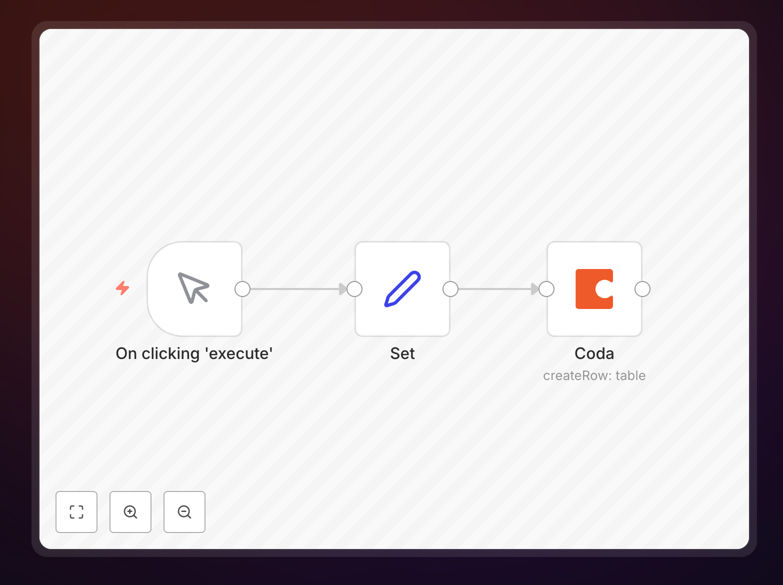
What This Workflow Does
This n8n workflow template solves the tedious manual process of copying data into Coda tables by automating record creation from any source. Whether you're collecting form submissions, syncing CRM data, or importing spreadsheet information, this workflow ensures your Coda documents stay updated without manual entry.
The automation maps incoming data fields to your Coda table columns precisely, maintaining data integrity while eliminating copy-paste errors. It handles authentication, field mapping, and error recovery - letting you focus on analyzing data rather than entering it.
How It Works
1. Trigger Setup
The workflow begins when new data arrives from your chosen trigger source - this could be a webhook, scheduled poll, or app event. Common triggers include form submissions, database changes, or API responses.
2. Data Transformation
n8n nodes clean and format the incoming data to match your Coda table structure. This step handles date formatting, text normalization, and field mapping to ensure perfect compatibility.
3. Coda Authentication
The workflow securely connects to your Coda account using OAuth 2.0, requiring no credential storage. You specify exactly which documents and tables the automation can access.
4. Record Creation
The core action creates a new row in your specified Coda table, populating all mapped columns with the transformed data. The workflow verifies successful creation before proceeding.
Who This Is For
This automation benefits any team using Coda as their collaborative workspace:
- Operations teams tracking projects, inventory, or assets
- HR departments managing employee records and onboarding
- Sales teams maintaining CRM pipelines and customer data
- Marketing teams collecting campaign results and lead data
- Product teams logging feature requests and bug reports
Pro tip: Combine this with other workflows to create complete Coda automation systems - like automatically generating follow-up tasks when new records are added.
What You'll Need
- An n8n instance (cloud or self-hosted)
- Coda account with edit permissions to your target document
- Data source configured (webhook, API, database, etc.)
- Your Coda document ID and table name
- Field mapping plan between source data and Coda columns
Quick Setup Guide
- Download the JSON template file
- Import into your n8n instance
- Connect your Coda account via OAuth
- Configure your trigger source (webhook, schedule, etc.)
- Map incoming data fields to your Coda table columns
- Test with sample data
- Activate the workflow
Key Benefits
Eliminate 5-10 hours monthly of manual data entry by automating record creation in Coda tables. Teams report 90% reduction in data entry errors.
Real-time data synchronization ensures your Coda documents always reflect the latest information without refresh delays or manual imports.
Scalable record creation handles bulk imports effortlessly - whether adding 5 records or 500, the automation processes them identically.
Audit-ready tracking provides complete logs of all automated additions, including timestamps and source data for compliance purposes.