What This Workflow Does
This automation solves the common business problem of disconnected financial systems. Many companies use Xero for accounting but maintain custom databases in FileMaker for operations, reporting, or client management. Manually transferring data between these systems is time-consuming, error-prone, and creates reporting delays.
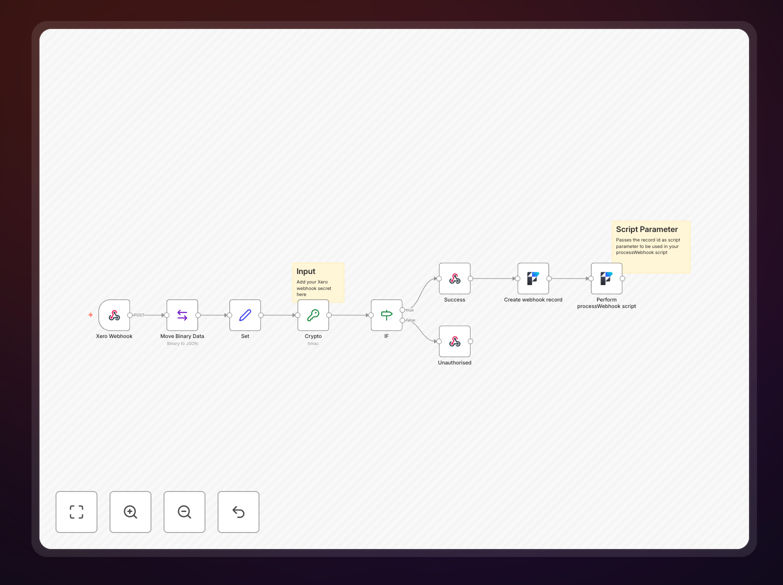
The workflow automatically captures events from Xero—like new invoices, payments, or contact updates—via webhooks and instantly records them in your FileMaker database. This creates a seamless bridge between your accounting software and operational systems, ensuring data consistency without manual intervention.
By automating this connection, businesses eliminate duplicate data entry, reduce accounting errors, and gain real-time visibility into financial data across their entire organization. The system handles the technical complexity so your team can focus on analysis and decision-making rather than data transfer.
How It Works
1. Xero Webhook Trigger
The workflow starts when Xero sends a webhook notification about a specific event you've configured, such as a new invoice creation or payment receipt. This webhook contains all relevant data about the transaction.
2. Data Processing & Transformation
The incoming Xero data is parsed and transformed to match your FileMaker database structure. This includes mapping fields, formatting dates and currencies, and extracting relevant information from nested objects.
3. FileMaker Database Update
Using the FileMaker node, the workflow creates or updates records in your specified database. It can handle complex relationships, look up existing records, and maintain data integrity across tables.
4. Error Handling & Logging
If any step fails, the workflow captures the error, logs details for troubleshooting, and can send alerts to your team. Successful transactions are also logged for audit purposes.
Who This Is For
This template is ideal for accounting firms managing multiple client databases, business owners using FileMaker for custom operations alongside Xero accounting, developers building integrated solutions for clients, and operations teams responsible for maintaining data consistency across systems.
If you're spending hours each week manually entering financial data from Xero into FileMaker (or vice versa), dealing with reconciliation errors, or struggling with delayed reporting because data isn't synchronized, this automation will transform your workflow.
What You'll Need
- Xero account with API access and webhook configuration permissions
- FileMaker Server or FileMaker Cloud with Data API enabled
- n8n instance (self-hosted or cloud) with internet-accessible webhook URL
- Basic understanding of your FileMaker database structure and field mappings
- API credentials for both Xero and FileMaker with appropriate permissions
Pro tip: Start by automating just one type of transaction (like new invoices) to test the integration before expanding to other events. This minimizes complexity during initial setup.
Quick Setup Guide
- Import the template into your n8n instance using the downloaded JSON file.
- Configure Xero webhook in your Xero developer portal, pointing to your n8n webhook URL.
- Set up FileMaker credentials in n8n with your database host, database name, and authentication details.
- Map data fields between Xero's output and your FileMaker table structure in the "Edit Fields" nodes.
- Test with sample data by creating a test invoice in Xero and verifying it appears correctly in FileMaker.
- Activate the workflow and monitor the execution logs for the first few transactions.
Key Benefits
Eliminate manual data entry completely, saving 5-15 hours per week for accounting teams that previously transferred data between systems manually.
Reduce errors by 95%+ compared to manual entry, ensuring financial reports are accurate and reconciliation happens smoothly at month-end.
Real-time data synchronization means your FileMaker database always reflects current financial status, enabling timely decision-making and client reporting.
Scalable solution that handles increasing transaction volumes without additional staff time, supporting business growth seamlessly.
Audit trail automation creates logs of all data transfers, simplifying compliance and making it easy to trace any transaction through the system.