Google Sheets Email Automation Invoice Processing Cron n8n

Invoice Creator with Google Sheets & Automated Payment Reminders

Automate monthly invoice generation and daily overdue payment reminders. Save hours on billing admin, reduce late payments, and keep cash flow healthy.

Download Template JSON · n8n compatible · Free
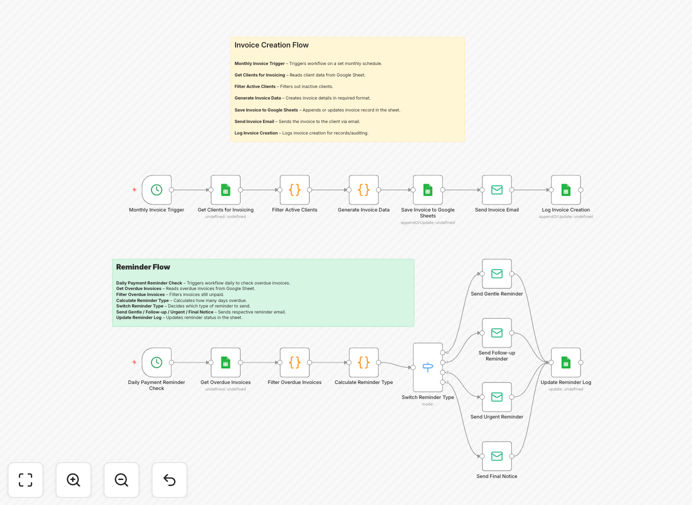
Invoice automation workflow diagram showing Google Sheets, email, and scheduling nodes

What This Workflow Does

Manual invoicing and payment chasing are time-consuming, error-prone, and frustrating. This automation solves that by connecting Google Sheets with your email system to create invoices on a schedule and send reminders automatically.

The workflow runs two parallel processes: a monthly invoice creation flow that pulls client data from Sheets, generates invoices, emails them, and logs everything; and a daily reminder flow that checks for overdue invoices and sends escalating reminders (gentle → follow-up → urgent → final notice).

You get a fully automated billing system that reduces administrative overhead, ensures timely payments, and provides a clear audit trail in Google Sheets.

How It Works

1. Monthly Invoice Trigger

A Cron node triggers the workflow monthly (or weekly/daily). This ensures invoices are generated consistently without manual intervention.

2. Read Client Data from Google Sheets

The workflow connects to your Google Sheet containing client details, billing amounts, and project information. It filters for active clients ready for invoicing.

3. Generate Invoice Data

Using the client data, the system creates invoice details—ID, amount, due date—and formats them for email delivery.

4. Save Invoice to Google Sheets & Send Email

Each invoice is appended to a tracking sheet, then emailed to the client with a professional template. A log entry records the creation.

5. Daily Overdue Check

A separate Cron trigger runs daily to scan the tracking sheet for unpaid invoices past their due date.

6. Calculate & Send Reminders

The workflow calculates how many days overdue each invoice is, then sends appropriate reminders: gentle (7 days), follow-up (14 days), urgent (21 days), or final notice (30 days).

7. Update Reminder Log

Every reminder sent updates the Google Sheet with the reminder type and timestamp, creating a complete payment history.

Who This Is For

This template is ideal for freelancers, small agencies, consultants, and SaaS businesses that bill clients regularly. If you send 10+ invoices per month and spend hours tracking payments, this automation will save you significant time.

It’s also valuable for businesses with subscription models, project-based billing, or any recurring revenue stream where timely invoicing and follow-up directly impact cash flow.

Pro tip: Customize reminder email templates to match your brand tone—gentle reminders can maintain client relationships while urgent notices ensure payment.

What You'll Need

  1. A Google Sheets spreadsheet with client columns: Name, Email, Invoice Amount, Due Date, Status.
  2. Access to Google Sheets API (free with Google account).
  3. An email service (Gmail, SendGrid, SMTP) configured in n8n.
  4. n8n instance (cloud or self-hosted).
  5. Basic understanding of your billing cycle (monthly, weekly, project-based).

Quick Setup Guide

1. Download the template JSON file and import it into your n8n workspace.

2. Connect the Google Sheets node to your client data sheet.

3. Configure the email node with your service (Gmail, SendGrid, etc.).

4. Set the Cron schedule: monthly for invoice generation, daily for reminders.

5. Test with a sample client to ensure invoices generate and emails send correctly.

6. Adjust reminder thresholds (7, 14, 21, 30 days) based on your payment terms.

7. Run the workflow live and monitor the Google Sheets log for automation activity.

Key Benefits

Save 5–10 hours monthly by eliminating manual invoice creation, email drafting, and payment tracking.

Reduce late payments by 30–50% with systematic, escalating reminders that clients can't ignore.

Improve cash flow predictability by ensuring invoices are sent on schedule and followed up consistently.

Maintain client relationships with professional, automated communication that feels personal but requires zero effort.

Create a transparent audit trail in Google Sheets, showing every invoice sent and every reminder triggered.

Frequently Asked Questions

Common questions about invoice automation and integration

Automating invoice creation and payment reminders eliminates manual billing errors, ensures consistent follow-up, and saves 5–10 hours per month. It reduces late payments by sending timely reminders and provides a clear audit trail in Google Sheets.

Manual processes often lead to forgotten invoices or inconsistent follow-up, hurting cash flow. Automation ensures every client receives their invoice on schedule and reminders escalate appropriately.

Automated invoice reminders shorten payment cycles by consistently nudging clients. Gentle reminders for 7-day overdue invoices, follow-ups at 14 days, urgent notices at 21 days, and final notices at 30 days ensure payments are collected faster, improving monthly cash flow.

Businesses using automated reminders often see payment times drop from 45+ days to under 30 days, directly boosting revenue predictability and reducing financial stress.

Yes, n8n integrates with dozens of email services including Outlook, SendGrid, Mailgun, and SMTP. You can replace the email node with any supported service. The workflow logic remains the same—just configure your preferred email provider.

This flexibility lets businesses use their existing email infrastructure without changing providers, maintaining brand consistency and security.

Prepare columns for Client Name, Invoice ID, Amount, Due Date, Status, Reminder Type, and Last Updated. The workflow reads active clients, generates invoices, logs them, and updates statuses automatically. You can add custom columns like Payment Method or Notes.

Start with a simple sheet; the automation will populate it over time. Ensure email addresses are accurate so reminders reach the right recipients.

Automated reminders provide clear, documented communication. Clients receive consistent, professional emails with invoice details, reducing confusion. The system logs every reminder sent, creating a transparent record that prevents disputes about notification timing.

When clients claim they weren't notified, you can show the Google Sheets log with exact timestamps and email content, resolving disputes quickly.

Yes, it works for both. For subscriptions, set the monthly trigger. For one-off projects, you can manually trigger invoice generation or adjust the schedule. The Google Sheet can include billing types, and the workflow can filter accordingly.

Add a "Billing Type" column to differentiate subscription vs project invoices, then customize reminder schedules per type.

The biggest savings come from eliminating manual data entry, reducing follow-up calls, and avoiding payment tracking spreadsheets. Businesses typically save 5–10 hours monthly, reduce late payments by 30–50%, and improve client satisfaction with prompt, error-free billing.

Time saved translates directly into revenue: freed-up hours can be spent on client work or business growth instead of administrative chores.

Yes, GrowwStacks specializes in custom automation solutions. We can tailor this workflow to your specific billing cycles, integrate with your accounting software, add multi-channel reminders (SMS, Slack), and build advanced reporting dashboards.

Custom builds ensure the automation fits your exact business processes, scales with your growth, and delivers maximum ROI. Contact us for a free consultation.

  • Integration with QuickBooks, Xero, or FreshBooks
  • Multi-channel reminders (email + SMS + Slack)
  • Advanced reporting and cash flow dashboards

Need a Custom Invoice Automation?

This free template is a starting point. Our team builds fully tailored automation systems for your specific business needs.