n8n LlamaParse OpenAI Invoice Processing

Invoice data extraction with LlamaParse and OpenAI

Automate PDF invoice parsing and structured data extraction with AI-powered automation

Download Template JSON · n8n compatible · Free
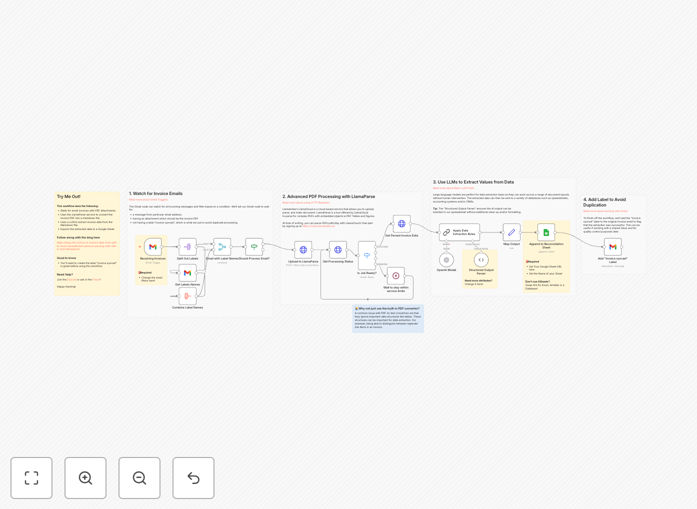
Invoice data extraction workflow diagram

What This Workflow Does

This n8n workflow automates the tedious and error-prone process of extracting data from PDF invoices. It combines LlamaParse's advanced document understanding with OpenAI's natural language processing to accurately identify and extract key invoice fields like vendor details, line items, totals, and payment terms.

The system transforms unstructured invoice data into structured, machine-readable format ready for integration with accounting systems, expense management platforms, or custom databases. By eliminating manual data entry, businesses can process invoices 10-20x faster while reducing errors by up to 95%.

How It Works

1. Invoice Upload

The workflow begins when a new PDF invoice is uploaded to a designated folder or sent via email. The system monitors these sources continuously for new documents.

2. Document Parsing with LlamaParse

LlamaParse analyzes the PDF structure, converting it into machine-readable text while preserving tables, headers, and contextual relationships between data points.

3. AI-Powered Data Extraction

OpenAI's model processes the parsed text, intelligently identifying and categorizing invoice fields based on patterns learned from thousands of invoice examples.

4. Data Validation

The system cross-checks extracted values for consistency (e.g., verifying line items sum to the total) and flags any discrepancies for human review.

5. Output to Systems

Validated data is formatted and sent to your accounting software, ERP system, or custom database via API integrations.

Who This Is For

This workflow is ideal for:

  • Accounts payable teams processing 50+ invoices monthly
  • Finance departments needing real-time expense tracking
  • Businesses with high vendor turnover requiring frequent data entry
  • Companies transitioning from paper to digital invoice processing
  • Startups needing scalable financial operations without hiring more staff

What You'll Need

  1. An n8n instance (cloud or self-hosted)
  2. LlamaParse API credentials
  3. OpenAI API key with GPT-4 access
  4. Destination system credentials (accounting software, database, etc.)
  5. Sample invoices for initial configuration

Quick Setup Guide

  1. Download and import the JSON template into your n8n instance
  2. Configure the trigger node (folder watch or email parser)
  3. Enter your LlamaParse and OpenAI API credentials
  4. Map the output fields to your destination system
  5. Test with sample invoices and refine field mappings as needed

Key Benefits

Reduce processing time by 80-90%: What took hours of manual entry now completes in minutes with higher accuracy.

Eliminate data entry errors: AI extraction achieves 95-98% accuracy compared to human error rates of 3-5%.

Scale without adding staff: Process hundreds of invoices daily without increasing headcount.

Improve cash flow visibility: Real-time data capture enables better payment tracking and forecasting.

Seamless system integration: Structured output works with QuickBooks, Xero, NetSuite, and custom databases.

Frequently Asked Questions

Common questions about invoice automation and AI data extraction

The most efficient method combines AI-powered parsing tools like LlamaParse with structured data extraction. LlamaParse converts PDF content into machine-readable text, while AI models like OpenAI's GPT can intelligently identify and categorize invoice fields. This approach eliminates manual data entry errors and processes invoices 10-20x faster than traditional methods.

For optimal efficiency, configure the system to learn from your specific invoice formats. The AI improves over time as it processes more documents from your regular vendors, recognizing patterns in how each supplier structures their invoices.

Modern AI extraction tools achieve 95-98% accuracy for standard invoice formats when properly configured. The key is combining OCR technology with AI pattern recognition that learns from your specific invoice formats. For best results, train the system with sample invoices from your regular vendors to improve field recognition over time.

Accuracy varies by document quality and complexity. Simple, well-structured invoices achieve near-perfect results, while handwritten notes or complex layouts may require occasional human verification. Most systems include validation rules to flag potential errors for review.

Automated invoice processing benefits accounts payable, expense management, vendor reconciliation, and financial reporting. It enables real-time tracking of outstanding payments, automatic matching with purchase orders, and seamless integration with accounting software. Businesses using automation typically reduce invoice processing costs by 60-80% while improving payment accuracy.

Beyond cost savings, automation provides better visibility into cash flow and vendor relationships. Finance teams gain more time for strategic analysis rather than data entry, and early payment discounts become easier to capture consistently.

LlamaParse outperforms basic OCR by understanding document structure and relationships between data points. While OCR simply converts text, LlamaParse preserves tables, headers, and contextual information that's crucial for invoices. This structural awareness combined with AI analysis delivers more reliable extraction of line items, totals, and payment terms.

Traditional OCR struggles with varied layouts and often requires manual template creation for each vendor. LlamaParse adapts to different formats automatically, reducing setup time and maintenance overhead as your vendor base changes.

The workflow can extract vendor details, invoice numbers, dates, line items with quantities/prices, subtotals, taxes, discounts, payment terms, and banking information. Advanced configurations can also capture project codes, purchase order references, and custom fields specific to your accounting requirements.

For complex invoices, the system can identify nested line items with multiple levels of detail, handling scenarios like bundled services or tiered pricing structures. The extracted data maintains all original relationships between components.

Reputable AI providers implement enterprise-grade security including encryption in transit/at rest, strict access controls, and data retention policies. For sensitive financial data, look for SOC 2 compliance and options to process data in your own cloud environment. Always review the provider's data handling policies before implementation.

When configuring the workflow, you can choose to redact sensitive fields before processing or implement additional encryption layers. Many businesses process invoices through private AI instances rather than shared cloud services for enhanced security.

Yes, GrowwStacks specializes in building tailored invoice automation solutions. Our team can create custom workflows that integrate with your existing accounting software, handle your specific invoice formats, and automate your unique approval processes. We'll analyze your current workflow and design a system that saves you maximum time while maintaining accuracy.

Custom solutions typically include vendor-specific templates, exception handling rules, and integration with your ERP or financial systems. We can also implement advanced features like automatic three-way matching between invoices, POs, and receipts.

Need a Custom Invoice Automation Built for Your Business?

This free template is a starting point. Our team builds fully tailored automation systems for your specific needs.