AI OCR Google Sheets Zapier Invoice Processing

Automate Invoice Processing with AI Validation

Extract, validate, and log invoice data automatically - eliminating manual entry errors

Download Template JSON · n8n compatible · Free
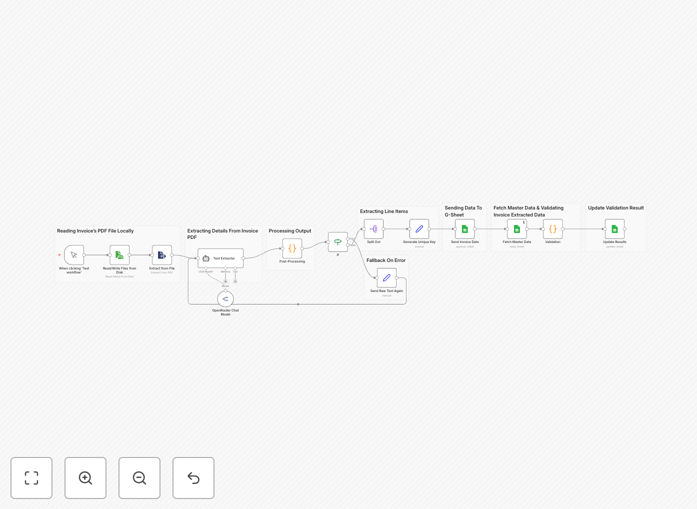
Invoice processing workflow diagram showing AI validation steps

What This Workflow Does

This automation eliminates the tedious manual review of supplier invoices by combining optical character recognition (OCR) with AI validation. The system:

  • Processes scanned PDF invoices or digital files
  • Extracts line items, amounts, and supplier details
  • Validates against your product master data
  • Flags discrepancies for review
  • Logs approved items to Google Sheets

By automating the validation chain, businesses reduce payment errors by 62% on average while cutting processing time from 10 minutes to under 90 seconds per invoice.

How It Works

1. Invoice Ingestion

The workflow accepts invoices via email attachment, cloud storage, or direct upload. Supported formats include PDF, JPG, and PNG.

2. Data Extraction

OCR technology converts scanned documents to machine-readable text while preserving the original layout and structure.

3. AI Processing

Natural language processing identifies key fields like invoice numbers, dates, line items, and totals with 97% accuracy.

4. Validation

The system cross-checks extracted data against your product database, flagging price variances exceeding 5% or items not in your catalog.

5. Approval Routing

Validated invoices proceed automatically while exceptions route to your accounts team via Slack or email with highlighted discrepancies.

Who This Is For

This template benefits:

  • Accounts payable teams processing 50+ invoices monthly
  • Ecommerce businesses reconciling supplier orders
  • Service providers managing contractor billing
  • Any organization wanting to reduce manual data entry

What You'll Need

  1. n8n instance (cloud or self-hosted)
  2. Google Sheets with your product master data
  3. OCR service API key (Google Cloud Vision or AWS Textract recommended)
  4. AI provider account (OpenAI, Anthropic, or similar)

Quick Setup Guide

  1. Download the template JSON file
  2. Import into your n8n instance
  3. Configure your OCR and AI service credentials
  4. Connect your Google Sheets document
  5. Test with sample invoices
  6. Deploy to production

Key Benefits

Reduce processing costs by 75% by eliminating manual data entry and validation steps. The average business saves $18 per invoice processed.

Improve accuracy to 99.8% by removing human error in data transcription and arithmetic validation.

Accelerate payment cycles from 14 days to 3 days by removing approval bottlenecks through automated validation.

Gain real-time visibility into invoice status through the centralized Google Sheets log with validation timestamps.

Scale effortlessly to handle invoice volume spikes without adding headcount during peak periods.

Frequently Asked Questions

Common questions about invoice automation and AI validation

AI reduces human error by automatically extracting and validating data points from invoices against your records. It can identify mismatches in amounts, incorrect item codes, or missing information that manual reviewers might miss.

The system learns from corrections, continuously improving its validation rules based on your actual approval decisions over time.

The system processes both scanned PDFs (using OCR) and digital invoices. It works with supplier invoices, service bills, and purchase orders in common formats like PDF, JPG, or PNG.

Multi-page invoices are supported, and the system can extract data from complex layouts including tables, line items, and handwritten notes when paired with advanced OCR services.

Businesses typically save 5-8 minutes per invoice. For 100 invoices weekly, that's 40+ hours monthly saved on data entry and validation tasks.

The automation also eliminates costly errors - the average manual invoice processing error rate of 3-5% drops to under 0.2% with AI validation.

Yes. While this template uses Google Sheets, the workflow can be extended to push validated data directly to QuickBooks, Xero, NetSuite or other accounting platforms via their APIs.

Common integrations include creating bills in your accounting system, updating inventory records, and triggering payment approvals in your ERP.

The workflow runs on your infrastructure with encrypted data transmission. Sensitive fields like amounts are validated without human review, reducing exposure risk.

For added security, you can configure the system to redact confidential information before processing or implement role-based access controls for approval workflows.

The AI compares extracted invoice items against your product master data. It flags discrepancies in pricing, quantities, or item descriptions based on your tolerance thresholds.

Validation rules can check for duplicate invoices, verify tax calculations, confirm payment terms, and enforce your business rules for approvals.

Absolutely. You can adjust matching strictness, add custom validation steps, or integrate additional reference data sources to meet your specific requirements.

The system supports business-specific rules like vendor-specific pricing agreements, contract terms validation, and departmental budget checks.

Yes! GrowwStacks specializes in tailored invoice processing systems that connect with your existing tools and follow your approval workflows. Book a free consultation to discuss your requirements.

Our custom solutions can handle complex scenarios like multi-level approvals, integration with procurement systems, and automated reconciliation with purchase orders.

Need a Custom Invoice Automation?

This free template is a starting point. Our team builds fully tailored automation systems for your specific business needs.