What This Workflow Does
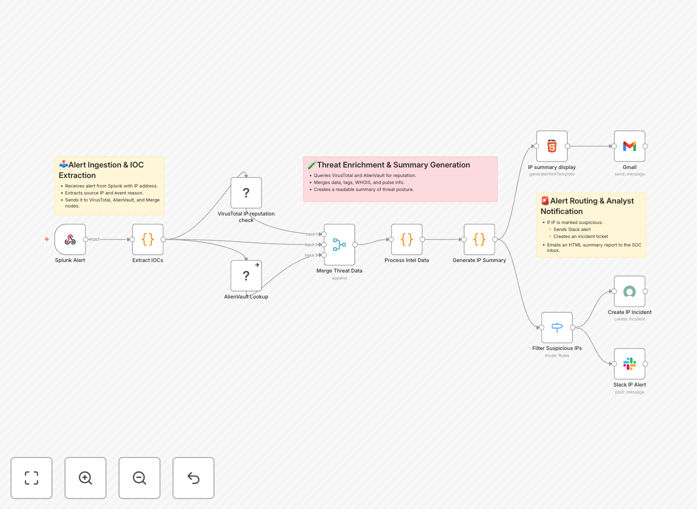
Security teams are inundated with alerts. This automation tackles a critical, time-consuming task: investigating suspicious IP addresses flagged by your SIEM (Splunk). Instead of manually copying IPs into multiple threat intelligence websites, this workflow automatically enriches each alert with data from VirusTotal and AlienVault OTX, synthesizes the findings into a clear report, and routes it to the right people—all within seconds.
It transforms raw, noisy Splunk alerts into actionable intelligence. When an IP is detected in a malicious log event, the workflow extracts it, queries two leading threat intelligence platforms, merges the results, and decides the next step based on severity. High-risk IPs can trigger immediate Slack alerts and ServiceNow tickets, while lower-risk ones generate a detailed HTML email summary for daily review. This ensures your SOC analysts spend their time investigating real threats, not looking up data.
How It Works
The workflow is a logical pipeline that ingests, enriches, analyzes, and acts.
1. Trigger & Ingestion
A Splunk alert containing a suspicious IP address triggers the workflow via a webhook. The workflow parses the incoming JSON payload to isolate the IP for analysis.
2. Dual Threat Intelligence Enrichment
The IP is sent simultaneously (or sequentially) to the VirusTotal and AlienVault OTX APIs. VirusTotal returns detection scores from dozens of antivirus engines, associated malware hashes, and community tags. AlienVault OTX provides reputation scores, known related pulses (threat campaigns), and geographical/ISP data.
3. Data Processing & Merging
Responses from both services are normalized and merged into a unified data structure. A Function node calculates a composite threat score and determines the alert severity (e.g., Critical, High, Medium, Informational).
4. Conditional Routing & Action
A Switch node evaluates the threat score. Critical threats can be set to automatically create a ServiceNow incident and post an urgent message to a dedicated Slack #security-alerts channel. All events, regardless of severity, generate a formatted HTML report for the audit trail.
5. Reporting & Notification
An HTML node builds a clean, readable report summarizing the IP, its reputation scores, associated malware, geographic info, and links to the full analysis on VirusTotal/AlienVault. This report is sent via Gmail (or your SMTP server) to a designated SOC inbox.
Who This Is For
This template is designed for security professionals and IT teams responsible for monitoring and responding to threats.
- SOC Analysts: Automate the initial triage of IP-based alerts to focus on complex investigations.
- IT Managers at mid-sized companies who lack a 24/7 SOC but need to implement basic, automated threat intelligence.
- MSPs (Managed Service Providers): Standardize and scale threat investigation across multiple client environments.
- DevOps/SRE Teams managing cloud infrastructure who need to automate security response within their CI/CD or incident management pipelines.
If you're using Splunk (or any log source that can send webhooks) and want to add automated, enriched threat context to your alerts, this workflow is your starting point.
What You'll Need
- A running n8n instance (self-hosted or n8n.cloud).
- Splunk with the ability to send webhook alerts for search results containing IP addresses.
- API keys for VirusTotal (public API has rate limits; private is recommended for production) and AlienVault OTX (free tier available).
- Destination credentials configured in n8n for your chosen notification channels: Slack (webhook or bot token), Gmail/Office 365 (SMTP), and ServiceNow (if used).
Pro tip: Start with the AlienVault OTX free API tier to test the workflow. For high-volume environments, consider upgrading to VirusTotal's private API to avoid rate limiting and gain access to additional data points like passive DNS and historical reports.
Quick Setup Guide
You can have this automation running in under 30 minutes.
- Download the template using the button above and import it into your n8n instance.
- Configure credentials in n8n's "Credentials" section for VirusTotal, AlienVault OTX, Slack, and your email service.
- Update the webhook URL in the first node and configure your Splunk alert to send a POST request to this URL when an IP is detected. The payload should include the IP address in a predictable field (e.g.,
result.ip). - Adjust the Switch node logic to match your organization's risk thresholds. Define what score constitutes a "Critical" vs. "High" alert.
- Test the workflow manually by entering a test IP (like a known malicious IP from a threat feed) into the webhook trigger or using the n8n "Test Workflow" function.
- Activate the workflow and configure your Splunk alert to call the webhook. Monitor the first few executions to ensure data flows correctly and notifications are received as expected.
Key Benefits
Reduce alert investigation time from minutes to seconds. What used to be a manual, multi-tab process is now fully automated, freeing up your security team for higher-value analysis.
Improve threat detection accuracy with correlated intelligence. Relying on a single threat feed is risky. By combining VirusTotal's scanning results with AlienVault's community pulse data, you get a more reliable verdict on an IP's malicious intent.
Ensure consistent and auditable response procedures. Every alert is processed the same way, creating a standardized HTML report for the record. This is invaluable for compliance audits and post-incident reviews.
Enable 24/7 coverage without staffing overhead. The automation runs continuously, providing immediate threat enrichment even during nights, weekends, or periods of high alert volume.
Build a scalable foundation for your security automation. This workflow is a modular component. You can easily extend it to check domains, hashes, or add steps like querying internal blocklists or ticketing systems beyond ServiceNow.