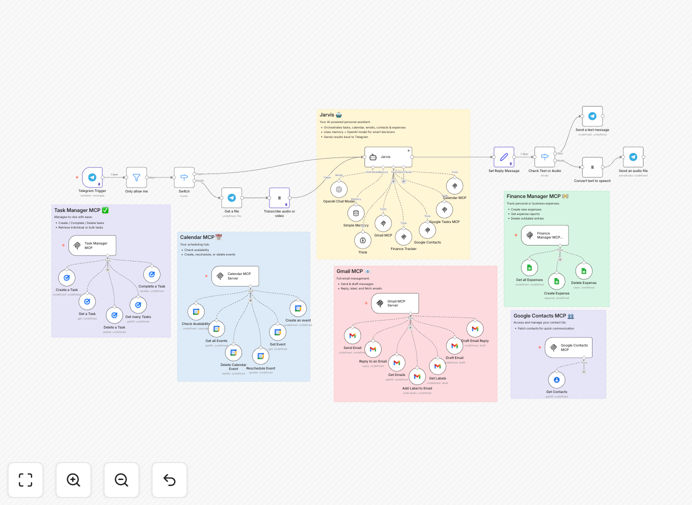
What This Workflow Does
This template transforms Telegram into a central command hub for your digital life. Instead of juggling multiple apps for scheduling, email, task management, and expense logging, you simply message your AI assistant in plain English (or send a voice note). The agent interprets your request, interacts with the appropriate tools, and confirms the action—all within Telegram.
It solves the problem of fragmented productivity tools by creating a unified, conversational interface for common administrative work. Whether you're a busy founder, executive, or freelancer, this automation reclaims hours each week by eliminating manual data entry and app-switching.
The system uses OpenAI's models with MCP (Model Context Protocol) to give the AI access to real-world tools like your calendar and email. This isn't just a chatbot—it's an action-taking assistant that executes tasks across your connected services.
How It Works
The workflow follows a clear sequence: receive command, understand intent, execute action, confirm completion.
1. Command Reception via Telegram
You send a text or voice message to your dedicated Telegram bot. The trigger node captures this input and passes it to the AI processing layer.
2. AI Intent Recognition & Tool Selection
OpenAI analyzes your message, classifies the intent (e.g., "schedule meeting," "log expense," "draft email"), and selects the appropriate MCP tool from its available set.
3. Tool Execution
The workflow routes to the specific tool node—Google Calendar for events, Gmail for emails, a database for expense tracking—and performs the requested action with the parameters extracted by the AI.
4. Response & Confirmation
Once the action is complete, the agent formats a human-readable confirmation and sends it back to you on Telegram, closing the loop.
Who This Is For
This template is ideal for professionals who manage multiple responsibilities and tools daily. Founders and executives can use it to offload scheduling and communication tasks. Virtual assistants can scale their services by automating repetitive actions. Freelancers and consultants can maintain better client communication and time tracking without manual overhead.
Teams managing shared calendars and task lists will find it particularly valuable for coordinating availability and assignments through a simple chat interface. It's also perfect for tech-savvy individuals who want to experiment with AI agent capabilities beyond simple chatbots.
Pro tip: Start with one or two core functions (like calendar scheduling) to get comfortable with the setup. Once that's working smoothly, add email handling or expense logging. This incremental approach prevents configuration overload.
What You'll Need
- A running n8n instance (cloud or self-hosted)
- Telegram Bot Token from BotFather
- OpenAI API key with GPT-4 or GPT-3.5-turbo access
- Google Service Account credentials with access to Calendar, Gmail, and Contacts (optional but recommended)
- ElevenLabs API key if you want voice note support (optional)
- A database or spreadsheet for expense tracking (Google Sheets works well)
Quick Setup Guide
Follow these steps to deploy your personal AI agent in under 30 minutes:
- Import the template: Download the JSON file above and import it into your n8n workspace.
- Configure credentials: In the "Credentials" section, add your Telegram Bot Token, OpenAI API key, and Google Service Account JSON.
- Test the Telegram connection: Send a message to your bot—you should see it appear in the workflow trigger.
- Adjust tool permissions: Review the Google scopes in the MCP nodes to ensure they match what you need (e.g., calendar events.write, gmail.send).
- Customize prompts: Edit the OpenAI node's system prompt to tailor the agent's personality and response style.
- Activate the workflow: Toggle the workflow to "Active" and send a test command like "Schedule a demo for tomorrow at 2 PM."
Key Benefits
Consolidate your tool stack. Instead of switching between calendar, email, task, and finance apps, you have one conversational interface that handles them all. This reduces cognitive load and minimizes errors from manual entry.
Save 5–10 hours per week on administrative tasks. Scheduling meetings alone can consume hours. This agent handles finding times, sending invites, and following up—freeing you for higher-value work.
Reduce context switching and mental fatigue. Every app switch costs focus. By keeping actions within a familiar chat environment, you maintain flow state and preserve mental energy for creative or strategic thinking.
Scale personal assistance without hiring. For solopreneurs and small teams, a virtual AI assistant provides many benefits of a human assistant at a fraction of the cost, available 24/7.
Future-proof with extensible architecture. The MCP-based design means you can add new capabilities (like CRM updates or project management) by simply connecting additional tools—no need to rebuild from scratch.