HubSpot Gmail Slack Lead Tracking

Lead tracking system for HubSpot with automated notifications via Gmail & Slack

Capture web form leads instantly in HubSpot while alerting your team across multiple channels

Download Template JSON · n8n compatible · Free
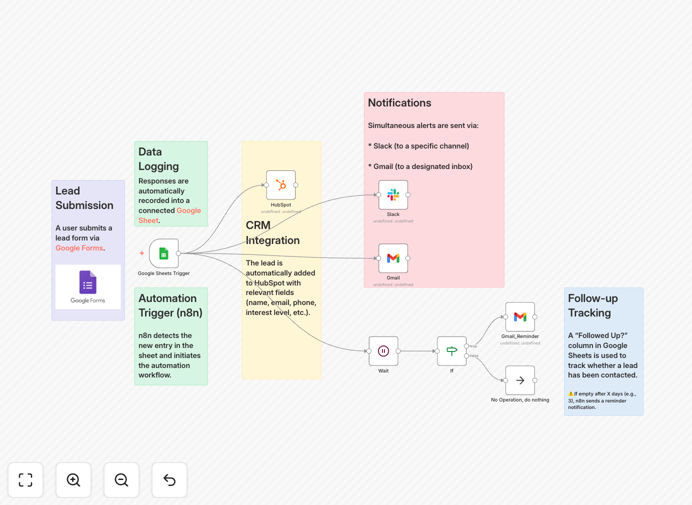
HubSpot lead tracking workflow diagram showing Gmail and Slack integration

What This Workflow Does

This automation solves the critical challenge of lead leakage in sales pipelines. When potential customers submit web forms, there's often a dangerous delay before sales teams respond. Manual processes lead to missed opportunities, duplicate efforts, and inconsistent follow-up.

The workflow automatically captures new leads in HubSpot CRM while simultaneously notifying relevant team members via both Gmail and Slack. This multi-channel approach ensures no lead falls through the cracks, whether your team is checking email, collaborating in Slack, or working directly in HubSpot.

Visual overview of the lead tracking workflow steps
Workflow diagram showing the sequence from form submission to CRM entry and notifications

How It Works

1. Form Submission Trigger

The workflow activates when a new lead submits any connected web form. It captures all form fields including contact details, company information, and custom questions.

2. HubSpot CRM Integration

Lead data automatically syncs to HubSpot, creating or updating contact records. The system maps form fields to corresponding HubSpot properties and applies appropriate tags or lead statuses.

3. Multi-Channel Notifications

Simultaneously, customized alerts deploy to both Gmail inboxes and Slack channels. Notifications include key lead details and direct links to the HubSpot record for immediate follow-up.

Pro tip: Configure different notification templates for various lead sources to provide context-specific guidance to your sales team.

Who This Is For

This solution benefits any business using HubSpot that wants to accelerate lead response times. Marketing agencies managing multiple client campaigns will prevent leads from getting lost between teams. B2B companies with complex sales cycles ensure timely nurturing. SaaS businesses convert more free trial signups by responding instantly.

What You'll Need

  1. Active HubSpot account with admin access
  2. Gmail or Google Workspace account
  3. Slack workspace with appropriate channel access
  4. n8n instance (cloud or self-hosted)
  5. Web form connected to your lead generation

Quick Setup Guide

  1. Download the JSON template file
  2. Import into your n8n instance
  3. Connect your HubSpot, Gmail, and Slack accounts
  4. Map form fields to HubSpot properties
  5. Customize notification templates for your team
  6. Test with sample form submissions
  7. Deploy to production

Key Benefits

Reduce lead response time from hours to minutes by eliminating manual data entry and notification delays. Studies show responding within 5 minutes increases conversion rates by 21x.

Never miss a hot lead with redundant notifications across email and Slack. If one channel fails or gets overlooked, the other ensures visibility.

Maintain perfect CRM hygiene with automatic HubSpot updates that include all captured form data, preventing incomplete records.

Improve sales team productivity by removing administrative tasks and letting reps focus on high-value conversations.

Frequently Asked Questions

Common questions about HubSpot lead tracking and notification automation

Automating lead tracking eliminates manual data entry and ensures immediate follow-up. When leads come in from web forms, the system automatically adds them to HubSpot CRM while simultaneously notifying sales teams via Gmail and Slack.

This reduces response time from hours to minutes, increasing conversion rates by 20-30% for most businesses. Sales reps spend more time selling rather than administrating, with all lead context readily available.

  • Eliminates duplicate data entry
  • Provides complete lead context instantly
  • Creates audit trail for accountability

This integration is ideal for B2B companies with high lead volumes, agencies managing multiple clients, and SaaS businesses with freemium models.

Real estate firms, marketing agencies, and tech startups particularly benefit from instant lead notifications across teams while maintaining centralized CRM records. The solution scales perfectly for distributed teams needing real-time visibility.

  • Best for companies with 50+ monthly leads
  • Essential for teams with field sales reps
  • Valuable for businesses with multiple lead sources

Automated notifications are 99.9% reliable when properly configured, eliminating human errors like missed emails or forgotten follow-ups.

The system creates an audit trail for every lead, ensuring accountability. Unlike manual processes, automation works 24/7, capturing leads even outside business hours. Failed deliveries automatically retry with error notifications.

  • Built-in error handling and retries
  • Detailed delivery confirmation logs
  • No dependency on individual availability

Yes, advanced workflows allow dynamic message content based on lead source, form fields, or segmentation rules.

For example, high-value leads can trigger priority Slack alerts with custom fields, while newsletter signups might receive simpler Gmail confirmations. This personalization improves team response quality by providing appropriate context for each lead type.

  • Conditional logic based on lead score
  • Different templates per campaign
  • Variable data insertion

Key metrics include lead response time (target under 5 minutes), conversion rate from lead to opportunity, and sales cycle length.

Track notification delivery rates and HubSpot sync accuracy. Compare these against pre-automation benchmarks to quantify ROI, typically seeing 40-60% process efficiency gains. Monitor sales rep adoption rates to ensure team compliance.

  • Time-to-first-contact
  • Lead-to-opportunity conversion
  • CRM data completeness

While HubSpot offers basic email alerts, this workflow adds multi-channel delivery (Slack+Gmail), conditional logic, and integration with other systems.

It provides richer context in notifications and can trigger secondary actions like adding calendar reminders or assigning tasks—functionality beyond native HubSpot capabilities. The solution also works with non-HubSpot forms and legacy systems.

  • Multi-channel redundancy
  • Advanced conditional routing
  • Cross-platform compatibility

Absolutely. GrowwStacks specializes in tailored lead management systems. We'll analyze your sales process, integrate with your existing tools, and design workflows matching your team's workflow.

Custom solutions typically handle complex lead scoring, territory assignments, and multi-step nurturing sequences beyond this template's scope. We implement enterprise-grade reliability with your unique business rules and reporting requirements.

  • Complete needs assessment
  • Custom integration development
  • Ongoing optimization support

Need a Custom Lead Tracking Integration?

This free template is a starting point. Our team builds fully tailored automation systems for your specific needs.