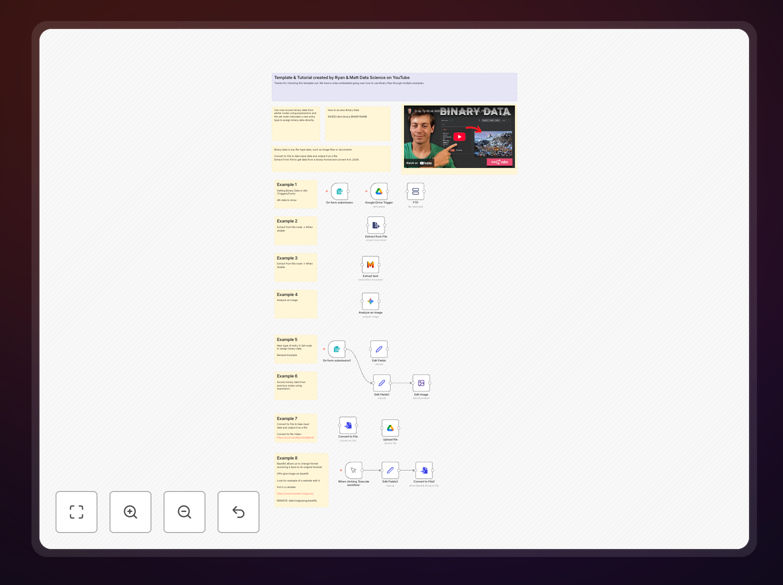
What This Workflow Does
This template solves the common challenge of handling non-text files—images, PDFs, videos, documents—in automation workflows. Most businesses struggle with manual file processing, format conversions, and moving files between systems, which consumes hours of employee time and introduces errors.
The workflow provides eight practical examples that demonstrate how to import binary data from sources like Google Drive and FTP, extract content from files, convert between formats, analyze images with AI, and utilize base64 encoding when needed. It transforms complex file operations into repeatable, reliable automation.
By implementing this template, you eliminate manual file handling, reduce processing time from hours to seconds, ensure consistency across file operations, and unlock new automation possibilities like automated document processing and intelligent media analysis.
How It Works
Step 1: Import Binary Data
The workflow begins by fetching files from multiple sources. You can trigger it with new files in Google Drive, FTP server updates, or form submissions containing attachments. This demonstrates how to bring binary data into n8n without losing file integrity or metadata.
Step 2: Extract and Analyze Content
Once files are imported, specialized nodes extract text from PDFs and documents, analyze images for content or quality issues, and prepare files for downstream processing. This step shows how to work with the actual content within binary files, not just move them around.
Step 3: Convert and Transform
The workflow includes format conversion examples—changing image types, converting documents to PDF, and preparing files for specific systems. This addresses compatibility issues that often block automation between different software platforms.
Step 4: Store and Route
Finally, processed files are saved to appropriate destinations based on their type and content analysis. The workflow demonstrates conditional routing—sending invoices to accounting systems, images to marketing platforms, and documents to storage—all based on automated decisions.
Who This Is For
This template is ideal for businesses that regularly handle files across departments. Marketing teams processing images and videos, accounting departments managing invoices and receipts, HR teams handling employee documents, and IT departments synchronizing files between systems will find immediate value.
Developers building applications that need file upload processing, agencies managing client assets, e-commerce businesses processing product images, and educational institutions handling student submissions can adapt these examples to their specific needs. Even teams with limited technical skills can implement the basic import and routing examples.
What You'll Need
- A running n8n instance (cloud or self-hosted)
- Access to file sources like Google Drive, FTP servers, or form submissions
- Destination systems where processed files should go (cloud storage, databases, etc.)
- API credentials for any integrated services (optional for the template examples)
- Basic understanding of your file workflow requirements
Quick Setup Guide
- Download the template using the button above
- Import the JSON file into your n8n instance
- Review the eight example workflows to understand the patterns
- Replace placeholder connections with your actual file sources
- Test with sample files to verify the processing works as expected
- Adapt the examples to your specific use cases
- Schedule or trigger the workflow based on your needs
Pro tip: Start with one example that matches your most pressing file handling challenge. Implement and test it thoroughly before adding complexity. This approach delivers quick wins and builds confidence in binary data automation.
Key Benefits
Eliminate manual file handling: Reduce employee time spent downloading, converting, and uploading files by 80-90%. What takes hours manually completes in seconds automatically.
Ensure consistency and accuracy: Automated processes follow the same rules every time, eliminating human errors in file naming, format conversion, and routing decisions.
Unlock new capabilities: Add AI analysis to image processing, automatic text extraction from documents, and intelligent routing based on file content—capabilities impractical to implement manually.
Improve system integration: Seamlessly move files between platforms that don't natively talk to each other, breaking down data silos and creating cohesive workflows across your tech stack.
Scale without added overhead: Process 10 or 10,000 files with the same reliability and speed. Automation grows with your business without requiring proportional increases in administrative work.