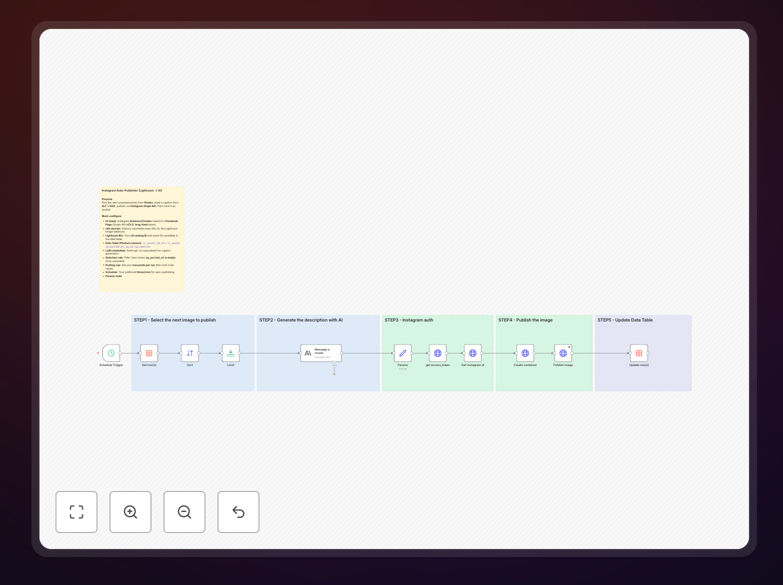
What This Workflow Does
This automation solves a common pain point for photographers, content creators, and social media managers: the tedious, manual process of posting edited photos from Adobe Lightroom to Instagram. It pulls the next photo from a queue, generates a human-sounding caption using AI (based on the image's metadata and alt text), uploads it via the Instagram Graph API, and marks it as posted.
The workflow ensures your Instagram feed stays active and consistent without daily manual effort. It's designed to work alongside two companion workflows: one that queues photos from Lightroom Cloud with AI-generated alt text, and another that serves images via a webhook. Together, they create a complete, hands-free publishing pipeline.
Beyond saving time, this automation helps maintain a professional brand presence. Consistent posting is key to audience growth and engagement, and AI-generated captions can be tuned to match your brand voice, ensuring every post feels personal and authentic.
How It Works
Step 1: Trigger & Queue Check
The workflow starts on a schedule (cron or interval trigger). It checks a Data Table for the next photo ready to post, filtering by status (e.g., "ready"). This queue system allows you to batch-prepare content and let automation handle the publishing cadence.
Step 2: AI Caption Generation
Using an AI node (like Anthropic's Claude or OpenAI), the workflow generates a caption. It combines the photo's alt text (which can also be AI-generated), metadata (location, time), and your predefined caption rules (tone, length, hashtag policy, call-to-action style). The result is a unique, engaging caption for each post.
Step 3: Image Retrieval & Preparation
The workflow fetches the image from a designated webhook endpoint (the companion "Lightroom Image Webhook" workflow). This ensures the image is in a format Instagram accepts (JPEG) and is publicly accessible for the API upload.
Step 4: Instagram Graph API Post
Using your Instagram Business/Creator account credentials and access token, the workflow uploads the image and caption via the official Instagram Graph API. This is the stable, sanctioned method for programmatic posting, avoiding unofficial methods that might break.
Step 5: Status Update & Logging
Once the post is successful, the workflow updates the Data Table record with the posted timestamp and the Instagram media ID. This keeps your queue clean and provides a log for tracking what has been published.
Who This Is For
This template is ideal for photographers, visual artists, influencers, and brands that regularly share curated visuals on Instagram. If you use Adobe Lightroom for editing and want to maintain a consistent, high-quality Instagram presence without the daily grind of manual posting, this automation is for you.
Small businesses that rely on visual storytelling—like restaurants, travel agencies, fashion brands, or real estate agencies—can also benefit. It allows a team member to queue edited photos during the week, and the system publishes them at optimal times, keeping the social media feed fresh and professional.
Content creators managing multiple accounts or themes can use separate queues and workflows to automate different content streams (e.g., personal photography vs. client work).
What You'll Need
- An Instagram Business or Creator Account with access to the Graph API.
- A valid Instagram Graph API Access Token and your Instagram Account ID.
- An n8n instance (cloud or self-hosted) with the HTTP Request, Set, Data Table, and AI nodes available.
- The companion workflows: "Lightroom Cloud → Photos Queue (AI Alt Text)" and "Lightroom Image Webhook (Direct JPEG for Instagram)" to create a full pipeline.
- Basic understanding of n8n to configure the schedule, caption rules, and API credentials.
Quick Setup Guide
- Download and Import: Click the download button above to get the JSON file. Import it into your n8n workspace.
- Configure Instagram API: In the Instagram Graph API node, enter your access token and account ID. Ensure your Instagram account is set up as a Business or Creator account.
- Set Up Your Data Table: Create a Data Table with columns for image URL, alt text, status, and posted timestamp. Populate it with your queued photos.
- Adjust the Schedule: Modify the Schedule Trigger node to match your desired posting frequency (e.g., daily at 9 AM).
- Customize AI Caption Rules: In the AI node, adjust the prompt to match your brand voice, desired caption length, and hashtag strategy.
- Test and Activate: Run the workflow once manually to verify the posting works. Then activate the schedule and let it run automatically.
Key Benefits
Save 5–10 hours per month by eliminating manual photo selection, export, upload, caption writing, and posting.
Maintain perfect posting consistency, which is critical for Instagram algorithm favorability and audience retention.
Ensure brand-aligned captions with AI that can be tuned to your specific tone, avoiding repetitive or bland text.
Scale your content output without increasing your workload—queue photos during editing sessions, automate the publishing.
Gain reliable, API-based posting using Instagram's official Graph API, avoiding unstable third-party methods.
Pro tip: Use the companion "Lightroom Cloud → Photos Queue" workflow to automatically add newly edited photos to your Data Table with AI-generated alt text. This creates a fully automated pipeline from Lightroom edit to Instagram post.