n8n Ollama AI RAG PGVector Local AI

Local Document Question Answering with Ollama AI, Agentic RAG & PGVector

Fully local implementation of Agentic RAG (Retrieval Augmented Generation) for document question answering without cloud dependencies

Download Template JSON · n8n compatible · Free
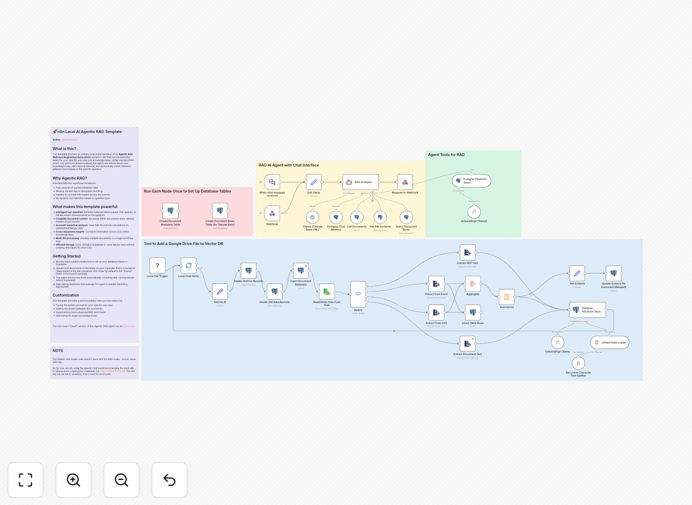
Local document question answering workflow diagram showing Ollama AI, RAG architecture and PGVector integration

What This Workflow Does

This n8n workflow template implements a complete local document question answering system using cutting-edge AI technologies while maintaining full data privacy. It combines Ollama AI for local LLM processing, Agentic RAG (Retrieval Augmented Generation) architecture for context-aware responses, and PGVector for efficient semantic search across your documents.

The system allows you to upload documents (PDFs, Word files, text) and ask natural language questions about their content. Unlike cloud-based solutions, everything runs locally on your infrastructure, ensuring sensitive data never leaves your environment. This is particularly valuable for legal, healthcare, and financial organizations with strict data governance requirements.

How It Works

1. Document Ingestion

The workflow first processes uploaded documents by extracting text content and breaking it into semantically meaningful chunks. These chunks are then converted into vector embeddings using a local embedding model through Ollama.

2. Vector Storage

The generated embeddings are stored in PGVector, an open-source vector similarity search for PostgreSQL. This creates a searchable knowledge base where documents are represented numerically based on their semantic meaning.

3. Question Processing

When a user submits a question, the system converts it into an embedding using the same model. PGVector then performs a similarity search to find the most relevant document chunks based on semantic meaning rather than keyword matching.

4. Agentic RAG Response

The retrieved document chunks are fed to the local LLM (through Ollama) along with the original question. The Agentic RAG architecture enables the AI to reason about the context and generate accurate, well-supported answers while citing relevant source material.

Who This Is For

This solution is ideal for businesses that need to query internal documentation, research papers, or proprietary knowledge bases while maintaining complete data privacy. Common use cases include:

  • Legal firms analyzing case files and precedents
  • Healthcare organizations querying medical research
  • Financial institutions analyzing reports and regulations
  • Technical support teams searching knowledge bases
  • Research teams working with sensitive data

Pro tip: For optimal performance, run this workflow on a machine with at least 16GB RAM and a modern CPU (or GPU if available). The hardware requirements will vary based on the size of your document collection and the Ollama model you choose.

What You'll Need

  1. n8n instance (self-hosted or cloud)
  2. Ollama installed locally with at least one LLM model downloaded
  3. PostgreSQL database with PGVector extension enabled
  4. Basic understanding of n8n workflows (or willingness to learn)
  5. Documents in supported formats (PDF, DOCX, TXT)

Quick Setup Guide

  1. Download the template JSON file
  2. Import into your n8n instance (Settings → Workflows → Import)
  3. Configure the PostgreSQL/PGVector connection details
  4. Set up Ollama connection parameters (host, port, model name)
  5. Test with sample documents and questions
  6. Deploy as an API endpoint or integrate with your existing systems

Key Benefits

Complete data privacy - Unlike cloud-based solutions, your documents and queries never leave your infrastructure, eliminating compliance risks.

Cost-effective AI - Running locally avoids per-query pricing models of commercial APIs, making it economical for high-volume usage.

Customizable knowledge - The system learns from your specific documents, providing more relevant answers than generic AI assistants.

Transparent sourcing - Answers include references to source document sections, enabling verification and deeper research.

Future-proof architecture - The modular design allows swapping components (LLMs, vector DBs) as better options emerge.

Frequently Asked Questions

Common questions about local AI document processing and RAG systems

Agentic RAG enhances traditional Retrieval Augmented Generation by adding reasoning capabilities. While standard RAG simply retrieves and summarizes content, Agentic RAG enables the AI to evaluate multiple document chunks, compare conflicting information, and synthesize more nuanced answers. This results in higher quality responses that better understand context and relationships between concepts.

For example, when analyzing legal documents, an Agentic RAG system might recognize when two precedents conflict and explain the differences, rather than just presenting both without analysis. The agentic component adds a layer of critical thinking that mimics how human experts process information.

Ollama provides an easy-to-use framework for running large language models locally with optimized performance. It handles model downloads, GPU acceleration (when available), and provides a simple API interface. Unlike cloud-based LLMs, Ollama keeps all processing on your hardware, ensuring data never leaves your control.

Ollama supports a wide range of open-source models (like Llama 2, Mistral, and others) that can be fine-tuned for specific domains. A healthcare organization might use a medically-trained model, while a legal firm could use one optimized for case law analysis. This specialization improves answer quality for professional use cases.

PGVector enables semantic search by storing document content as vector embeddings - numerical representations of meaning. When searching, it finds documents with similar vector patterns rather than just matching keywords. This allows the system to understand queries like "papers about sustainable urban development" even if those exact words don't appear in the documents.

Traditional databases rely on exact matches or simple text indexes. PGVector's approach captures conceptual relationships, finding relevant content even when terminology differs. For research applications, this means discovering connections between studies that use different phrasing for similar concepts.

The system handles structured and semi-structured documents including PDFs, Word files, and plain text. Technical manuals, research papers, legal documents, and knowledge base articles work particularly well. Documents with clear section headings and well-formed paragraphs yield the best results as the chunking process can maintain logical divisions.

Highly visual content (like infographics) or poorly scanned documents may require preprocessing. The system works best with text-heavy materials where semantic relationships between concepts are important for answering questions. Contracts, specifications, and technical documentation are ideal candidates.

For domain-specific questions based on your documents, local RAG systems often outperform general-purpose AI services. Commercial APIs are trained on public data and may lack deep knowledge of your specialized content. This system grounds all answers directly in your source materials, reducing hallucinations and improving relevance.

Accuracy depends on your document quality and the chosen local LLM. While commercial services use larger models, their generic training can be a disadvantage for specialized queries. A properly configured local system with domain-relevant documents typically provides more precise, verifiable answers for professional use cases.

Yes, the system can process documents and answer questions in multiple languages, depending on the capabilities of the chosen Ollama model. Many modern open-source LLMs support multilingual operation, and PGVector's semantic search works across languages by comparing meaning rather than literal translations.

For best results, use a model specifically trained for your target languages. The system can handle mixed-language document collections, answering English questions about French documents (for example) if the model has strong translation capabilities. This makes it valuable for international organizations with multilingual knowledge bases.

Absolutely! GrowwStacks specializes in building tailored AI automation solutions for businesses. While this template provides a solid foundation, we can develop custom implementations with additional features like user authentication, document version control, approval workflows, and integration with your existing systems.

Our team can optimize the system for your specific document types, compliance requirements, and use cases. We handle everything from infrastructure setup to user interface design, creating a turnkey solution that fits seamlessly into your operations. Custom solutions often include performance tuning, ongoing maintenance, and staff training.

Need a Custom Local AI Document Processing Solution?

This free template is a starting point. Our team builds fully tailored automation systems for your specific needs.