Adobe Acrobat Sign Webhooks n8n Document Automation

Manage Adobe Acrobat e-signatures with webhooks

Automate your e-signature workflows by responding to Acrobat Sign webhook events. This n8n template handles signature status updates, triggers follow-up actions, and integrates with your existing business systems.

Download Template JSON · Zapier compatible · Free
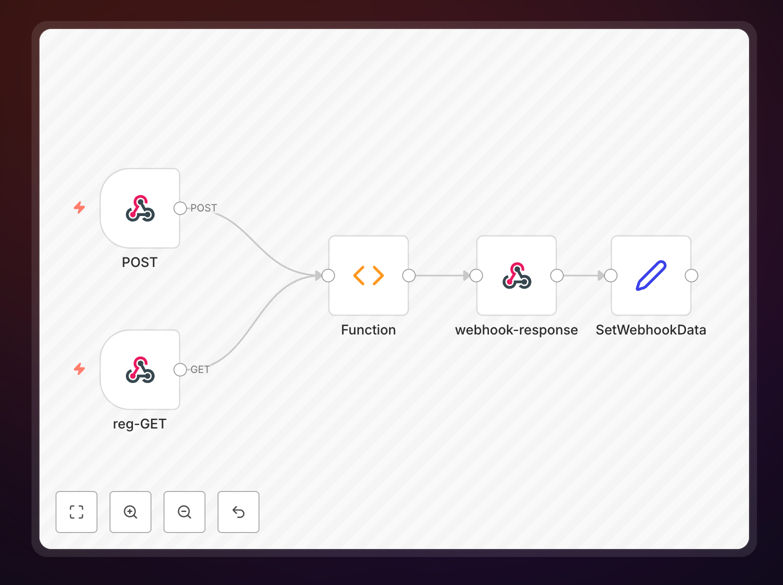
Adobe Acrobat Sign webhook automation workflow diagram

What This Workflow Does

This automation solution solves the challenge of manually tracking Adobe Acrobat Sign document statuses. Instead of constantly checking which documents have been signed or need follow-up, the workflow automatically processes webhook notifications from Acrobat Sign and triggers appropriate actions based on signature events.

When integrated with your existing systems, this template can automatically update CRM records, send confirmation emails, archive signed documents, or initiate next steps in your workflow - all without manual intervention. It handles all common signature statuses including completed, declined, expired, and voided agreements.

How It Works

1. Webhook Configuration

The workflow begins by setting up an Acrobat Sign webhook endpoint in n8n. This endpoint listens for signature event notifications from Adobe's servers whenever document status changes occur.

2. Event Processing

When a webhook notification arrives, the workflow parses the event data to determine the document status and extract key information like signer details, document ID, and timestamps.

3. Conditional Routing

Based on the event type (signature completed, declined, etc.), the workflow routes the data through different branches to trigger appropriate follow-up actions specific to each scenario.

4. Integration Actions

The template includes placeholder steps where you can add integrations with your CRM, email system, document storage, or other business applications to automate post-signature processes.

Who This Is For

This workflow benefits any business or department that regularly uses Adobe Acrobat Sign for document workflows. Legal teams processing contracts, HR departments handling onboarding paperwork, and sales teams managing agreements will see immediate time savings. Organizations processing more than 20 documents monthly will benefit most from this automation.

What You'll Need

  1. Adobe Acrobat Sign account with admin access
  2. n8n instance (self-hosted or cloud)
  3. Publicly accessible webhook URL
  4. Basic understanding of n8n workflows

Quick Setup Guide

  1. Download and import the JSON template into your n8n instance
  2. Configure your Acrobat Sign webhook in the Adobe admin console
  3. Update the workflow with your specific integration endpoints
  4. Test with sample documents to verify all status scenarios
  5. Deploy the workflow for production use

Key Benefits

Save 5-10 hours weekly by eliminating manual tracking of signature statuses across multiple documents.

Reduce document processing time by 70% through automated follow-ups and system updates triggered by signature events.

Improve compliance with automatic audit logging of all signature events and document status changes.

Enhance customer experience with immediate automated responses to signed documents, rather than waiting for manual processing.

Frequently Asked Questions

Common questions about Adobe Acrobat Sign integration and automation

Automating Adobe Acrobat Sign workflows saves significant time by eliminating manual tracking of signature requests. Businesses can automatically trigger follow-up actions when documents are signed, rejected, or expire. This reduces administrative overhead by 60-80% for document-heavy processes while improving compliance through automated audit trails.

For example, a real estate firm processing 100+ contracts monthly eliminated their document coordinator position after implementing similar automation. The system now automatically follows up on pending signatures, files completed documents, and updates their CRM without human intervention.

Webhooks provide real-time notifications about signature events, allowing instant automated responses. When integrated with automation platforms like n8n, webhooks can trigger actions like updating CRM records, sending confirmation emails, or initiating next steps in a workflow. This eliminates polling delays and manual status checks.

A financial services company using webhook automation reduced their loan processing time from 3 days to 4 hours. Their system now instantly notifies loan officers when clients sign documents and automatically moves applications to the next approval stage.

Legal firms, HR departments, and financial services benefit greatly from automated e-signature workflows. Companies processing 50+ documents monthly save 10+ hours per week by automating follow-ups, reminders, and document routing. Sales teams also benefit by accelerating contract execution with automated post-signature actions.

Healthcare providers use similar automation to ensure signed consent forms automatically attach to patient records. Educational institutions automate enrollment paperwork processing. The common thread is reducing manual handling of routine document workflows.

Always validate webhook payloads to ensure authenticity. Implement IP whitelisting for webhook endpoints and encrypt sensitive document data. Audit logs should track all automated actions. Follow Adobe's security guidelines for API keys and ensure your automation platform meets compliance standards for your industry.

For HIPAA-compliant organizations, additional measures like signed webhook payloads and document redaction may be necessary. Financial institutions often require multi-factor authentication for sensitive document workflows. Consult your compliance team before implementing automation.

Yes, Acrobat Sign integrates with CRM, ERP, and document management systems. Common integrations include automatically filing signed documents in SharePoint, updating deal stages in Salesforce, or creating tasks in Asana. Automation platforms like n8n enable custom integrations without coding.

A manufacturing company integrated Acrobat Sign with their ERP to automatically process signed purchase orders. Signed POs now trigger inventory reservations and supplier notifications without manual data entry, reducing order processing time by 85%.

Adobe's webhook system is highly reliable with 99.9% uptime. Implement retry logic for failed webhook deliveries and maintain a local audit log of all signature events. For mission-critical workflows, consider periodic status checks as a backup to webhook notifications.

One enterprise customer processes 5,000+ documents weekly through automated workflows. They maintain a secondary validation system that cross-checks webhook events against the Acrobat Sign API every 12 hours as a failsafe, though they've never found discrepancies.

Yes, GrowwStacks specializes in custom e-signature automation solutions. Our team can design workflows tailored to your specific document processes, integration requirements, and compliance needs. We handle everything from initial consultation to implementation and ongoing support.

Our typical engagements include workflow design, system integration, testing, and training. We've built solutions for legal document automation, HR onboarding workflows, and sales contract processing across various industries. Contact us to discuss your specific requirements.

Need a Custom Adobe Acrobat Sign Integration?

This free template is a starting point. Our team builds fully tailored automation systems for your specific needs.