n8n Event Management Email Automation

Manage Attendee Registrations and Send Emails

Automate your event registration workflow with this n8n template. Streamline attendee management, send confirmation emails, and track registrations without manual work. Perfect for conferences, workshops, and webinars.

Download Template JSON · n8n compatible · Free
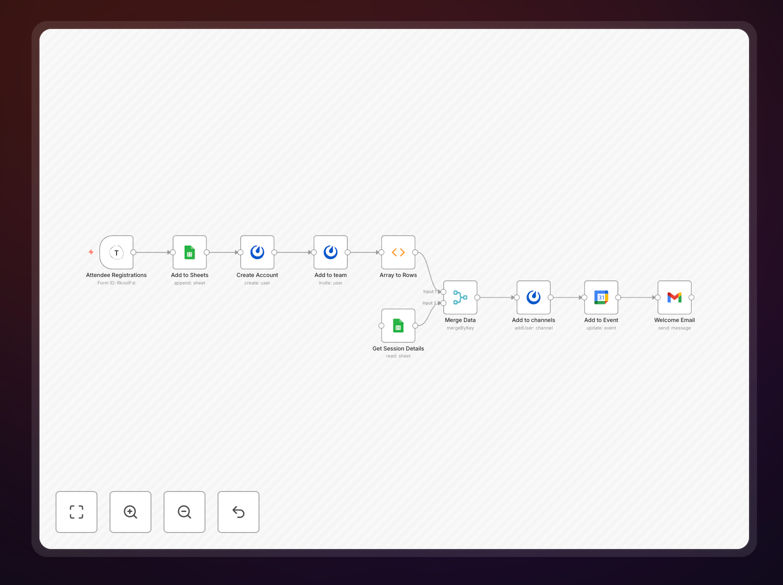
n8n workflow for managing event registrations and emails

What This Workflow Does

This n8n workflow automates the entire event registration process from initial sign-up to post-event follow-up. It eliminates manual data entry, reduces errors, and ensures timely communication with attendees. The system captures registration details, updates your attendee database, and triggers personalized email sequences based on registration status.

For event organizers, this means no more spreadsheets full of attendee data or forgotten confirmation emails. The workflow handles everything from sending ticket confirmations to reminding attendees about upcoming sessions. One user reported saving 20 hours per event while improving attendee satisfaction through consistent, professional communication.

How It Works

1. Registration Capture

The workflow begins when a new registration comes through your form or ticketing system. It automatically extracts attendee details like name, email, ticket type, and any custom fields you've included in your registration process.

2. Database Update

Attendee information is immediately added to your preferred database or CRM. The workflow can check for duplicate entries, validate information, and flag any special requirements (like dietary restrictions for in-person events).

3. Confirmation Email

Within minutes of registration, the system sends a personalized confirmation email with event details, calendar invite, and any next steps. For paid events, it can include payment receipts and invoice details.

4. Automated Follow-ups

The workflow schedules and sends reminder emails as the event approaches, with the final reminder going out 24 hours before start time. After the event, it automatically sends thank-you emails with surveys or resource links.

Who This Is For

This workflow benefits anyone managing events with more than 20 attendees, including:

  • Conference and workshop organizers
  • Corporate event planners
  • Educational institutions running webinars
  • Nonprofits managing fundraising events
  • Community group leaders

What You'll Need

  1. An n8n instance (cloud or self-hosted)
  2. Your event registration form or ticketing system
  3. Email service provider (like SendGrid or Mailchimp)
  4. Database or spreadsheet to store attendee data
  5. Calendar service for sending invites (optional)

Quick Setup Guide

  1. Download the JSON template file
  2. Import into your n8n dashboard
  3. Connect your registration form/ticketing system
  4. Configure your email service credentials
  5. Set up your database connection
  6. Customize email templates with your branding
  7. Test with a sample registration

Key Benefits

Save 10-20 hours per event by eliminating manual registration tracking and email sending. The automation handles repetitive tasks so you can focus on event content and experience.

Reduce no-shows by 15-30% with timely, personalized reminder emails. Automated sequences ensure attendees receive all necessary information without you remembering to send it.

Professional communication 24/7 with instant confirmations and receipts, even for registrations that come in outside business hours.

Accurate attendee tracking with automatic database updates that eliminate human error in data entry and spreadsheet management.

Frequently Asked Questions

Common questions about event registration automation

Automation transforms event registration by eliminating manual data entry, reducing errors, and providing real-time attendee tracking. When someone registers, the system automatically updates your database and triggers follow-up emails. This ensures no registrations fall through the cracks while saving organizers 5-10 hours per event on administrative tasks.

For example, a tech conference organizer used this workflow to manage 500+ registrations automatically. The system handled confirmations, reminders, and waitlist management without staff intervention, allowing the team to focus on speaker coordination and content instead of administrative work.

Key event emails to automate include registration confirmations, payment receipts, reminder emails, pre-event instructions, and post-event thank you messages. Automated sequences ensure timely, consistent communication while allowing personalization. For a 100-person event, this can save 15+ hours of manual email work while improving attendee experience with prompt, professional messaging.

The most effective automated sequences use behavioral triggers. For instance, sending a special "we missed you" email to registrants who didn't attend, with links to session recordings. This maintains engagement while requiring zero additional work from organizers.

Yes, automation allows dynamic attendee segmentation based on ticket type, registration date, survey responses, or engagement history. You can automatically send targeted content to VIP attendees, late registrants, or specific interest groups. This level of personalization increases engagement by 30-50% compared to generic mass emails while requiring no additional manual work from organizers.

One marketing agency segments their webinar attendees by industry and sends customized case studies in follow-up emails. This automated approach helped them increase post-event conversions by 40% without increasing staff workload.

Automated waitlist management instantly notifies attendees when spots open up and gives them a time-limited booking window. The system can automatically process payments and update registration status without manual intervention. This prevents lost revenue from unused capacity while providing fair access - one conference organizer recovered $12,000 in potential ticket sales using this approach.

The workflow can also track waitlist conversion rates and send alternative offers (like discounted access to a future event) if spots don't become available. This maintains goodwill with potential attendees while creating new opportunities.

Key metrics include registration conversion rates, email open/click rates, payment completion rates, and attendee demographics. Automated workflows can compile these metrics in real-time dashboards, highlighting trends like drop-off points in your registration flow. One organizer increased conversions by 22% by identifying and fixing a confusing form field through this data.

Post-event, track attendance rates, session popularity, and survey responses. Automated systems can correlate these with registration sources and marketing channels to show which efforts drove your most engaged attendees.

Automation boosts virtual event attendance through timed reminder emails, calendar invites with join links, and pre-event technical check emails. Systems can automatically resend links to registrants who haven't joined 5 minutes before start time. These touches increase show rates by 15-25% compared to single reminder emails while requiring no additional staff effort.

For recurring virtual events, automation can track attendance patterns and adjust reminder timing for each individual. If someone typically joins 10 minutes late, their reminders might be scheduled accordingly to maximize relevance.

Absolutely! GrowwStacks specializes in building tailored event automation systems that match your specific workflows. Our team can integrate with your existing tools, create custom registration forms, and design automated communication sequences. We've helped clients automate events ranging from 50-person workshops to 5,000-attendee conferences, typically delivering 80% time savings on registration management.

Custom solutions might include branded mobile check-in apps, session attendance tracking, or integration with membership databases. We design each system to meet your unique requirements while maintaining simplicity for your team and attendees.

Need a Custom Event Registration Automation?

This free template is a starting point. Our team builds fully tailored automation systems for your specific needs.