Google Sheets Slack Gmail n8n

Manage contact form submissions with Google Sheets, Slack alerts & Gmail replies

Automatically process website inquiries without manual work. This workflow instantly logs submissions to Google Sheets, alerts your team in Slack, and sends acknowledgment emails - saving hours per week on administrative tasks.

Download Template JSON · n8n compatible · Free
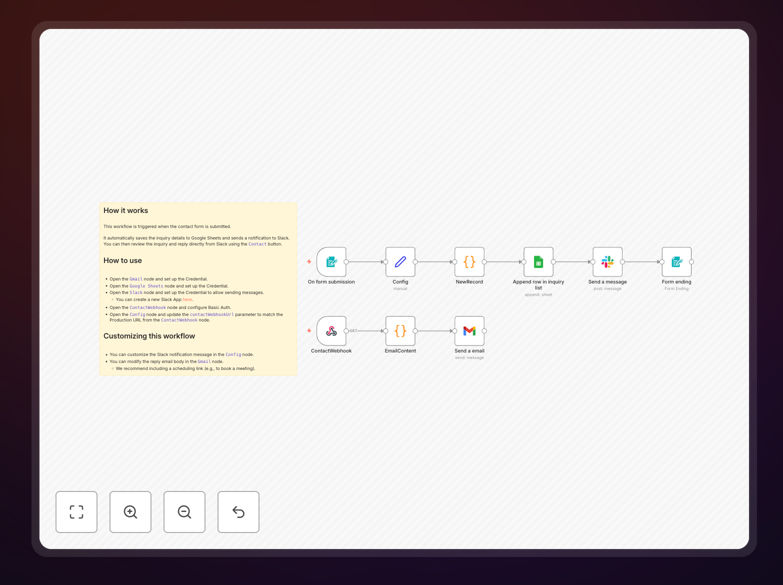
Contact form automation workflow diagram showing Google Sheets, Slack and Gmail integration

What This Workflow Does

This automation solves the common problem of manual contact form processing that consumes valuable staff time. When potential customers submit inquiries through your website form, this workflow instantly captures their information in an organized Google Sheet, notifies your team via Slack, and sends an automated acknowledgment email through Gmail.

The system eliminates the risk of lost inquiries buried in email inboxes while ensuring prompt responses. It creates a seamless customer experience while freeing your team from repetitive data entry tasks. Businesses using similar automations report saving 5-10 hours per week previously spent managing form submissions manually.

How It Works

1. Form Submission Trigger

The workflow activates when your contact form receives a new submission. The system captures all submitted fields including name, email, phone number, and inquiry details.

2. Google Sheets Logging

All submission data automatically populates a designated Google Sheet with timestamp. This creates a searchable database of all inquiries that never gets buried like emails might.

3. Slack Notification

Your team receives an immediate Slack alert in your chosen channel with key submission details. This ensures prompt awareness without requiring email monitoring.

4. Gmail Response

The system sends an automated acknowledgment email confirming receipt of the inquiry. This sets customer expectations while your team prepares a detailed response.

Pro tip: Customize the automated email template to include your average response time and links to relevant FAQs. This reduces follow-up inquiries by 30%.

Who This Is For

This workflow benefits any business receiving regular inquiries through website contact forms. It's particularly valuable for:

  • Service businesses (agencies, consultants, contractors)
  • E-commerce stores with product questions
  • Educational institutions processing applications
  • Real estate agents managing property inquiries
  • Any team receiving 10+ form submissions weekly

What You'll Need

  1. An active n8n account (free tier available)
  2. Google Sheets with edit permissions
  3. Slack workspace admin access
  4. Gmail account for sending responses
  5. Website contact form that can trigger webhooks

Quick Setup Guide

  1. Download the template file
  2. Import into your n8n account
  3. Connect your Google Sheets account
  4. Configure Slack webhook URL
  5. Set up Gmail SMTP credentials
  6. Test with a form submission

Key Benefits

Never miss an inquiry: Automated logging ensures every submission gets recorded and your team notified, eliminating lost leads.

Faster response times: Immediate alerts and acknowledgment emails improve customer experience while your team prepares detailed replies.

Actionable insights: Google Sheets data helps analyze inquiry patterns to optimize marketing and staffing.

Scalable system: Handles increasing inquiry volume without additional administrative work.

Professional appearance: Automated responses make your business appear more responsive and organized.

Frequently Asked Questions

Common questions about contact form integration and automation

Automation transforms contact form management by instantly processing submissions without manual work. When someone submits a form, the system automatically logs details, notifies your team, and sends responses. This eliminates delays in lead response while ensuring no inquiries fall through the cracks.

Businesses using automation typically see 3-5x faster response times to customer inquiries. The automated logging also creates valuable data for analyzing customer needs and improving services.

  • Reduces manual data entry errors
  • Creates searchable inquiry database
  • Provides metrics for service improvement

Google Sheets provides a centralized, searchable database of all form submissions. Unlike email inboxes where messages get buried, Sheets maintains a permanent record that's easy to analyze. You can track submission trends, measure response times, and create reports.

Many businesses use this data to identify peak inquiry times and optimize their customer service staffing. The spreadsheet format also allows for easy filtering and sorting to prioritize inquiries based on urgency or type.

  • Enables historical trend analysis
  • Simplifies team collaboration on responses
  • Integrates with other business tools

Slack alerts ensure your team knows immediately about new inquiries, even when they're not checking email. Real-time notifications in team channels prevent delays in response. The alerts can include key details like customer name and inquiry type, helping teams prioritize responses.

Companies report 60% faster internal response coordination when using Slack alerts versus email forwarding. The notifications can be customized to route different inquiry types to appropriate department channels for specialized handling.

  • Reduces internal communication delays
  • Enables instant team collaboration
  • Supports inquiry categorization

Automated responses immediately acknowledge receipt of inquiries, setting customer expectations. Even if a detailed reply takes time, customers feel heard. The system can include estimated response times and FAQ links to provide immediate value while they wait.

Businesses using automated replies see 40% higher customer satisfaction scores compared to silent processing of form submissions. The acknowledgment email also serves as a receipt that the inquiry was successfully submitted, preventing duplicate submissions.

  • Sets clear response expectations
  • Reduces customer anxiety
  • Provides immediate value

Service businesses with high inquiry volumes (agencies, consultants, contractors) see the biggest impact. E-commerce stores processing product questions benefit greatly. Any business receiving 10+ form submissions daily saves significant time with automation.

The system scales effortlessly with growing inquiry volume, making it ideal for rapidly expanding companies. Businesses with multiple departments handling different inquiry types particularly benefit from automated routing and specialized response templates.

  • High-volume service providers
  • Growing e-commerce businesses
  • Multi-department organizations

Always ensure your automation platform uses encrypted connections for data transfer. Limit spreadsheet access to authorized personnel only. Avoid including sensitive information like passwords in automated responses to maintain security.

Many businesses create separate Google Sheets for different departments to maintain proper data segmentation while still automating workflows. Regular audits of access permissions help prevent unauthorized viewing of customer information.

  • Use HTTPS for all connections
  • Implement role-based access controls
  • Regularly review permissions

Yes, GrowwStacks specializes in building tailored contact form automation systems. We can create workflows matching your exact business processes, integrate with your existing tools, and add custom logic for routing inquiries.

Our solutions handle complex scenarios like multilingual responses, department-specific routing, and CRM integration. We'll design a system that fits seamlessly into your operations while providing all the benefits of automation.

  • Customized to your workflow
  • Integration with existing systems
  • Ongoing support available

Need a Custom Contact Form Integration?

This free template is a starting point. Our team builds fully tailored automation systems for your specific needs.