What This Workflow Does
When a system goes down or a security incident occurs, every minute counts. Manual incident response is slow, error-prone, and leads to extended downtime. This automation workflow eliminates the chaos by automatically executing your custom incident response playbook across PagerDuty, Jira, and team communication channels.
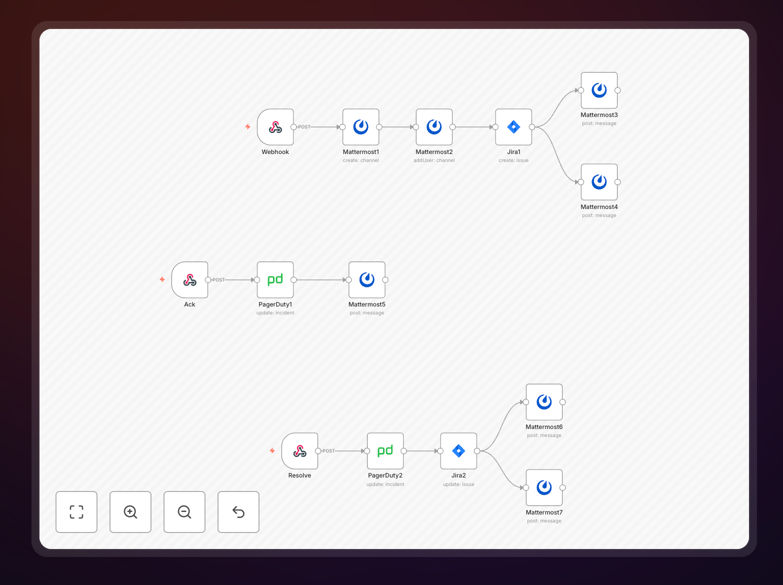
The workflow consists of three integrated sub-workflows that trigger when incidents are created, acknowledged, and resolved in PagerDuty. It creates dedicated discussion channels for the on-call team, generates Jira tickets with full incident context, updates status across all systems, and ensures everyone has the right information at the right time—without manual intervention.
How It Works
1. Incident Detection & Initial Response
When PagerDuty detects an incident, a webhook triggers the workflow. The system immediately creates a dedicated Mattermost channel for the on-call team with buttons to acknowledge or resolve the incident. This ensures immediate team coordination without searching through general channels.
2. Ticket Creation & Documentation
The workflow automatically creates a Jira ticket with all incident details: severity, service affected, timeline, and assigned team members. This eliminates the manual copy-paste process that often delays documentation and creates inconsistencies in ticket information.
3. Status Synchronization
When team members acknowledge or resolve the incident through Mattermost buttons, the workflow updates PagerDuty status and transitions the Jira ticket accordingly. This maintains a single source of truth across all systems, preventing confusion about incident state.
4. Resolution & Follow-up
Once resolved, the workflow can trigger post-mortem documentation processes, notify stakeholders, and archive the discussion channel. This completes the incident lifecycle with proper closure and learning documentation.
Who This Is For
This automation is ideal for DevOps teams, SREs (Site Reliability Engineers), IT operations managers, and security teams managing on-call rotations. Companies with 24/7 services, SaaS platforms, e-commerce sites, or any business where system downtime directly impacts revenue will benefit most. If your team spends more than 15 minutes manually coordinating during incidents, this workflow will save significant time and reduce errors.
What You'll Need
- PagerDuty account with API access configured
- Jira instance (Cloud or Server) with project permissions
- Mattermost workspace or similar team communication platform
- n8n instance (self-hosted or cloud) running version 0.200 or later
- Webhook endpoints configured in PagerDuty for incident events
Pro tip: Start with a non-critical service for your first implementation. This allows you to test the workflow thoroughly without risking production incidents. Once validated, expand to other services gradually.
Quick Setup Guide
- Download the template using the button above and import it into your n8n instance
- Configure credentials for PagerDuty, Jira, and Mattermost in n8n's credentials management
- Set up webhooks in PagerDuty to point to your n8n webhook URLs for incident events
- Customize the Jira project and ticket fields to match your organization's workflow
- Test with a simulated incident to ensure all connections work correctly
- Deploy to production and monitor the first few real incidents closely
Key Benefits
Reduce mean time to resolution (MTTR) by 40-60%. Automated playbook execution eliminates manual coordination delays, getting systems back online faster.
Eliminate human error in incident documentation. Automatic Jira ticket creation ensures consistent, complete information every time, improving post-mortem analysis.
Improve team satisfaction and reduce burnout. Structured automation reduces the chaos of incident response, making on-call rotations less stressful for engineers.
Create audit trails for compliance requirements. Every action is automatically logged across systems, providing clear documentation for security and compliance audits.
Scale incident response without adding headcount. As your systems grow, automation handles increased incident volume without requiring proportional team growth.