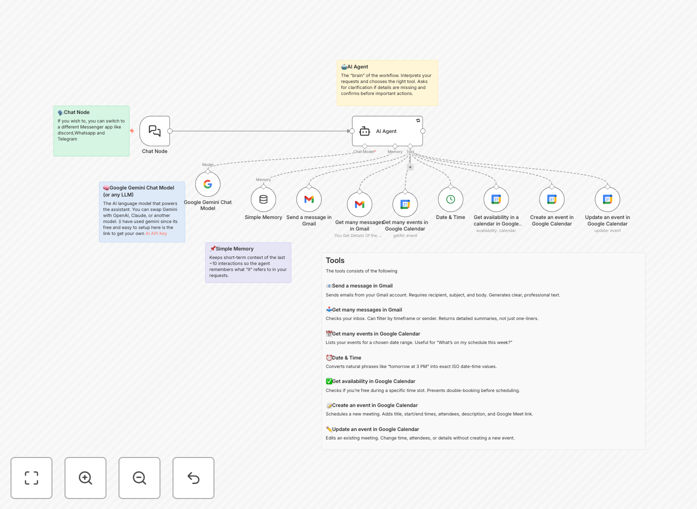
What This Workflow Does
This automation transforms how you manage your schedule and communications by deploying an AI assistant that understands natural language commands. Instead of manually switching between Google Calendar and Gmail, you can simply ask the assistant to "schedule a meeting with Sarah tomorrow at 3 PM" or "check my emails from this morning and summarize them." The AI interprets your request, checks availability, creates calendar events, sends email invitations, and follows up—all while maintaining professional communication standards.
For busy professionals, entrepreneurs, and teams, this eliminates the administrative overhead of coordination. The system includes built-in guardrails that prevent double-booking, ask for clarification when details are missing, and confirm actions before executing them. It's like having a full-time virtual assistant dedicated to your calendar and email management, available 24/7 without the cost of human staffing.
How It Works
1. Natural Language Interpretation
The AI Agent node serves as the "brain" of the workflow. It processes your plain English requests (like "What's on my calendar next week?" or "Email the team about the project update") and determines which tools to use based on the context and available parameters.
2. Calendar Intelligence
Google Calendar nodes check your availability, list upcoming events, create new meetings with proper titles, times, attendees, and Google Meet links, and update existing events when changes are needed. The Date & Time node converts natural phrases like "tomorrow at 3 PM" into precise ISO timestamps.
3. Email Management
Gmail nodes handle sending professional emails with clear subjects and bodies, retrieving recent messages with filtering options, and generating summaries rather than just raw data. The AI ensures emails are properly formatted and contextually appropriate.
4. Context Preservation
A Simple Memory node maintains short-term context of the last 10-15 interactions, allowing the assistant to remember what "it" refers to in ongoing conversations and maintain continuity across multiple requests.
5. Execution with Guardrails
Before taking any action that creates data or notifies others, the assistant confirms its plan with you. If information is missing (timezone, duration, attendees), it asks clarifying questions rather than guessing, ensuring accuracy and preventing errors.
Who This Is For
This template is ideal for busy professionals who spend hours each week on scheduling and email management. Consultants and freelancers who need to coordinate with multiple clients will find it invaluable for reducing administrative overhead. Small business teams can use it to streamline internal meeting coordination without constant back-and-forth emails. Executives and managers who need to protect their time while remaining accessible will appreciate the intelligent scheduling capabilities. Even solopreneurs can benefit from having an always-available assistant to handle client communications and calendar management.
What You'll Need
- A self-hosted or cloud n8n instance
- Google Workspace or Gmail account with API access enabled
- Google Calendar API credentials (OAuth2)
- Gmail API credentials (OAuth2)
- AI model API key (Google Gemini, OpenAI GPT, or another supported LLM)
- Basic understanding of n8n interface and credential setup
Pro tip: Start with a test Google account before connecting your primary work account. This lets you verify the automation works correctly without risking your actual calendar and email data.
Quick Setup Guide
- Download and import the JSON template into your n8n instance
- Create OAuth2 credentials for Google Calendar and Gmail in the Google Cloud Console
- Add these credentials to the corresponding nodes in the workflow
- Configure your AI model node (Gemini, GPT, etc.) with your API key
- Update default values: your calendar email ID, preferred timezone, and default conference solution
- Test with simple queries like "What meetings do I have today?" or "Schedule a 30-minute catch-up with Alex tomorrow"
- Gradually expand to more complex requests as you gain confidence in the system
Key Benefits
Save 5-10 hours weekly by eliminating manual scheduling and email triage. The AI handles the time-consuming coordination work, freeing you for revenue-generating activities.
Never double-book or miss meetings with intelligent availability checking and conflict prevention. The system maintains a single source of truth for your schedule.
Improve professional responsiveness with instant, accurate scheduling and email handling. Clients and colleagues get timely responses even when you're focused on other work.
Reduce administrative errors through systematic guardrails and confirmation steps. The AI asks for clarification rather than making assumptions with incomplete information.
Scale your availability without scaling your workload. The assistant can handle increasing scheduling demands without requiring additional time from you.