ConvertKit Email Marketing Automation n8n Subscriber Management

Automate ConvertKit Subscriber Management

Free n8n workflow to automate subscriber segmentation, tagging, and lifecycle management. Save hours on manual email list administration.

Download Template JSON · n8n compatible · Free
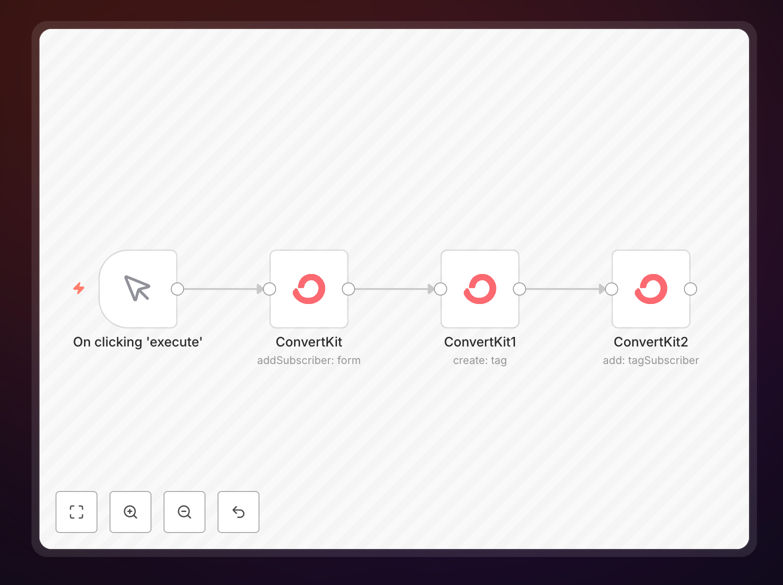
ConvertKit subscriber management automation workflow interface showing segmentation and tagging logic

What This Workflow Does

Manual subscriber management in ConvertKit consumes valuable marketing hours—tagging new leads, segmenting audiences, updating fields, and managing lifecycle stages. This automation eliminates those repetitive tasks by automatically processing subscriber data based on triggers from your website, e-commerce platform, CRM, or other systems.

The workflow intelligently routes subscribers to appropriate segments, applies relevant tags, updates custom fields, and triggers targeted email sequences—all without manual intervention. It ensures your email list stays organized, segmented, and ready for personalized marketing campaigns.

How It Works

1. Subscriber Data Ingestion

The workflow receives subscriber data from various sources: form submissions, purchase data, webinar registrations, or API calls. It validates and standardizes the information before processing.

2. Intelligent Segmentation Logic

Based on predefined rules (purchase history, engagement level, lead source, etc.), the workflow determines the appropriate ConvertKit segment, tag, or sequence for each subscriber.

3. ConvertKit API Integration

The workflow interacts with ConvertKit's API to create/update subscribers, apply tags, add to forms or sequences, and update custom fields with the processed data.

4. Error Handling & Logging

Comprehensive error handling ensures failed operations are logged and retried, with notifications sent to your team if critical issues arise.

Pro tip: Start with 3-5 key segmentation rules based on your most important customer behaviors, then expand as you see what data drives the best email performance.

Who This Is For

This automation is ideal for digital marketers, course creators, SaaS companies, e-commerce brands, and agencies managing ConvertKit lists with 1,000+ subscribers. It's particularly valuable for businesses experiencing list growth that makes manual management impractical, teams running complex email marketing campaigns with multiple segments, or companies integrating ConvertKit with other business systems.

What You'll Need

  1. A ConvertKit account with API access enabled
  2. n8n instance (self-hosted or cloud)
  3. Source systems configured (forms, e-commerce, CRM, etc.)
  4. Clear segmentation rules and tagging structure
  5. API credentials for any additional integrated services

Quick Setup Guide

  1. Download the template using the button above
  2. Import the JSON file into your n8n instance
  3. Configure the ConvertKit node with your API credentials
  4. Set up your trigger (webhook, schedule, or app trigger)
  5. Customize the segmentation logic to match your business rules
  6. Test with sample data, then activate the workflow

Key Benefits

Save 5-10 hours weekly by eliminating manual subscriber management tasks. Marketing teams can focus on strategy and content creation instead of administrative list maintenance.

Improve segmentation accuracy to 99% with automated rules that apply consistently across all subscribers. No more human error in tagging or categorization.

Ensure timely follow-ups by automatically triggering welcome sequences, re-engagement campaigns, or post-purchase flows based on real-time subscriber actions.

Maintain data hygiene with automated processes to clean bounced emails, update inactive statuses, and merge duplicate records—keeping your list healthy and deliverability high.

Scale effortlessly as your list grows from hundreds to hundreds of thousands without adding manual labor or complexity to your email marketing operations.

Frequently Asked Questions

Common questions about ConvertKit automation and integration

Automating ConvertKit subscriber management saves 5-10 hours weekly by eliminating manual list updates, improves segmentation accuracy to 99%, ensures consistent follow-up sequences, and reduces human error in tagging and categorization. This leads to higher email engagement and better conversion rates.

Beyond time savings, automation enables sophisticated personalization at scale. You can trigger different email sequences based on specific subscriber behaviors, purchase history, or engagement levels—something impractical to manage manually as your list grows.

Automation improves email marketing ROI by delivering timely, personalized content based on subscriber behavior. Automated segmentation ensures subscribers receive relevant offers, increasing open rates by 20-40% and click-through rates by 15-30%. It also reduces list fatigue by preventing irrelevant emails.

By automating lifecycle management, you recover potentially lost revenue from abandoned carts, inactive subscribers, or missed follow-ups. The system works 24/7 to nurture leads through your funnel without manual intervention.

You can automate subscriber tagging based on form submissions, purchase history, or engagement levels; segment subscribers into lists automatically; trigger welcome sequences or re-engagement campaigns; update subscriber fields from external data sources; and clean inactive subscribers based on engagement metrics.

Advanced automations can also score leads based on multiple interactions, route high-value subscribers to special sequences, sync subscriber data between ConvertKit and your CRM, and generate reports on segmentation performance.

n8n provides more advanced logic than ConvertKit's native automation, allowing multi-step workflows with conditional branching, integration with 300+ other apps for data enrichment, custom JavaScript transformations, and complex data processing that ConvertKit alone cannot handle. It's ideal for sophisticated marketing automation.

While ConvertKit's built-in automation works well for simple if-then rules, n8n enables workflows that combine data from multiple sources, perform calculations, make API calls to other services, and create dynamic content—all before updating ConvertKit subscribers.

Common data sources include e-commerce platforms (Shopify, WooCommerce), CRM systems (HubSpot, Salesforce), form builders (Typeform, Google Forms), webinar tools (Zoom, Demio), membership platforms, customer support systems, and custom databases. n8n connects them all to ConvertKit in real-time.

The key advantage is creating a unified subscriber profile by combining data from multiple touchpoints. For example, you might tag a subscriber as "high-value" based on their purchase history from Shopify combined with their webinar attendance from Zoom.

Maintain data quality by implementing validation rules in your automation, regularly syncing with source systems, setting up duplicate detection, creating hygiene workflows to remove bounced emails, and establishing clear tagging conventions. Automated data cleaning workflows can run weekly to keep lists fresh.

Consider implementing a data governance layer that standardizes field values, normalizes formatting, and flags anomalies. Regular audits of automation performance help identify areas where data quality might be degrading over time.

Yes, GrowwStacks specializes in custom ConvertKit automation solutions tailored to your specific business needs. We build workflows that integrate ConvertKit with your unique tech stack, implement advanced segmentation logic, create personalized customer journeys, and set up reporting dashboards to track performance.

Our team works with you to understand your marketing goals, subscriber lifecycle, and existing systems. We then design and implement automation that saves time while improving email marketing results. From simple tagging workflows to complex multi-channel nurturing sequences, we handle the technical implementation so you can focus on growing your business.

  • Integration with your specific tech stack
  • Custom segmentation logic based on your business rules
  • Ongoing optimization and support

Need a Custom ConvertKit Automation?

This free template is a starting point. Our team builds fully tailored automation systems for your specific business needs.