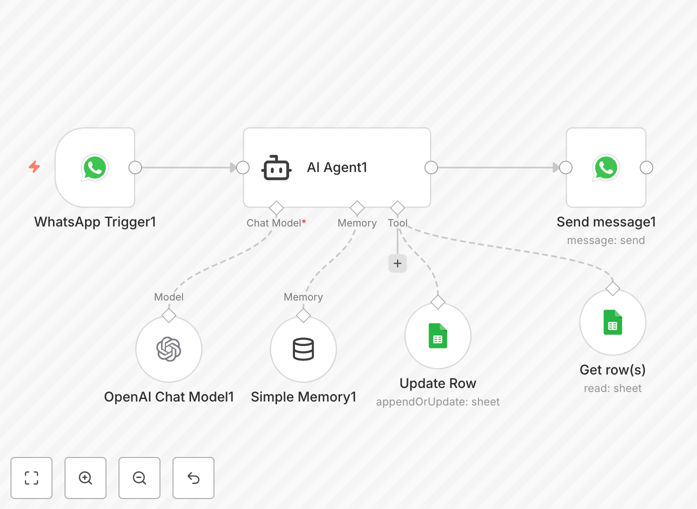
What This Workflow Does
This automation solves the chaotic back‑and‑forth of team task management. Instead of manually updating spreadsheets, scheduling status meetings, or sending endless follow‑up messages, your team can interact directly through WhatsApp. When a member sends a message like “Update project Alpha to 80% complete” or “What’s due this Friday?”, the AI agent interprets the request, fetches or updates the relevant data in Google Sheets, and sends a clear, actionable response back via WhatsApp.
The workflow turns WhatsApp into a conversational command center for your projects. It highlights overdue tasks, surfaces upcoming deadlines, and provides smart summaries—all without anyone needing to open a spreadsheet or project‑management tool. This eliminates data‑entry delays, reduces errors, and keeps everyone synchronized in real time.
How It Works
1. WhatsApp Message Trigger
When a team member sends a message to your dedicated WhatsApp Business number, the workflow instantly captures it. The trigger filters for relevant keywords (like “update,” “status,” “due,” “task”) to ensure only task‑related messages are processed.
2. AI Interpretation & Context
The message is passed to GPT‑4 (or another AI model), which understands natural language. The AI identifies the intent—whether it’s a status update, a deadline query, or a request to create a new task—and extracts key details (task name, progress percentage, due date, assignee).
3. Google Sheets Integration
The workflow connects to your Google Sheets task tracker. It searches for the relevant task row, updates the status, adds notes, or retrieves the requested information. All changes are logged with timestamps and user identifiers for full auditability.
4. Smart Response Generation
Based on the action taken, the AI crafts a concise, human‑like response. For example: “✅ Updated ‘Client Proposal’ to 90% complete. Next deadline: March 15.” This response is sent back via WhatsApp, closing the loop instantly.
Who This Is For
This template is ideal for teams and businesses that rely on quick, mobile‑friendly communication but need structured task tracking. It’s perfect for:
- Remote & hybrid teams who coordinate across time zones and need real‑time updates without meetings.
- Field service & sales teams who are on the move and report progress via mobile.
- Small business owners managing contractors or freelancers through WhatsApp groups.
- Project managers who want to reduce administrative overhead and keep spreadsheets automatically synced.
- Startups & agencies that use Google Sheets as their primary task tracker but want a more interactive interface.
What You’ll Need
- WhatsApp Business API account connected to n8n (or a service like Twilio for WhatsApp).
- OpenAI API key for GPT‑4 (or another supported AI model like Claude or Gemini).
- Google Sheets document with your task data (columns like Task, Status, Due Date, Assignee, Notes).
- n8n instance (cloud or self‑hosted) with internet access to the above services.
- Team WhatsApp numbers whitelisted to interact with the automation.
Quick Setup Guide
Follow these steps to import and configure the workflow in under 15 minutes:
- Download the template using the button above and import it into your n8n instance.
- Configure the WhatsApp trigger by adding your WhatsApp Business API credentials in the first node.
- Add your OpenAI API key in the AI Agent node, and optionally adjust the system prompt for your team’s tone.
- Connect the Google Sheets node by authenticating with Google and pasting your spreadsheet ID and sheet name.
- Map the fields to match your spreadsheet columns (Task, Status, Due Date, etc.).
- Test the workflow by sending a WhatsApp message like “What tasks are due this week?” and verify the response.
- Activate the workflow and share the WhatsApp number with your team.
Pro tip: Start with a small pilot group (3–5 people) to refine the AI’s responses and field mappings before rolling it out to the entire team. This helps catch edge cases and tailor the language to your team’s jargon.
Key Benefits
Save 5–15 hours per week on administrative coordination. No more manual spreadsheet updates, status‑meeting prep, or chasing people for updates. The automation handles the grunt work while your team focuses on actual work.
Eliminate communication delays and errors. Real‑time updates mean everyone sees the same information instantly. The AI interprets messages consistently, removing ambiguity and typos that creep into manual entries.
Keep remote teams synchronized without extra tools. Your team already uses WhatsApp; now it becomes a powerful project‑management interface. No new apps to install, no complex training required.
Maintain a single source of truth in Google Sheets. All task data stays centralized, searchable, and backup‑ready. You can still run reports, create dashboards, or share progress with stakeholders using familiar spreadsheet tools.
Scale your coordination as the team grows. The workflow can handle hundreds of concurrent requests, assign tasks automatically, and escalate overdue items—something manual processes struggle with as you add more people.