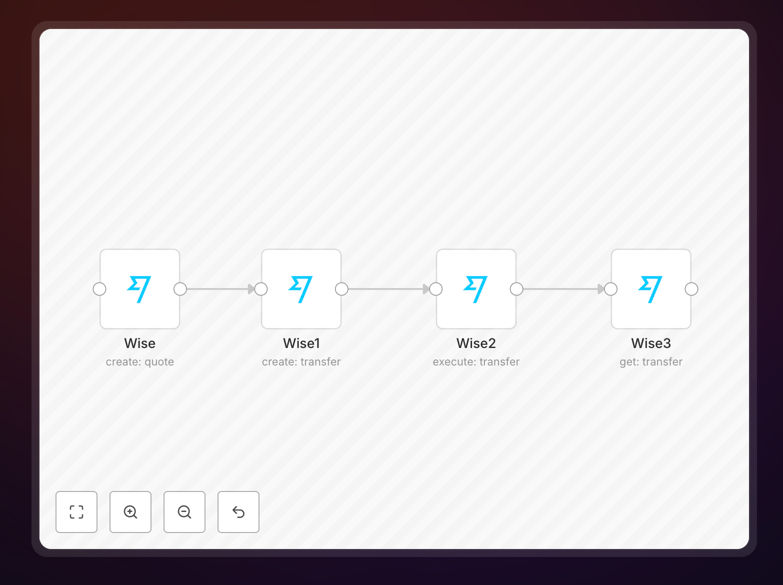
What This Workflow Does
Managing international payments manually through Wise involves repetitive steps: creating quotes for each transfer, executing payments, and tracking their status across different currencies and recipients. This process consumes valuable finance team time and introduces risks of human error in payment details.
This n8n workflow automates the entire Wise transfer lifecycle. It creates quotes based on predefined parameters, executes transfers automatically once quotes are ready, and retrieves transfer information for real‑time status tracking. The automation connects Wise with your business systems, turning manual payment operations into a seamless, automated financial workflow.
Whether you're paying international vendors, processing employee reimbursements across borders, or handling customer refunds in different currencies, this template eliminates the manual overhead. It ensures payments are executed consistently, tracked accurately, and integrated with your financial records.
How It Works
Step 1: Quote Creation
The workflow begins by creating a quote in Wise using the Wise node. It takes input parameters like source and target currencies, amount, recipient details, and payment purpose. The quote is generated with real‑time exchange rates and fees, providing the foundation for the transfer.
Step 2: Transfer Creation
Once the quote is ready, the Wise1 node creates a new transfer based on that quote. This step prepares the payment with all necessary details, ready for execution. The workflow can include validation checks here to ensure payment accuracy before proceeding.
Step 3: Transfer Execution
The Wise2 node executes the transfer, moving funds from your Wise balance to the recipient. This step automates the actual payment execution, eliminating the need for manual approval and transfer initiation for each payment.
Step 4: Status Tracking
After execution, the Wise3 node retrieves detailed information about the transfer—status, completion time, fees, and any errors. This data can be sent to your accounting software, CRM, or internal databases for real‑time payment tracking and reconciliation.
Pro tip: Add a conditional step before transfer execution to validate payment details against your internal records. This prevents incorrect payments while maintaining full automation.
Who This Is For
This automation is ideal for businesses that regularly use Wise for international payments:
- Finance teams managing vendor payments across borders
- Companies with international employees needing reimbursements or salary payments
- E‑commerce businesses processing customer refunds in multiple currencies
- Freelancers and agencies paying international contractors or partners
- Any organization seeking to reduce manual payment processing time and errors
If your finance team spends hours each week creating Wise quotes, executing transfers, and updating payment records, this workflow will transform their efficiency.
What You'll Need
- A Wise Business account with API access enabled
- Your Wise API credentials (available in your Wise Business dashboard)
- An n8n instance (cloud or self‑hosted)
- Basic understanding of n8n workflow configuration
- Optional: Integration with your accounting software (QuickBooks, Xero, etc.) or CRM for automated triggers
Quick Setup Guide
Follow these steps to implement this Wise automation in your business:
- Download the template using the button above and import it into your n8n instance.
- Configure the Wise node with your API credentials from your Wise Business account.
- Set your transfer parameters—source/target currencies, amounts, recipient details—either directly in the workflow or via incoming data from another system.
- Test the workflow with a small transfer to ensure quote creation, execution, and status retrieval work correctly.
- Connect triggers from your business systems (invoice approvals, reimbursement requests, scheduled payments) to automate the entire process.
- Monitor and optimize—review transfer logs in n8n and adjust parameters as needed for different payment types.
Pro tip: Start with a single payment type (like vendor invoices) to validate the automation, then expand to other payment categories once confident.
Key Benefits
Save 2‑10 hours weekly per finance team member by eliminating manual quote creation, transfer execution, and status tracking for international payments.
Reduce payment errors through automated validation and consistent parameter application, minimizing incorrect amounts or recipient details.
Improve payment visibility with real‑time status tracking integrated into your financial systems, providing instant audit trails.
Scale international payments effortlessly—handle hundreds of transfers monthly without increasing manual workload.
Integrate Wise with your entire financial stack—connect payments automatically to accounting software, CRM, ERP, and internal databases.