What This Workflow Does
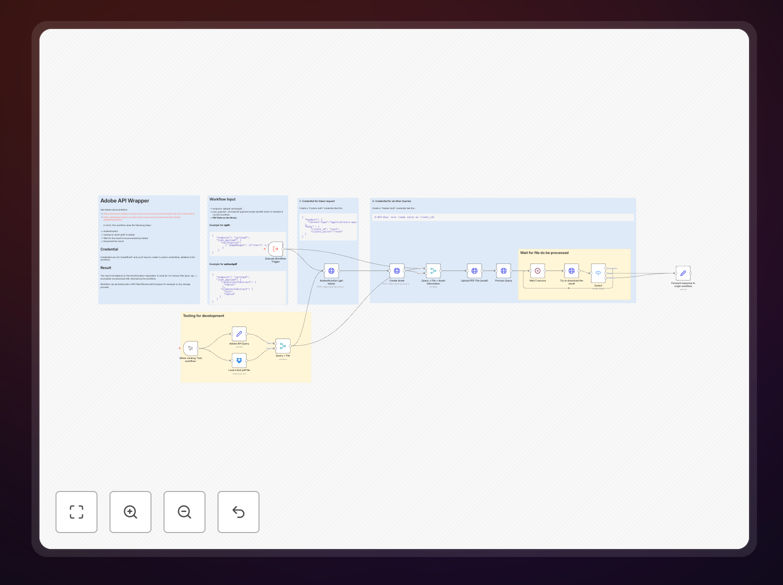
This n8n workflow template automates PDF document manipulation using Adobe's powerful PDF Services API. It eliminates the tedious manual work of splitting, combining, and processing PDF files - tasks that consume significant time in many businesses. The template provides a foundation you can customize for your specific document processing needs.
Common use cases include combining multiple signed contract pages into single documents, splitting large reports into chapters, making scanned documents searchable through OCR, and preparing files for digital archiving. The workflow handles these operations automatically based on your configured rules, saving hours of manual document processing time.
How It Works
1. Document Input
The workflow accepts PDF files from your configured source - this could be email attachments, cloud storage, or a form submission. The template includes sample triggers you can adapt to your specific document intake process.
2. API Authentication
The workflow handles authentication with Adobe's PDF Services API using your credentials. This secure connection ensures your documents are processed through Adobe's enterprise-grade infrastructure.
3. Document Processing
Based on your configured rules, the workflow performs the specified operations - combining multiple files, splitting by pages, applying OCR, or other supported manipulations. The template includes examples of each operation type.
4. Output Delivery
Processed documents are delivered to your specified destination - this could be cloud storage, email recipients, or integrated with other systems like your CRM or document management platform.
Who This Is For
This template is ideal for businesses that regularly process PDF documents including law firms, financial services, healthcare organizations, and any company dealing with contracts, invoices, or reports. It's particularly valuable for teams processing more than 20 PDFs weekly, where manual handling becomes time-consuming and error-prone.
Pro tip: Combine this with our document classification template to automatically route different PDF types (invoices vs contracts) to appropriate processing workflows.
What You'll Need
- An Adobe PDF Services account with API credentials
- n8n instance (cloud or self-hosted)
- Source for your PDF documents (email, cloud storage, etc.)
- Destination for processed files (cloud storage, email, etc.)
- Basic understanding of your document processing requirements
Quick Setup Guide
- Download the template file using the button above
- Import into your n8n instance (Settings → Workflows → Import)
- Configure your Adobe API credentials in the HTTP Request nodes
- Set up your document source and destination connections
- Test with sample documents and adjust processing rules as needed
- Activate the workflow and monitor initial runs
Key Benefits
Save 5-15 hours weekly per employee by eliminating manual PDF processing tasks. Automation ensures consistent handling of every document according to your business rules.
Reduce errors that occur with manual document handling like missing pages or incorrect file naming. The workflow applies the same precise operations to every file.
Scale document processing effortlessly during peak periods without adding staff. The automated workflow can handle 100 documents as easily as 10.
Improve compliance with standardized document handling procedures and detailed logs of all processing operations performed.
Enhance searchability by automatically applying OCR to scanned documents, making their contents searchable and accessible.