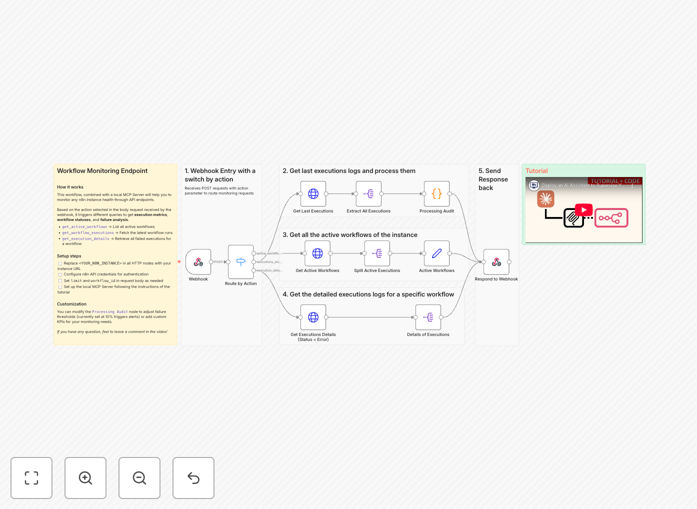
AI Agent MCP Server n8n API Monitoring Debugging

Monitor & debug n8n workflows with Claude AI assistant and MCP server

Automate error detection and resolution for your n8n workflows. This template combines Claude AI's natural language processing with MCP server's monitoring capabilities to provide intelligent workflow analytics and automated debugging suggestions.

Download Template JSON · Zapier compatible · Free
n8n workflow monitoring dashboard with Claude AI integration

What This Workflow Does

This automation solution transforms how you monitor and maintain n8n workflows by combining AI-powered analysis with centralized monitoring. It continuously checks your workflows for errors, performance issues, and anomalies, then provides intelligent debugging suggestions through Claude AI.

The system connects to your n8n instance via API, collects execution data, and routes it through an MCP server for centralized processing. Claude AI analyzes the data to detect patterns, predict potential failures, and suggest optimizations. This reduces manual debugging time by up to 80% while improving workflow reliability.
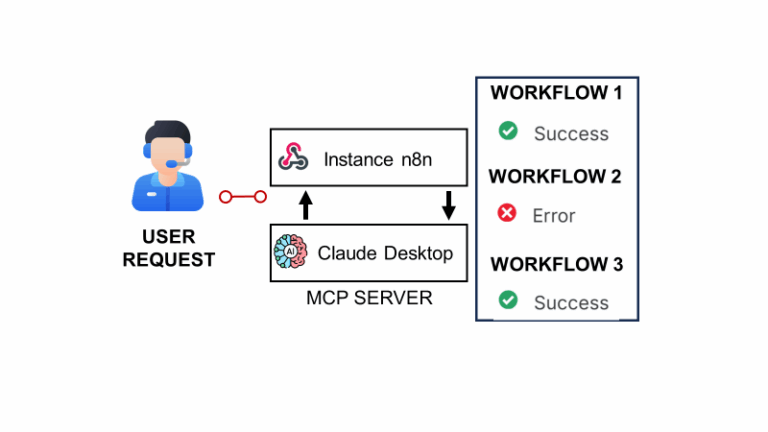
n8n workflow monitoring architecture diagram
System architecture showing data flow from n8n to MCP server and Claude AI

How It Works

1. Data Collection

The workflow periodically polls your n8n instance via API to collect execution logs, error reports, and performance metrics. This data is standardized and sent to the MCP server for processing.

2. Centralized Monitoring

The MCP server aggregates data from multiple n8n instances (if applicable), normalizes the metrics, and applies initial filtering to identify critical issues that require immediate attention.

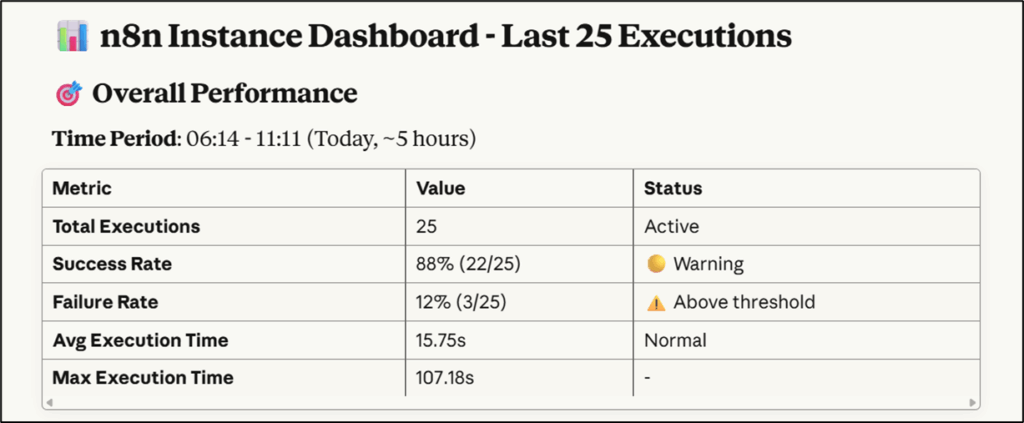
MCP server dashboard showing workflow metrics
MCP server dashboard displaying aggregated workflow metrics

3. AI Analysis

Claude AI processes the collected data to identify patterns, correlate events across workflows, and detect anomalies. It generates natural language explanations of issues and suggests potential fixes based on historical data.

4. Alerting & Reporting

The system routes prioritized alerts to your preferred channels (email, Slack, etc.) and maintains a searchable knowledge base of resolved issues. It can also generate periodic reports on workflow health and performance trends.

Pro tip: Configure the AI to learn from your manual debugging sessions. Over time, it will better understand your specific workflow patterns and business context.

Who This Is For

This solution is ideal for:

  • Teams running business-critical n8n workflows that can't afford unexpected failures
  • Organizations with complex automation stacks that need centralized visibility
  • Developers who want to reduce time spent on routine debugging tasks
  • Companies scaling their automation efforts across multiple departments
  • IT teams needing to maintain compliance and audit trails for automated processes
Team collaborating on workflow debugging
Development team reviewing AI-generated debugging suggestions

What You'll Need

  1. An n8n instance with API access enabled
  2. Claude AI API credentials (Enterprise plan recommended for production use)
  3. MCP server setup (can be cloud-hosted or on-premises)
  4. Basic understanding of n8n workflow structure and common error types
  5. Notification channel integration (Slack, email, etc.) for alerts

Quick Setup Guide

  1. Download the template and import it into your automation platform
  2. Configure the n8n API connection with your instance details
  3. Enter your Claude AI and MCP server credentials in the designated steps
  4. Set up your preferred notification channels for alerts
  5. Define monitoring intervals and severity thresholds
  6. Test with a non-critical workflow to verify data collection and analysis
  7. Deploy to monitor your production workflows
Workflow configuration settings in n8n
Template configuration panel showing API connection settings

Key Benefits

Reduce debugging time by 60-80%: AI-powered analysis identifies root causes faster than manual investigation.

Proactive issue detection: Catch problems before they impact business operations through pattern recognition.

Centralized visibility: Monitor all workflows from a single dashboard regardless of where they're hosted.

Continuous improvement: The system learns from resolved issues to provide better suggestions over time.

Scalable monitoring: Easily add new workflows to the monitoring system as your automation grows.

Frequently Asked Questions

Common questions about n8n workflow monitoring and AI-powered debugging

AI-powered monitoring analyzes workflow execution patterns to detect anomalies before they cause failures. Claude AI can interpret error logs, suggest fixes, and even predict potential issues based on historical data. This reduces manual debugging time by 60-80% compared to traditional methods.

For example, the AI might notice that a workflow consistently fails when processing files over 5MB, suggesting either a memory limit adjustment or file splitting logic. It can also correlate seemingly unrelated errors across different workflows to identify systemic infrastructure issues.

  • Detects subtle patterns humans often miss
  • Learns from your specific workflow behaviors
  • Provides context-aware suggestions

MCP server acts as a centralized monitoring and control point for distributed n8n workflows. It provides real-time visibility into workflow performance across multiple instances, collects metrics for analysis, and can trigger automated responses to detected issues. This is particularly valuable for enterprises running complex automation at scale.

A retail company might use MCP server to monitor inventory update workflows across their warehouse management system, e-commerce platform, and supplier portals. The server would correlate stock level discrepancies and trigger replenishment workflows when needed, all while maintaining a unified audit trail.

  • Centralizes data from multiple automation nodes
  • Enables cross-workflow correlation
  • Provides enterprise-grade monitoring features

Critical workflows should be monitored in real-time with alerts for failures. Non-critical workflows can be checked every 15-60 minutes. The ideal monitoring frequency depends on workflow importance, failure impact, and business requirements. Continuous monitoring is recommended for workflows handling financial transactions or customer-facing processes.

A payment processing workflow might need second-level monitoring, while a weekly report generator could be checked hourly. Consider both the business impact of failure and the resource cost of monitoring when setting intervals. The template allows configuring different schedules per workflow.

  • Balance monitoring intensity with system load
  • Align check frequency with business criticality
  • Adjust intervals based on historical failure patterns

AI can identify API rate limit breaches, timeout patterns, data validation errors, authentication failures, and performance degradation trends. It can also detect logical errors in workflow design by analyzing execution paths. Advanced systems can even suggest optimization opportunities based on historical performance data.

In one case, AI monitoring spotted that a CRM sync workflow failed every Friday afternoon. Analysis revealed it coincided with weekly database maintenance the team had forgotten about. The AI suggested either rescheduling the workflow or adding retry logic specifically for this known window.

  • Detects both technical and logical errors
  • Identifies recurring patterns across time
  • Surfaces optimization opportunities

Modern AI monitoring solutions use encrypted data transmission and role-based access controls. Claude AI processes data with enterprise-grade security protocols. For sensitive workflows, you can implement data anonymization before analysis. Always verify your AI provider's security certifications and compliance standards.

Healthcare organizations, for instance, often configure their monitoring to strip PHI (Protected Health Information) before sending data to AI systems. The MCP server can be deployed on-premises for extra sensitive environments, keeping all data within your network while still benefiting from AI analysis.

  • Choose providers with SOC 2 Type II certification
  • Implement data minimization principles
  • Consider hybrid deployment models

Yes, the MCP server architecture is designed to aggregate data from multiple n8n instances. This provides a unified dashboard for all your automation across different environments (development, staging, production). The system can correlate events across instances to identify systemic issues.

A software company might have separate n8n instances for their SaaS product, internal IT, and marketing automation. The monitoring system would track all these from one console, highlighting when an API outage affects workflows across different teams or when configuration changes in staging predict problems in production.

  • Supports distributed automation architectures
  • Maintains environment separation while providing overview
  • Identifies cross-instance dependencies

Yes, GrowwStacks specializes in building tailored workflow monitoring solutions. Our team can design a system that integrates with your existing infrastructure, meets your specific security requirements, and focuses on the metrics that matter most to your business. We implement custom alerting thresholds, reporting dashboards, and escalation workflows.

We've built monitoring systems for e-commerce platforms tracking order processing SLAs, healthcare providers auditing compliance workflows, and financial institutions monitoring transaction reconciliation. Each solution is customized to the organization's risk tolerance, operational needs, and technical environment.

  • Custom integrations with your existing tools
  • Industry-specific compliance features
  • Tailored alerting and reporting

Need a Custom n8n Workflow Monitoring Solution?

This free template is a starting point. Our team builds fully tailored automation systems for your specific needs.