What This Workflow Does
Manual competitor price tracking is time-consuming, error-prone, and reactive. This automation solves that by providing continuous, intelligent monitoring of competitor pricing with AI-powered analysis and smart alerting.
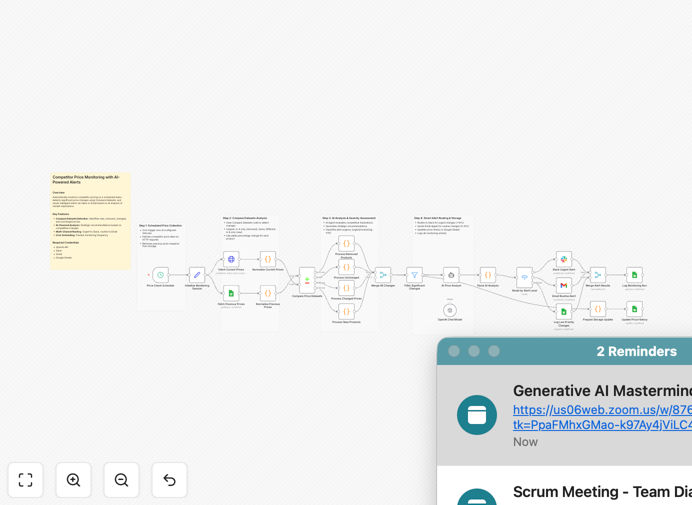
The workflow automatically collects competitor price data on a scheduled basis, compares it against historical pricing, detects meaningful changes, and uses AI to assess market impact. It then routes alerts intelligently—urgent changes to Slack for immediate attention, routine updates via email for review—while maintaining complete audit logs for trend analysis.
This transforms what was traditionally a manual spreadsheet exercise into a proactive competitive intelligence system that delivers actionable insights, not just raw data.
How It Works
1. Scheduled Data Collection
The workflow runs on a configurable schedule (default every 6 hours) to fetch current competitor pricing from your data sources while retrieving previous price snapshots from Google Sheets for comparison.
2. Data Normalization & Comparison
Current and historical data are normalized into a unified format. The Compare Datasets node identifies new products, removed products, price increases, decreases, and unchanged items—creating a complete change picture.
3. Change Evaluation & Classification
Percentage changes are calculated and classified by severity: urgent (≥10% change), routine (5–10% change), or no alert (<5%). This tiered approach ensures your team focuses on what matters most.
4. AI-Powered Strategic Analysis
An AI agent evaluates each significant change for competitive impact, generating concise recommendations: match the price, hold your position, or differentiate with value. It justifies urgency based on market implications.
5. Intelligent Alert Routing
Urgent alerts are sent to Slack channels for immediate team visibility. Routine updates are delivered via Gmail for scheduled review. All alerts and monitoring sessions are logged to Google Sheets for auditing and trend analysis.
6. Historical Data Maintenance
The workflow updates price history records, ensuring each monitoring cycle builds upon the last. This creates a valuable historical dataset for identifying long-term pricing trends and competitor strategies.
Who This Is For
This template is ideal for pricing teams, product managers, competitive intelligence analysts, and growth strategists in e-commerce, SaaS, retail, and any business where competitor pricing impacts revenue.
Specifically valuable for: E-commerce operations needing to match or beat competitor pricing; SaaS companies monitoring subscription plan changes; Retail businesses tracking seasonal price fluctuations; Manufacturers monitoring distributor pricing; Marketing teams analyzing promotional pricing strategies.
What You'll Need
- n8n instance (cloud or self-hosted) with access to the required nodes
- Competitor price data source (API endpoint, web scraping setup, or data feed)
- Google Sheets for price history storage and alert logging
- OpenAI API key for AI analysis capabilities
- Slack workspace for urgent alert notifications
- Gmail account for routine email updates
- Product identifier consistency (SKUs, product IDs) across your data sources
Pro tip: Start with monitoring 2-3 key competitors and 10-20 core products. Once the system is tuned and delivering value, expand to more competitors and products. This phased approach ensures accuracy and manageable alert volume.
Quick Setup Guide
- Download and import the template JSON file into your n8n instance
- Configure credentials for Google Sheets, OpenAI, Slack, and Gmail in n8n
- Set up your Google Sheets with three tabs: Price History, Alert Logs, and Monitoring Logs
- Replace the sample API endpoint with your actual competitor price data source
- Adjust alert thresholds in the Filter nodes to match your business rules
- Test with a manual trigger to verify data flow and alert delivery
- Activate the schedule trigger for automated monitoring at your preferred frequency
Key Benefits
Save 15+ hours monthly previously spent on manual price tracking and spreadsheet updates. The automation handles data collection, comparison, and reporting automatically.
Respond to price changes within hours instead of days, giving you a competitive edge in dynamic markets where pricing agility drives revenue and market share.
Make data-driven pricing decisions with AI analysis that considers market context, not just percentage changes. This reduces guesswork and improves pricing strategy effectiveness.
Maintain complete audit trails of all price changes and monitoring activities for compliance, reporting, and identifying long-term competitor pricing patterns.
Scale monitoring effortlessly from a few products to thousands without additional manual effort. The system handles volume increases with minimal configuration changes.