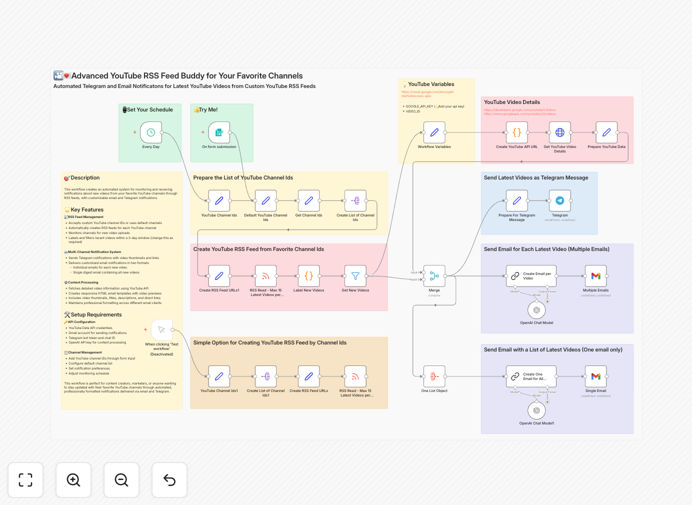
What This Workflow Does
Manually checking YouTube channels for new content is time-consuming and unreliable. You might miss important uploads from competitors, industry leaders, or favorite creators because YouTube's notification system is inconsistent and inbox-cluttering. This creates information gaps that impact marketing timing, competitive intelligence, and content strategy.
This automation solves that by creating a systematic monitoring engine. It connects to YouTube channel RSS feeds, detects new videos within configurable time windows, and delivers professionally formatted notifications through both email and Telegram. Instead of hoping YouTube alerts reach you, you receive guaranteed, consolidated updates exactly how and where you want them.
The workflow transforms passive content consumption into an active intelligence system. It's particularly valuable for marketers tracking competitor announcements, sales teams monitoring prospect content, and creators staying updated with industry trends without daily platform visits.
How It Works
Step 1: RSS Feed Collection & Monitoring
The workflow accepts a list of YouTube channel IDs—either predefined defaults or custom inputs through a form. For each channel, it generates and monitors the public RSS feed, which updates instantly when new content is published. This RSS approach avoids YouTube API complexities and rate limits.
Step 2: Video Filtering & Enrichment
New video entries are filtered based on publication date (default 3-day window, customizable). Each video is then enriched with detailed metadata via the YouTube Data API, fetching thumbnails, descriptions, durations, and direct links. This transforms raw RSS data into comprehensive video profiles.
Step 3: Multi-Channel Notification Delivery
Notifications are delivered through two parallel channels. Telegram receives instant push notifications with thumbnails and direct links—perfect for mobile alerts. Email receives professionally formatted HTML messages, available as individual per-video alerts or consolidated digests with multiple video previews.
Step 4: Content Processing & Formatting
The workflow creates responsive email templates that display video thumbnails, titles, descriptions, and watch links in a clean, client-compatible format. Optional AI processing can summarize descriptions or extract key topics, making notifications even more actionable.
Who This Is For
Content Creators & Influencers who need to track trending topics, competitor uploads, and collaboration opportunities without constantly refreshing YouTube.
Marketing & Competitive Intelligence Teams monitoring competitor announcements, product launches, and industry thought leadership to inform strategy.
Sales Professionals who want to personalize outreach based on a prospect's latest video content, demonstrating genuine engagement.
Researchers & Analysts compiling video mentions, tutorial releases, or educational content into structured reports.
Community Managers staying updated with relevant content to share with their audience across social platforms.
Pro tip: Use the digest email option for monitoring multiple channels. Instead of receiving 10 separate emails, get one consolidated report each morning with all new videos from your watched channels—perfect for daily briefing.
What You'll Need
- YouTube Data API credentials (for video enrichment—optional but recommended)
- Gmail or SMTP account for sending email notifications
- Telegram Bot Token & Chat ID for instant push notifications
- n8n instance (cloud or self-hosted) to run the workflow
- List of YouTube Channel IDs you want to monitor
Quick Setup Guide
1. Download and import the JSON template into your n8n instance.
2. Configure credentials for Gmail/Email, Telegram, and YouTube API in n8n's credential management.
3. Set your channel list—either modify the default array in the workflow or use the form trigger to submit channels dynamically.
4. Adjust the time window in the filter node if you want to monitor videos older or newer than the default 3 days.
5. Choose notification format—toggle between individual emails and digest emails based on your preference.
6. Activate the workflow and test with a known channel to ensure notifications arrive correctly.
Key Benefits
Save 2-3 hours weekly previously spent manually checking multiple YouTube channels. The automation does the monitoring work for you, freeing time for analysis and action instead of discovery.
Never miss important content from competitors or industry leaders. Unlike unreliable YouTube notifications, this system guarantees delivery through redundant channels (email + Telegram).
Receive professionally formatted alerts with thumbnails, descriptions, and direct links—far superior to plain text notifications that lack context.
Monitor unlimited channels without hitting API rate limits. The RSS-based approach scales efficiently compared to direct API polling.
Integrate with business processes by using video alerts as triggers for CRM updates, social sharing, or competitive analysis workflows.