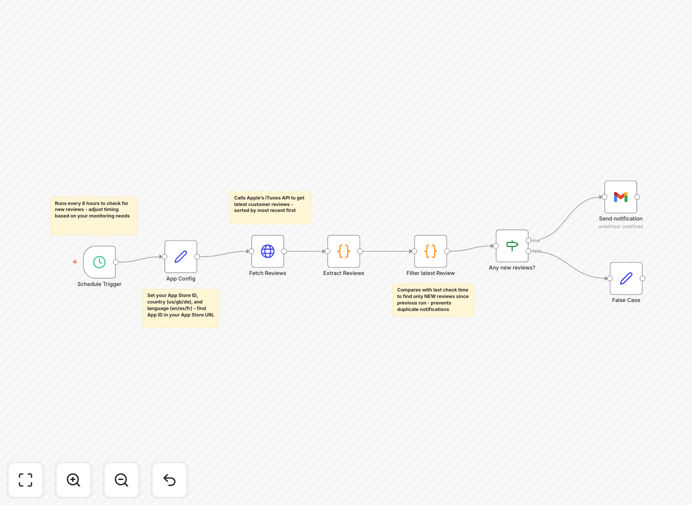
What This Workflow Does
This automation solves a critical problem for mobile app developers and product managers: staying on top of user feedback without constantly checking the App Store. It automatically monitors your iOS app's reviews on a scheduled basis (default every 6 hours, fully customizable), fetches new feedback via Apple's iTunes RSS API, and sends real-time notifications to your team via email, Slack, Telegram, or other channels.
The workflow filters out previously processed reviews, ensuring you only receive alerts for new feedback. It extracts structured data including ratings, review content, author information, dates, and app versions. This transforms scattered user comments into actionable business intelligence delivered directly to your inbox or team communication channels.
By automating this process, you eliminate manual monitoring that typically consumes 5-10 hours per week while ensuring no critical feedback slips through the cracks. Whether it's a bug report requiring immediate attention, a feature request for your roadmap, or a positive testimonial for marketing, you'll know about it instantly.
How It Works
1. Scheduled Trigger
The workflow begins with a schedule trigger that runs automatically at your chosen interval. You can configure it to check every few hours, daily at specific times, or on any cron schedule that fits your needs.
2. App Configuration
You define which apps to monitor by specifying their App Store IDs, country codes, and language preferences. The workflow can track multiple apps simultaneously across different regions.
3. API Data Fetching
The system calls Apple's iTunes RSS API to retrieve the latest customer reviews. This official API provides structured data about user ratings, comments, and metadata.
4. Data Processing & Filtering
Raw JSON data is parsed into readable review information. The workflow compares timestamps with previous runs to filter only new reviews, preventing duplicate notifications.
5. Notification Formatting
Reviews are formatted into clear, actionable messages that include star ratings, user comments, app version information, and direct links to the App Store page.
6. Alert Delivery
Notifications are delivered through your preferred channel—email for comprehensive reports, Slack for team collaboration, Telegram for mobile alerts, or any other integrated service.
Pro tip: Configure different notification channels for different review ratings. Send critical 1-star reviews to a dedicated support channel while routing positive 5-star reviews to your marketing team for testimonials.
Who This Is For
This workflow is essential for iOS developers who need to track user sentiment and identify bugs reported in reviews. Product managers benefit from monitoring customer satisfaction trends and feature requests. Customer support teams can respond quickly to complaints before they escalate.
Marketing professionals can collect testimonials and case studies from positive reviews. DevOps teams can integrate review monitoring into their release processes to catch regression issues. App publishers managing multiple applications need centralized monitoring across their portfolio.
Even small indie developers who wear multiple hats benefit from automated feedback collection, freeing up time for development while maintaining customer responsiveness.
What You'll Need
- n8n instance (cloud or self-hosted) with HTTP Request and notification nodes installed
- App Store ID for each iOS app you want to monitor (found in your app's App Store URL)
- Notification credentials for your preferred alert channel (Gmail/SMTP for email, webhook URL for Slack/Telegram/Teams)
- Internet access to query Apple's iTunes API (no special API keys required)
- Basic understanding of your app's target countries and languages for regional monitoring
Quick Setup Guide
- Find your App Store ID: Navigate to your app's App Store page. The number after "id" in the URL (e.g., https://apps.apple.com/us/app/app-name/id123456789) is your App Store ID.
- Configure app settings: In the workflow's App Config node, enter your App Store ID, country code (us, gb, de, etc.), and language code (en, es, fr, etc.).
- Set up notifications: Connect your preferred notification method. For email, configure Gmail or SMTP credentials. For Slack, add a webhook URL. For Telegram, set up a bot token and chat ID.
- Customize the schedule: Adjust the Schedule Trigger node to your preferred frequency. Default is every 6 hours (0 */6 * * *), but you can set daily checks (0 9 * * * for 9 AM) or more frequent monitoring.
- Test with a known app: Use a popular app ID like WhatsApp (310633997) for initial testing to verify the workflow fetches and formats reviews correctly before switching to your own app.
- Activate and monitor: Turn on the workflow and watch for your first notifications. Adjust filtering and formatting as needed based on initial results.
Pro tip: Start with a conservative schedule (once daily) and increase frequency as you verify the workflow's reliability. Monitor API response times and adjust if you encounter rate limiting from Apple's servers.
Key Benefits
Save 5-10 hours weekly by eliminating manual App Store checking. Instead of someone regularly visiting your app page, automation works 24/7 without breaks or oversight.
Improve response time to critical issues from days to minutes. When users report bugs or express frustration, you can address them immediately rather than discovering problems days later.
Capture every piece of feedback without human error. Manual checking inevitably misses some reviews, especially during busy periods or across multiple regional stores.
Transform feedback into actionable data by structuring unstructured reviews. The workflow extracts ratings, versions, and specific comments that can be routed to appropriate teams.
Build better products faster by understanding user needs directly from the source. Regular review analysis reveals patterns that inform development priorities and feature roadmaps.