Network Monitoring IT Automation Google Sheets Pushover Gmail

Monitor TP-Link Omada Network Disconnections Automatically

Free n8n workflow that listens for Omada email alerts, logs device status to Google Sheets, and sends push notifications for extended outages.

Download Template JSON · n8n compatible · Free
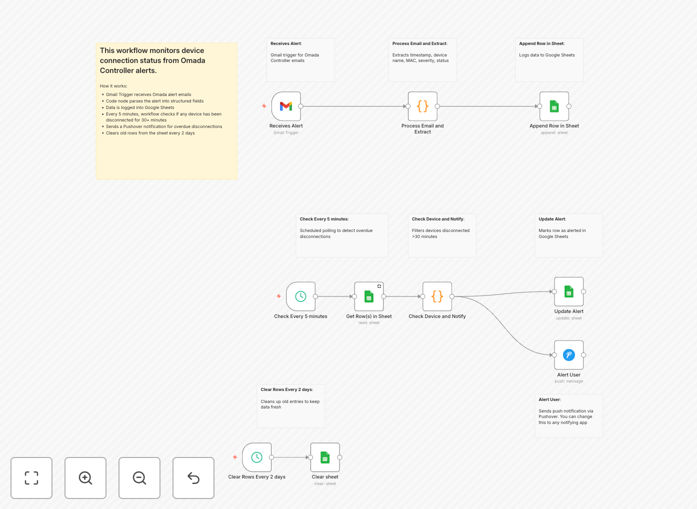
Visual diagram showing TP-Link Omada network monitoring workflow with Gmail, Google Sheets, and Pushover integration

What This Workflow Does

Network downtime costs businesses real money—in lost productivity, frustrated users, and emergency IT hours. This automation solves that by creating a lightweight, cost-effective monitoring system for TP-Link Omada networks without expensive software.

The workflow automatically detects when devices disconnect from your Omada network by monitoring alert emails from the Omada Controller. It parses each alert, logs the event to Google Sheets for historical tracking, and sends immediate push notifications via Pushover when a device stays disconnected for more than 30 minutes. This gives IT teams real-time visibility without manual checking.

How It Works

The automation runs in three parallel streams, each handling a different aspect of network monitoring.

1. Email Processing & Logging

When the Omada Controller sends an email alert about a device connection change, Gmail triggers the workflow. A Code node extracts the device name, MAC address, status (connected/disconnected), and timestamp from the email body. This structured data gets appended as a new row in Google Sheets, creating a complete audit trail.

2. Alert Checking & Notification

Every 5 minutes, a schedule trigger checks the Google Sheets log. It identifies the most recent status for each device, filters for currently disconnected devices, and calculates how long they've been offline. If any device has been disconnected for over 30 minutes, it sends a high-priority push notification via Pushover with device details and downtime duration.

3. Data Maintenance

Every two days, the workflow automatically cleans up the Google Sheet by removing the oldest rows while preserving the header. This prevents the log from growing indefinitely while maintaining recent history for troubleshooting.

Pro tip: Configure your Omada Controller to send alerts to a dedicated Gmail address used only for monitoring. This keeps automation emails separate from personal or other business communications.

Who This Is For

This template is ideal for small to medium businesses, managed service providers (MSPs), schools, retail chains, or any organization using TP-Link Omada networking equipment. It's particularly valuable for:

IT administrators managing multiple locations who need centralized visibility without complex monitoring setups. Network engineers who want automated alerting beyond basic email notifications. Business owners concerned about network reliability affecting operations. MSPs looking for cost-effective client monitoring solutions they can deploy quickly.

What You'll Need

  1. A TP-Link Omada Controller configured to send email alerts for device connection changes
  2. A Gmail account that receives these alerts (can be a dedicated address)
  3. Google Sheets for logging (free with Google account)
  4. Pushover account for mobile notifications (low-cost, one-time purchase)
  5. n8n instance (cloud or self-hosted) with OAuth2 access to Google services

Quick Setup Guide

  1. Create your log sheet: Make a new Google Sheet with headers: rowId, timestamp, timestampISO, category, severity, mac, name, type, status, checkAfter, alertSent, timeStampFormated
  2. Configure credentials in n8n: Set up OAuth2 connections for Google Sheets and Gmail, plus an API credential for Pushover
  3. Import the workflow: Use "New → Import from JSON" in n8n and paste the downloaded template
  4. Update node settings: Replace placeholder sheet IDs with your actual Google Sheet ID, and add your Pushover user keys
  5. Test the flow: Manually trigger a test by temporarily disconnecting a device from your Omada network

Pro tip: Before going live, adjust the "30 minute" threshold in the workflow to match your business needs. Critical devices might need alerts at 5 minutes, while less important ones could be 60 minutes.

Key Benefits

Save 5-10 hours monthly on manual network checks and alert monitoring. IT staff no longer need to periodically log into controllers or check email inboxes for alerts.

Reduce downtime by up to 70% through faster incident response. Push notifications reach technicians immediately, compared to emails that might be checked hourly.

Eliminate $500-$5,000 in monitoring software costs by using free Google Sheets and low-cost Pushover instead of enterprise network monitoring solutions.

Create compliance-ready audit trails automatically. Every network event gets timestamped and logged with details needed for security audits or SLA reporting.

Scale monitoring effortlessly across multiple locations. Once configured, the same workflow can monitor dozens of sites by simply adding their alert emails to the monitored Gmail account.

Frequently Asked Questions

Common questions about network monitoring automation and integration

Automating network monitoring saves IT teams hours of manual checking, provides instant alerts for outages, and creates a searchable log for troubleshooting. It ensures no disconnection goes unnoticed, improving network uptime and reducing downtime costs.

Manual monitoring is reactive and error-prone—technicians might miss an email or delay checking. Automation provides proactive, consistent coverage 24/7, catching issues before users complain and documenting patterns that help prevent future problems.

Using Gmail as a trigger is cost-effective and reliable. It doesn't require API access to your network hardware, works with any system that can send email alerts, and provides a universal inbox that n8n can securely monitor without complex firewall rules.

Email-based monitoring is particularly valuable for legacy systems or equipment without modern APIs. It creates a standardized interface—any device that can send an email can be monitored, making it future-proof as you add new hardware types to your network.

Pushover delivers high-priority push notifications directly to mobile devices, ensuring IT staff see critical alerts immediately, even when away from their desks. It's more reliable than email for urgent issues and supports different priority levels and sounds.

Unlike email that gets buried in inboxes, Pushover notifications can bypass phone silent modes for critical alerts. Teams can configure different sounds for different severity levels, and delivery receipts confirm when alerts have been received by on-call staff.

Google Sheets provides a free, accessible log that's easy to share with team members, create custom reports from, and integrate with other business tools. It eliminates the need for expensive monitoring software licenses while maintaining full data ownership.

Sheets can be connected to data visualization tools like Google Data Studio for dashboards, shared with non-technical stakeholders, and used to generate monthly uptime reports. The familiar interface reduces training time compared to specialized monitoring systems.

Automated logging creates a timestamped record of all network events, essential for compliance audits. It provides evidence of monitoring activities, helps identify patterns in device failures, and supports SLA reporting by documenting uptime and response times.

For industries with regulatory requirements, this automated audit trail demonstrates due diligence in network management. The structured data in Sheets can be easily exported for auditors or used to generate compliance reports automatically.

Similar patterns can automate server health monitoring, backup verification, security alert triage, software license tracking, user account provisioning, and help desk ticket creation from various alert sources like monitoring tools, logs, or chat messages.

The core pattern—"detect event via email/API, process data, log to spreadsheet, notify relevant people"—applies to dozens of IT operations. Once you master this workflow, you can adapt it to automate many routine IT tasks that currently consume manual effort.

  • Automate backup success/failure notifications
  • Create tickets from security system alerts
  • Track software license expiration dates
  • Monitor website uptime and performance

Yes, GrowwStacks specializes in building custom network monitoring and IT automation solutions tailored to your specific hardware, alerting preferences, and integration needs. We can connect any monitoring source to any notification channel with custom logic.

Our team works with businesses to design automations that fit their unique IT environment, whether you need multi-vendor monitoring, integration with existing ticketing systems like Jira or ServiceNow, custom escalation policies, or specialized reporting.

  • Custom dashboards with your branding
  • Integration with existing IT systems
  • Multi-level alert escalation rules
  • Scheduled reporting and analytics

Need a Custom Network Monitoring Automation?

This free template is a starting point. Our team builds fully tailored automation systems for your specific business needs.